UniLogic provides:
Servo Functions (COM: Servo Functions)
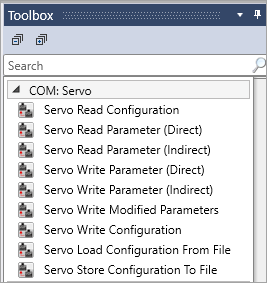
These are located under COM: Servo in the Ladder Toolbox. Use these to modify a servo drive's configuration, or to read / write parameters from and to the drive.
Motion Control Functions (MC Functions)
These are located under Motion Control in the Ladder toolbox. These are PLCopen-compliant functions that you use to operate the servo, and implement control of multiple axes.
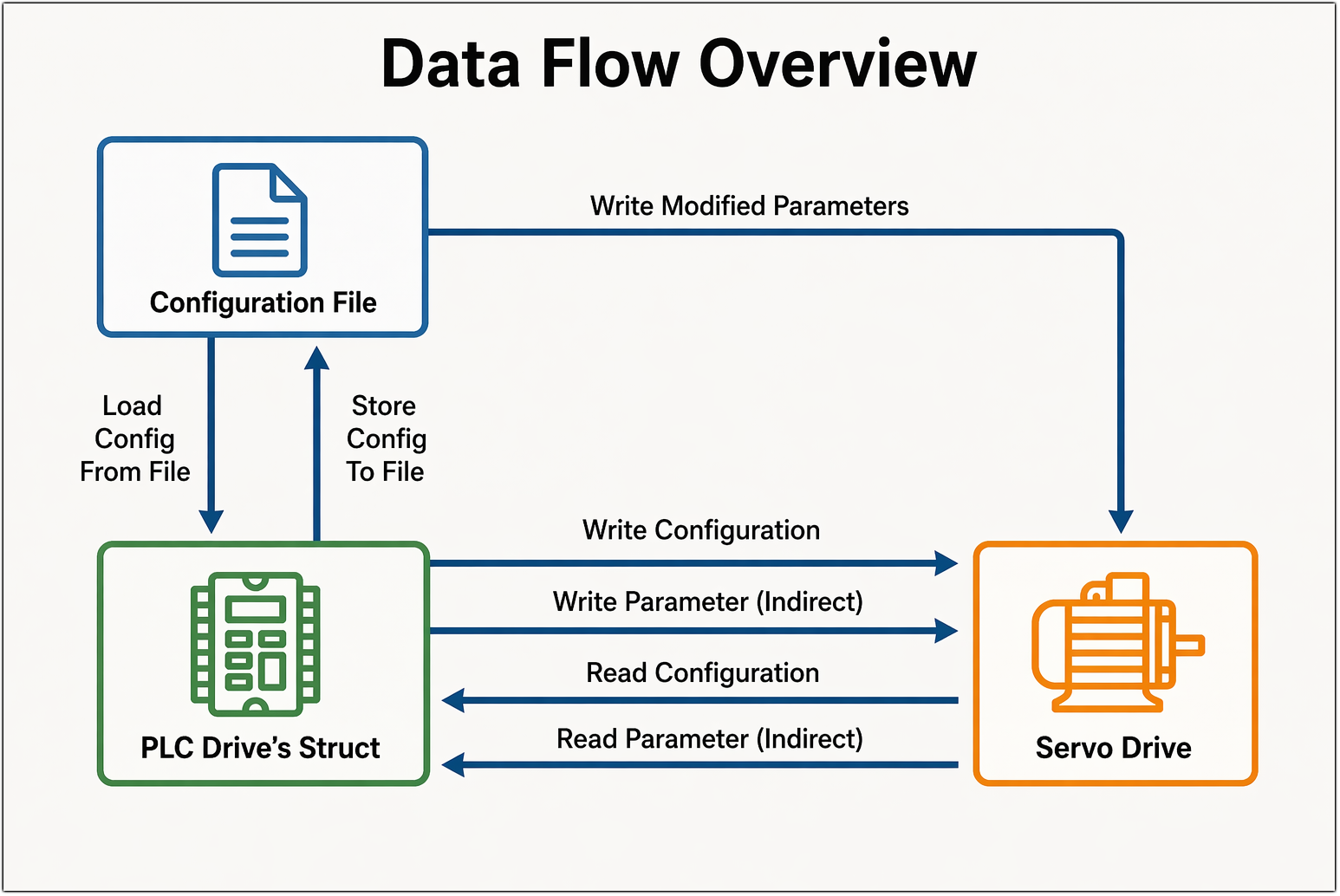
Servo functions allow a PLC Ladder program to exchange configuration data between three entities.
|
Entity |
Description |
|
PLC Drive's Struct |
The PLCs internal memory structure that holds a complete copy of the servo drive's parameters for a given axis |
|
Servo Drive |
The physical CANopen servo drive connected to the network |
|
Configuration File |
A file stored on the PLC file system containing a saved snapshot of a servo configuration |
All operations that communicate with the drive are asynchronous: the function sets the status to ACTION_STATUS_PENDING immediately, and updates it to ACTION_STATUS_SUCCESSFUL (or an error code) when the operation completes.
These functions may be considered as groups. They are listed under COM: Servo in the Ladder Toolbox.
These functions transfer complete configuration sets between the PLC Drive's Struct, the physical Servo Drive, and the Configuration Files stored on the PLC file system.
Data flow: Servo Drive → PLC Drive's Struct
This FB reads the complete set of parameters from the Servo Drive and stores them in the PLC Drive's Struct.
The function queries every readable parameter from the physical drive one by one. As each response arrives, the value is stored in the corresponding field of the PLC Drive's Struct. When all parameters have been read, the struct is fully up to date with the drive's actual current state.
|
|
Parameter Name |
Purpose |
|
A |
Servo |
Select the target servo axis |
|
B |
Status |
Indicates the function status code |
Result:
On success: the PLC Drive's Struct contains an exact snapshot of all parameter values currently held by the drive
On failure: the status reflects where the read stopped; diagnostics indicate which parameter failed
Typical use cases:
Capture the current state of a newly commissioned drive into the PLC
Before calling Store Configuration - ensure the struct is current before saving to file
Note: This operation reads every parameter sequentially and takes time proportional to the number of parameters. It does not modify the configuration file.
Data flow: PLC Drive's Struct → Servo Drive
This FB downloads the complete set of parameters from the PLC Drive's Struct to the servo drive.
The function iterates through every writable parameter in the drive's parameter map and sends each value from the PLC Drive's Struct to the drive. Each write is acknowledged before the next is sent. When complete, the drive's configuration exactly matches what the PLC Drive's Struct holds.
|
|
Parameter Name |
Purpose |
|
A |
Servo |
Select the target servo axis |
|
B |
Status |
Indicates the function status code |
Result:
On success: the servo drive is fully configured with all values from the PLC Drive's Struct
On failure: status reflects where the sequence stopped; diagnostics identify the failing parameter
Typical use cases:
After loading a configuration file (Load Configuration From File) - push those values to the physical drive
After replacing a drive - restore its full configuration
After editing parameters in the PLC Drive's Struct - apply all changes at once
Note: Writes every parameter sequentially. For changing just one or a few parameters, prefer Write Parameter (Indirect) or Write Modified Parameters.
Data flow: Configuration File → PLC Drive's Struct
This FB loads a saved servo configuration file from the PLC file system into the PLC Drive's Struct.
The specified file is read and its parameter values are copied into the PLC Drive's Struct for that axis. The file name is also remembered internally, enabling a subsequent Store Configuration To File call to know which file to overwrite. The servo drive is not contacted during this operation.
|
|
Parameter Name |
Purpose |
|
A |
Servo |
Select the target servo axis |
|
B |
File Name |
Name of the configuration file to load |
|
C |
Status |
Indicates the function status code |
Result:
On success: the PLC Drive's Struct is populated with the values from the file. The drive is unchanged
On failure: file not found, wrong drive type (ACTION_STATUS_TYPE_MISMATCH), or memory error
Typical use cases:
Load a known-good configuration into the PLC before calling Write Configuration to apply it to the drive
Switch between multiple saved configurations
Note: This is a file-to-memory operation only. To apply the loaded values to the physical drive, follow with Write Configuration. The file is tagged with the drive type; loading a file saved for a different drive type is rejected.
Data flow: PLC Drive's Struct → Configuration File
This FB saves the current contents of the PLC Drive's Struct back to the configuration file that was previously loaded.
The function takes all parameter values currently in the PLC Drive's Struct and writes them to the file on the PLC file system, overwriting the previous contents. The file name used is the one that was established by the last Load Configuration From File call.
|
|
Parameter Name |
Purpose |
|
A |
Servo |
Select the target servo axis |
|
B |
Status |
Indicates the function status code |
Result:
On success: the configuration file is updated with the current state of the PLC Drive's Struct
On failure: ACTION_STATUS_NO_PREVIOUS_LOAD if Load Configuration From File was never called; file write error otherwise
Typical use cases:
After tuning a drive online (Read Configuration → adjust → Write Parameter Indirect) - persist the final parameter set to file so it survives power cycles
Back up a drive's current configuration after commissioning
Note: A prior Load Configuration From File call is required - it establishes the target file name and the expected data size. Without it, this function returns ACTION_STATUS_NO_PREVIOUS_LOAD
Data flow: Configuration File → Servo Drive (directly)
This FB applies only the parameters that differ from the default configuration to the servo drive - without going through the PLC Drive's Struct.
A pre-generated configuration file contains a compact list of which parameters were changed and what their new values are. The function reads that file and sends only those modified parameters to the drive, skipping all others. This is faster than a full configuration download when only a small number of settings differ from the baseline.
|
|
Parameter Name |
Purpose |
|
A |
Servo |
Select the target servo axis |
|
B |
File Name |
Name of the modified parameters file |
|
C |
Status |
Indicates the function status code |
Result:
On success: all modified parameters are written to the drive
On failure: status reflects the error (file not found, drive rejection, etc.)
Typical use case: Apply a targeted set of user-customized settings to the drive - efficient when the majority of parameters remain at their default values.
Note: The modified parameters file is generated by UniLogic when the user saves a customized configuration; it must already exist on the PLC file system. The PLC Drive's Struct is not updated by this operation.
These functions read or write a single parameter at a time. They are faster than a full configuration transfer when only a few settings need to be inspected or changed. All four functions mirror the result into the PLC Drive's Struct to keep it consistent with the drive.
Data flow: Servo Drive → PLC Drive's Struct (single parameter)
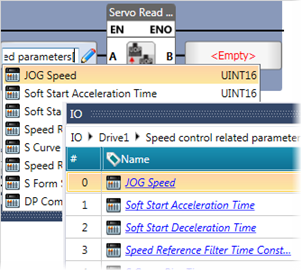
This FB reads the current value of one specific parameter from the servo drive - identical in effect to Read Parameter (Indirect), but the parameter is identified directly rather than by group and index.
Instead of specifying a group number and parameter number that the system resolves internally, the caller passes a direct reference to the exact member within the PLC Drive's Struct that should receive the result. The function reads that parameter from the drive and writes the value straight into that struct member.
|
|
Parameter Name |
Purpose |
|
A |
Servo Parameter |
A direct reference to the specific field in the PLC Drive's Struct to read into |
|
B |
Status |
Indicates the function status code |
Result:
On success: the referenced field in the PLC Drive's Struct is updated with the drive's current value
On failure: status reflects the error (e.g., timeout, drive rejection)
Typical use case: When the exact parameter location in the struct is already known at design time and hardcoded into the Ladder logic - no need to go through group/index resolution.
Note: Functionality equivalent to Read Parameter (Indirect); the only difference is how the parameter is addressed. The parameter must have read permission; otherwise returns ACTION_STATUS_WRONG_PERMISSION
Data flow: Servo Drive → PLC Drive's Struct (single parameter)
This FB reads the current value of one specific parameter from the servo drive.
The parameter is identified by its group number and parameter number within that group. The drive is queried for that single value, and the result is written back into both the caller-provided variable and the corresponding field in the PLC Drive's Struct.
|
|
Parameter Name |
Purpose |
|
A |
Servo |
Select the target servo axis |
|
B |
Group Index |
The parameter group (category) |
|
C |
Parameter Index |
The specific parameter within that group |
|
D |
Read Value |
Where to store the result |
|
E |
Status |
Indicates the function status code |
Result:
On success: the parameter's current value is available in the provided variable and mirrored in the PLC Drive's Struct
On failure: status reflects the error (e.g., timeout, drive rejection)
Typical use case: Inspect the live value of a specific drive setting without reading the full configuration.
Note: The parameter must have read permission; otherwise returns ACTION_STATUS_WRONG_PERMISSION
Data flow: PLC Drive's Struct → Servo Drive (single parameter)
This FB writes a new value to one specific parameter on the servo drive - identical in effect to Write Parameter (Indirect), but the parameter is identified directly rather than by group and index.
Instead of specifying a group number and parameter number, the caller passes a direct reference to the exact member within the PLC Drive's Struct whose value should be sent to the drive. The function takes the current value of that struct member and writes it to the corresponding parameter on the drive.
|
|
Parameter Name |
Purpose |
|
A |
Servo Parameter |
A direct reference to the specific field in the PLC Drive's Struct whose value to write |
|
B |
Value to Write |
The new value to write to the drive |
|
C |
Status |
Indicates the function status code |
Result:
On success: the drive's parameter is updated with the value taken from the referenced struct field
On failure: status reflects the error
Typical use case: When the exact parameter location in the struct is already known at design time and hardcoded into the Ladder logic - the programmer works directly with known struct members rather than navigating via group/index.
Note: Functionality equivalent to Write Parameter (Indirect); the only difference is how the parameter is addressed. The parameter must have write permission; otherwise returns ACTION_STATUS_WRONG_PERMISSION
Data flow: PLC Drive's Struct → Servo Drive (single parameter)
This FB writes a new value to one specific parameter on the servo drive.
The function identifies the parameter by group and parameter number, then sends the provided value to the drive. Once the drive acknowledges, the new value is also mirrored into the PLC Drive's Struct, keeping it consistent with the drive.
|
|
Parameter Name |
Purpose |
|
A |
Servo |
Select the target servo axis |
|
B |
Group Index |
The parameter group (category) |
|
C |
Parameter Index |
The specific parameter within that group |
|
D |
Value to Write |
The new value to write to the drive |
|
E |
Status |
Indicates the function status code |
Result:
On success: the drive's parameter is updated and the PLC Drive's Struct is synchronized
On failure: status reflects the error
Typical use case: Adjust a single drive setting (e.g., a gain or a limit) on the fly without downloading the full configuration.
Note: The parameter must have write permission; otherwise returns ACTION_STATUS_WRONG_PERMISSION
 |
|
|