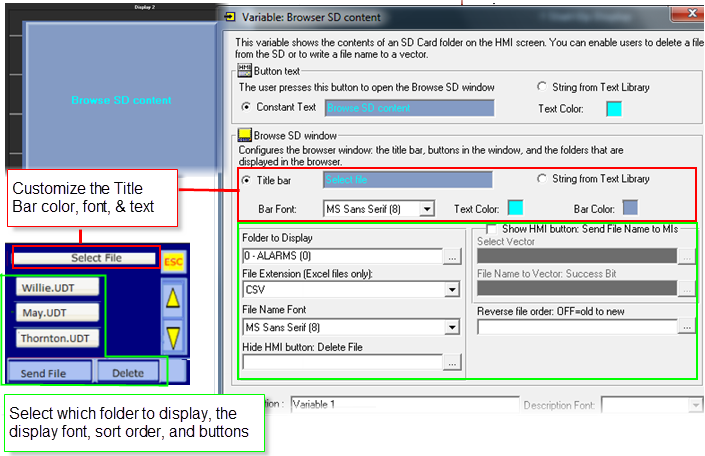
Placing this variable on screen enables a user to press a button to display all of the files in the specified folder.
Touch Screen models: The user presses the Browse SD on-screen button. If file selection is enabled, the user touches files names to select them.
Non-Touch Screens (V130): The user presses the Enter button, and navigates between files using the arrow keys.
SD Ladder Functions enable you to read/write data between an SD Card and PLC memory operands, including blocks of file data, Data Tables, and Trend data.
You can also enable the user to delete files, or to copy the file name to an operand vector. You can control whether to display the Delete button by using the Hide Delete File MB.
Note ♦ |
The SD Card Browser only displays file types that are relevant for the requested folder. For example, when you view DT files, you will only be able to see .udt and .fdt files; if there are other files in the folder they will not be displayed. In the Web folder, all file types are displayed Note that in VisiLogic versions earlier than 8.0.46, EXCEL folders cannot display .txt files. In addition, PLCs running an OS earlier than 3.0.59 do not support .txt display. |
Property |
Function |
Folder to Display |
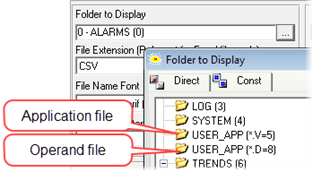
Note that: -When you select Excel, the next parameter File Extension is enabled. This is because the files in this folder may contain both .csv and .txt files. -You can enable your end user to navigate to the
user application and to the operand list:
|
File Extension |
Use this to select whether .csv or .txt files will be displayed; you cannot display both simultaneously. |
File Name Font |
Select a font. |
Hide HMI button: Delete File |
Link a bit a use it to show/ hide the Delete button (0=show 1=hide) |
Note that the next 4 parameters, together with the Delete file button, enable you to list and delete files. |
|
Show HMI Button: Send File Name to MIs |
Check this to display the Send File button and to enable the next two parameters. This enables the user to press the Send File button and write the name of a selected files to an MI vector. |
Select Vector |
This is the vector that will contain the file names after the user presses Send File. |
File Name to Vector: |
Turns ON after the file name is written. |
Reverse File Order |
Turn this ON to order the files in the folder from New to Old. |