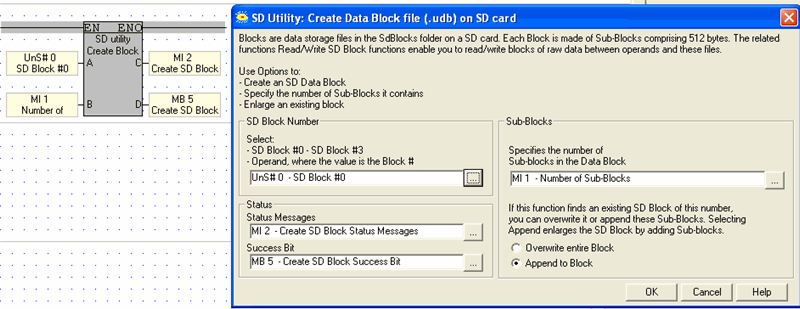
SD Data Blocks are data storage files in the SdBLocks folder on a SD card.
SD Data Blocks may reach a total of 4G, or a single Block may be up to 4G. A Data Block comprises Sub-Blocks of 512 Bytes. The SD Block functions enable you to read/write blocks of raw data between operands and these files.
Create SD Block
Creates an SD Data Block in the SdBLocks folder.
Read from SD Block to Vector
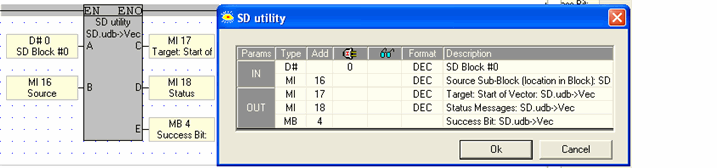
Reads a specified Sub-Block from a specified Data Block to an operand vector that is 512 bytes long.
Write from Vector to SD Block
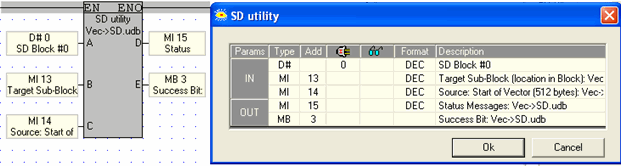
Writes 512 bytes from an operand vector to a specified Sub-Block in a Data Block
Use this function to:
Create an SD Data Block. You can create up to 4 SD Data Block: Block0.udb, Block1.udb, Block2.udb, and Block3.udb
Specify the number of Sub-Blocks it contains.
Enlarge an existing block.
You can also specify the number of Sub-Blocks the block will contain. This may be used to enlarge the Block by appending Sub-Blocks.
|
Parameter |
Purpose |
|
SD Block number |
Select the Block number, 0-3, or use an operand to assign a number at run time. |
|
Sub-Blocks |
Use this to specify the number of Sub-blocks in the Data Block. |
|
Overwrite/Append |
If this function finds an existing SD Block of this number, you can overwrite it or append these Sub-Blocks. Selecting Append enlarges the SD Block by adding Sub-blocks. |
|
Status Operand |
This MI is a bitmap; a bit turns ON to indicate status. The MI is initialized when the function starts.
|
|
Success Bit |
Turns ON when the Block is created. It remains ON until it is reset by the application, or until the application calls the function. |
|
Parameter |
Purpose |
|
SD Block number |
Select the Block number, 0-3, or use an operand to assign a number at run time. |
|
Target Sub-Block (location in Block): Vec->SD.udb |
The data will be written to this sub block. The number is the sequential number of the sub-block in the .udb file. |
|
Source: Start of Vector (512 bytes): Vec->SD |
Select the operand that is the start of the 512-byte long vector that provides the data that is written to the .udb file. |
|
Status Messages |
This MI is a bitmap; a bit turns ON to indicate status. The MI is initialized when the function starts.
Bits 10-13 can occur because the SD card does not have an SD_Blocks folder, or because a file of that name has not been created in the SD_Blocks folder.
|
|
Success Bit |
Turns ON when the data is successfully written to the Block. It remains ON until it is reset by the application, or until the application calls the function. |
|
Parameter |
Purpose |
|
SD Block number |
Select the Block number, 0-3, or use an operand to assign a number at run time. |
|
Source Sub-Block (location in Block): SD.udb-> Vec |
This is the sequential number of the sub-block in the .udb file. |
|
Target: Start of Vector: SD.udb-> Vec |
The function will write 512 bytes of data to the PLC, starting with this operand. |
|
Status Messages |
This MI is a bitmap; a bit turns ON to indicate status. The MI is initialized when the function starts.
Bits 10-13 can occur because the SD card does not have an SD_Blocks folder, or because a file of that name has not been created in the SD_Blocks folder.
|
|
Success Bit |
Turns ON when the data is successfully written to the Block. It remains ON until it is reset by the application, or until the application calls the function. |