A Number Variable enables you to:
Show any numeric value within a Display.
Control the format in which that value is shown, including the placement of a decimal point and leading zeros.
Use Linearization to show a converted value, such as an analog temperature converted to degrees Celsius.
Allow the operator to use the controller keypad to enter a number, such as a setpoint, via a Keypad Entry Variable.
Inserting and Defining the Variable
Click on the variable in the Variable toolbar, then click on the HMI screen and drag your cursor to create a field for the display of the variable data.
Release the mouse button; a dialog box opens, enabling you to define the source of the variable data.
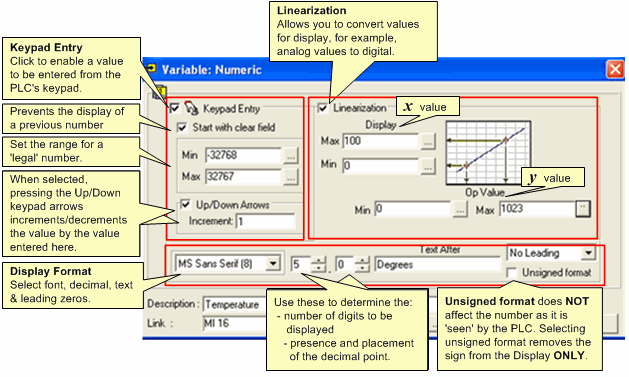
Select from the features and formats shown below.
Note that this image shows the options for a Standard Vision.
To see how to use Keypad Entry Variables, refer to the Indirect Clock example.
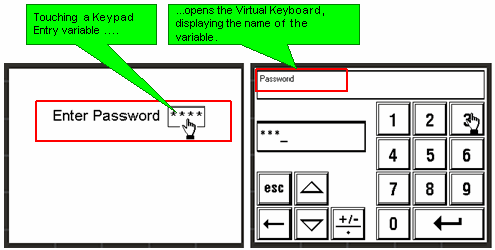
These models have a 'virtual' keyboard. After a keypad entry variable is touched on the screen, the keyboard is automatically displayed, enabling the value to be entered. Note that you can set a font for variable display in Font Handler.
|
Notes ♦ |
When an HMI keypad entry variable is active, and the Enter key is pressed on the controller keypad, SB 30 HMI Keypad Entries Completed turns ON. This can be used as a Jump condition. |
|
♦ |
SB 250, Keypad Entry within Limits, turns ON when a legal value is entered; SB 251, Keypad entry exceeds limits, turns ON when a value is out of range. You can use the status of these bits, for example, to provide a jump condition to another Display. When either of these SBs turns ON, the index number of the active variable is stored in SI 249. |
Note that you can limit the number of attempts by using SI 45 Numeric Key Entry Out of Limit - Counter of Attempts (Enhanced) to jump to another Display.
SI 253 the user can change the password (or view it when the controller is On-Line)
Note that there are a number of differences between Vision Divisions.
|
Keypad Entry Variables |
SB 92 Keypad Entry in Progress (ON during entry) (Enhanced Vision).. SB 93 Keypad Entry Var Activates (ON for 1 scan) (Enhanced Vision) SB 94 Keypad Entry Var Complete (ON for 1 scan) (Enhanced Vision) SB 250 HMI key entry within limits (Standard Vision only) SB 251 Keypad entry exceeds limits (Standard Vision only) SI 249 Last Active Keypad Entry Var (Standard Vision only) SI 250 Currently active keypad entry (read/write) (Standard Vision only) SDW 10 Keypad entry variable value |
SB 92 Keypad Entry in Progress (ON during entry) (Enhanced Vision) SB 93 Keypad Entry Var Activates (ON for 1 scan) (Enhanced Vision) SB 94 Keypad Entry Var Complete (ON for 1 scan) (Enhanced Vision) SI 45 Numeric Key Entry Out of Limit - Counter of Attempts (Enhanced Vision) (Counts the number of failed attempts to enter a value) If a Legal Entry bit is defined, SB 94 does not turn ON if the entered value is out of range. The keypad stays on screen until a legal value is entered. You can use SI 45 in conjunction with a Compare function to exit the variable.
|
|
Active Keypad Entry (SBs) |
SB 32 HMI Keypad Entry in Progress (Standard Vision) rises during keypad entry |
SB 92 HMI Keypad Entry in Progress (Enhanced Vision) rises during keypad entry |
|
Keypad Entry: Focus |
After Keypad Entry, the next variable set in Variable Tab Order automatically becomes active. |
If SB 76 is OFF after Keypad Entry, the user must use the arrow keys to move to the next variable. Turning SB 76 on causes the next variable set in Variable Tab Order to automatically become active. |
|
Password Entry via HMI |
|
Legal Entry bit in Password Variable turns ON when correct password is entered. |
|
Entering a legal keypad entry value |
SB 250 Keypad entry Within Limits turns ON for 1 scan |
SB 94 Keypad Entry Var Complete + Keypad entry property: Legal Entry MB
|
|
Entering an illegal keypad entry value |
SB 251 Keypad Entry Exceeds Limits turns ON for 1 scan |
|
|
Active Keypad Entry Variables (SIs) |
|
SI 250 Last Active Keypad Variable and SI 251 Currently Active Keypad Entry contains the number of the relevant DLU. |
|
Keypad Vars Locked |
Enhanced Vision (V130 only) Turned ON by user |
Turn ON to lock all keypad entry variables. |
|
Enter Display with locked Keypad Entry Variables |
In Ladder application, set SB30 |
Same |
|
Enter ASCII value |
|
Currently Active Keypad Entry |