
You can use these ladder function to control Unitronics Router I/Os via UniStream.
Get Router IO Struct enables you to read the current UCR Input/output
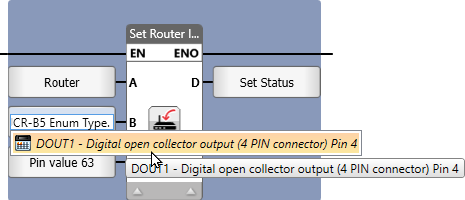
Set Router IO Struct allows you to set new values to UCR Input/output
|
|
Parameter Name |
Purpose |
|
A |
Router Struct |
Select router that has been defined in: PLC Communications > Router |
|
B |
Status |
0 = No Error 1 = Operation accepted 2 = Operation in progress -13 = GPS Error. (Only for UCR-B8) -15 = Router IO Error -16 = Router not initialized |
|
C |
Router IO Struct |
Use the bits in the struct to mirror the current I/O status. |
|
|
Parameter Name |
Purpose |
|
A |
Router Struct |
Select router that has been defined in: PLC Communications > Router |
|
B |
Enum Of Writable Pins To Select |
Click here to reveal the writable pins of the router; selct the pin to write to |
|
C |
Chosen pin value |
Link a tag to hold the value to write to the pin. |
|
D |
Status |
0 = No Error 1 = Operation accepted 2 = Operation in progress -13 = GPS Error. (Only for UCR-B8) -15 = Router IO Error -16 = Router not initialized |