Before enabling the Audit Trail, ensure the following conditions are met:
- A valid SD card is inserted in the PLC
- A Serial Number (SN) is burned into the PLC
UniStream PLCs support an Audit Trail, which provides a logical path linking a sequence of events to track transactions that have impacted the contents of a record.
Benefits of Audit Trail Compliance:
Accurate Record Keeping - Automatically maintain precise date and time stamps for events.
Event Traceability - Ensure all events are recorded in a clear, sequential order.
Data Change Transparency - Log data changes with before-and-after values.
User Activity Monitoring - Track user access and authentication events, including logins, logouts, password updates, and expiration.
Data Integrity Assurance - Safeguard audit records against tampering.
|
Before enabling the Audit Trail, ensure the following conditions are met:
|
Step 1: Enable User Access Control
In UniLogic, navigate to Solution Explorer > User Access Control and click to enable User Access Control.
Note that when you enable UAC, a new item called Audit appears.
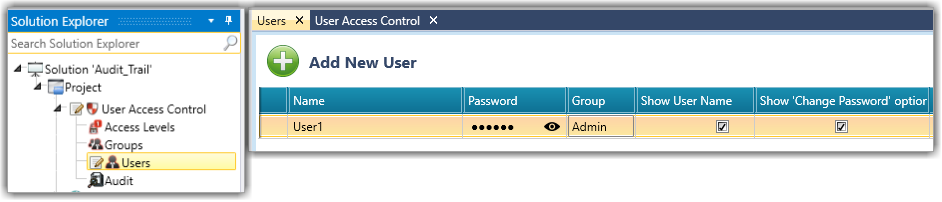
Step 2: Define Users
Assign usernames, passwords, and groups as needed.
Note that only defined users will have their actions tracked by the Audit Trail.
Step 3: Configure the Audit Trail
|
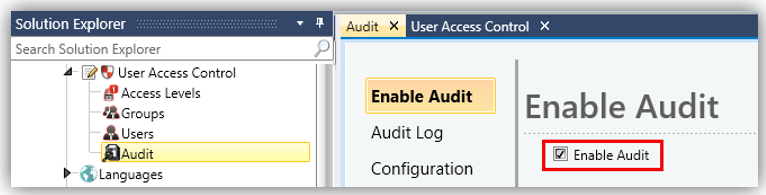
Enable Audit |
Click to Enable Audit
|
|
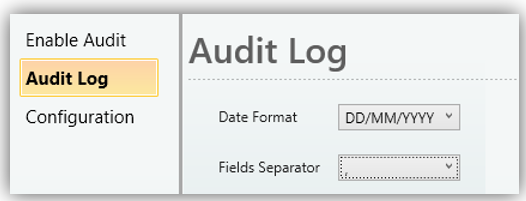
Audit Log |
Select the preferred format for date representation, and choose the character used to separate fields in the audit log.
|
|
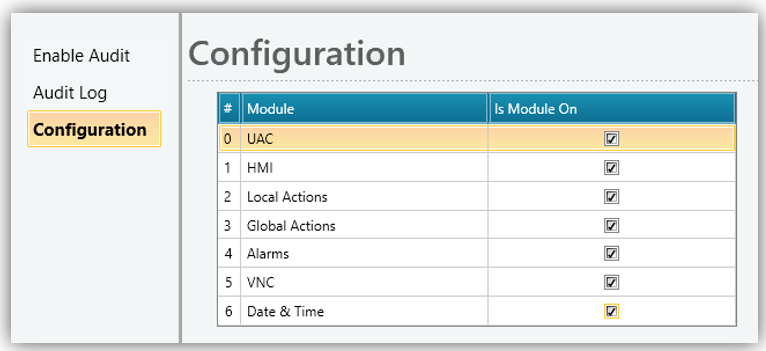
Configuration |
Check the corresponding boxes to enable the Audit Trail for each module you want to activate.
|
Step 4: Exporting the Audit Trail
After configuration, a new Global Action: Export Audit Trail becomes available in UniLogic.
You can trigger the export either automatically or manually. In both cases, the .csv and .csv.sign files are created on the SD card.
Step 5: Locate the Audit Files
Upon export (manual or automatic), the following files are created on the SD card.
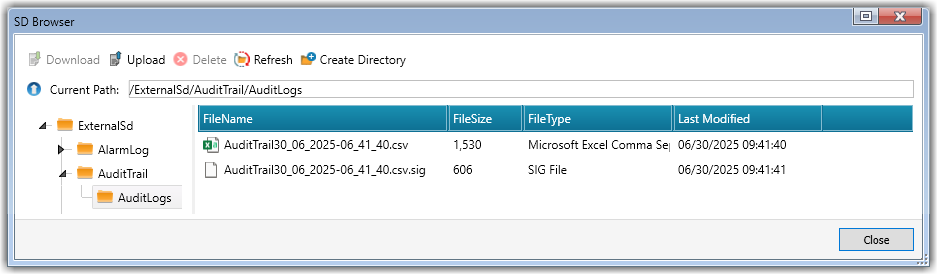
Step 6: Verifying the Audit Log
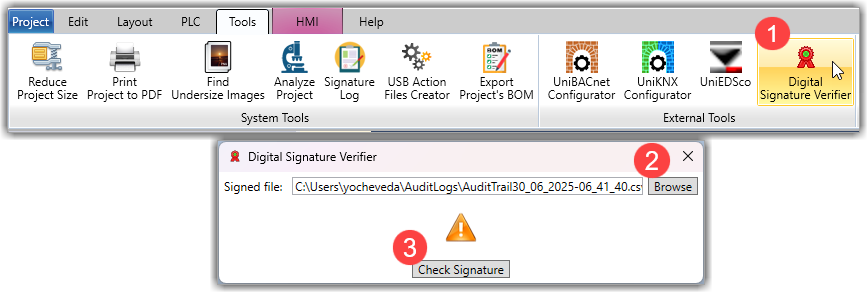
Download both the .csv and .csv.sign files from the SD card to the same folder on your PC.
Navigate to Tools > Digital Signature Verifier, browse to your .csv file and run the verification.
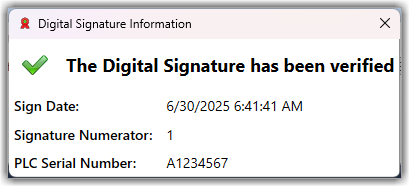
If the signature is valid and the file has not been tampered with, UniLogic will confirm that the verification passed.
Module-Based Audit Event Tracking
The table below outlines the events based on the configuration settings for each module.
|
Module |
Event |
Format |
|
General |
PLC Initial Power-up |
Date, Time, Event (PLC Initial Power-up) |
|
UAC |
Login, Logout |
Date, Time, "Login:" / "Logoff:", Username |
|
HMI |
State Machine Button Radio Button Combo-Box Check-Box List-Box Text-Box Password-Box Numeric-Box IP Address Edit IP Settings Edit Slider Timer-Box Data Table Analog Schedule Digital Schedule File Browser Accessing UniApps/Returning to UserApp |
Date, Time, Username, Screen Name, Element Name, Tag Name, Old Value, New Value |
|
Local Actions |
Set Bit Reset Bit Toggle Bit Increment Decrement Clear and Ack all Alarms Clear all Alarms Reset Numeric Set Value |
Date, Time, Username, Screen Name, Element Name, Action Name, Tag Name, Old Value, New Value |
|
Global Actions |
Ack and Clear all Alarms Clear all Alarms |
Date, Time, Username, Event Group ID, Event ID, Action (Ack and/or Clear) |
|
Alarms |
Alarm acknowledge Alarm Clear Clear Alarm History (in "Alarm History" widget) |
Date, Time, Username, Event Group ID, Event ID, Action (Ack and/or Clear) |
|
VNC |
Remote Connection Established Remote Connection Disconnected or Communication Loss |
Date, Time, "VNC Remote Access Connected, User", Username Date, Time, "VNC Remote Access Disconnected, User", Disconnected Username |
|
Date & Time |
Time change from UniLogic Time change from Ladder |
Date, Time, "Date/Time Changed", Old Value, New Value, Change source: UniLogic script / Ladder, Change Method (Manual or Auto) |