
-
Units must be written in descending order ( d > h > m > s > ms )
-
Each unit may appear only once
-
The optional sign '+' or '-' may appear only after #
This topic covers the following features available in the UniLogic ST editor.
Data Types - Duration Literals (TIME), Date and Time Literals (DATE_AND_TIME, TOD, DATE)
Operators - Time and Date Arithmetic
Functions - Type Conversion (TO_REAL, TO_DINT, MOVE,...), MUX
UniLogic Structured Text (ST) supports two categories of data types:
Duration (TIME)
Date / Time (DATE_AND_TIME, TIME_OF_DAY, DATE)
Each has a dedicated literal syntax and supports arithmetic operators.
|
Type |
Prefix |
Use |
|
TIME |
T# or TIME# |
Durations and timer presets |
|
DATE_AND_TIME |
DT# or DATE_AND_TIME# |
Full timestamps |
|
TIME_OF_DAY |
TOD# or TIME_OF_DAY# |
Time of day |
|
DATE |
D# or DATE# |
Calendar dates |
The TIME data type represents a signed time interval. It is stored internally as INT32 (milliseconds).
It is used for timer presets (PT), elapsed time (ET), and general-purpose time arithmetic.
Valid Range
|
Minimum: T#-24d20h31m23s648ms Maximum: T#+24d20h31m23s647ms |
Literal Syntax
Duration literals use the prefix T# or TIME#, followed by an optional sign and one or more time units in descending order:
|
T#<duration> TIME#<duration>
Syntax: [+-] [Nd] [Nh] [Nm] [Ns] [Nms] |
Supported Units:
|
Unit |
Meaning |
Example |
|
d |
Days |
T#1d |
|
h |
Hours |
T#12h |
|
m |
Minutes |
T#30m |
|
s |
Seconds |
T#45s |
|
ms |
Milliseconds |
T#500ms |
|
|
|
Note |
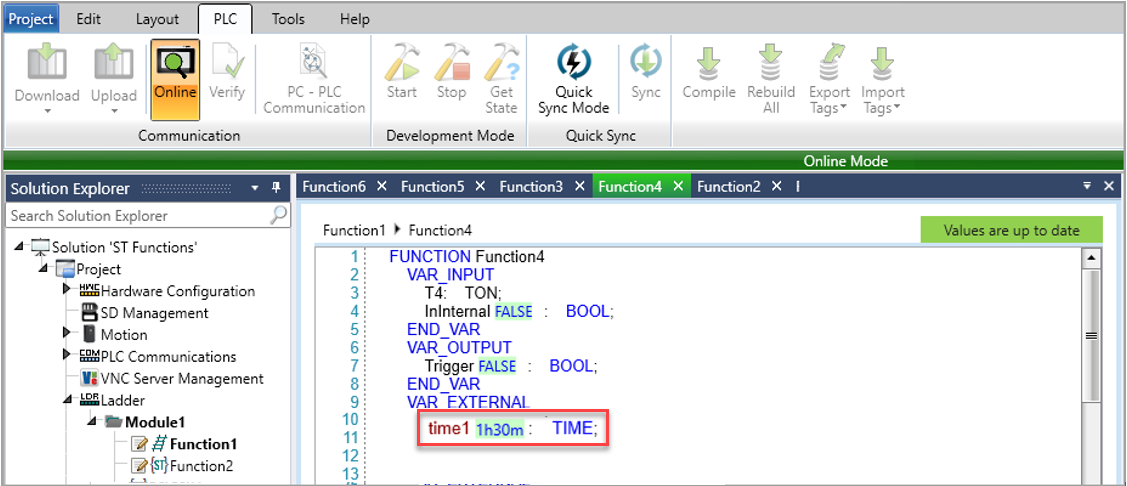
During online monitoring, TIME variables are displayed in their formatted representation (e.g., 5s, 1h30m ). You can enter values in the same format without the T# or TIME# prefix. |
UniLogic supports three date/time literal types. Each is stored as a UINT32 (seconds since the Unix epoch: 1970-01-01 00:00:00).
|
Type |
Meaning |
Example |
|
DATE |
A calendar date |
D#2026-04-09: 9th April 2026 |
|
TIME_OF_DAY |
Time of day as shown on a clock |
TOD#00:00:00: Midnight |
|
DATE_AND_TIME |
A full timestamp |
DT#2026-03-12-14:40:30.500: 2:40 pm and 30.5 seconds on 12th March 2026 |
|
Component |
Format |
Range |
|
Year |
YYYY |
1970 to 2106 |
|
Month |
MM |
01 to 12 |
|
Day |
DD |
01 to 31 |
|
Hour |
HH |
00 to 23 (24-hour format) |
|
Minute |
mm |
00 to 59 |
|
Second |
ss |
00 to 59 |
Conversion Functions
|
Function |
Description |
|
TO_UDINT |
Copies the UINT32 representation of a DT variable |
| TO_TIME |
Converts a compatible value to TIME |
|
TO_DT |
Converts a compatible value to DATE AND TIME |
|
Note |
TO_UDINT and TO_DT copy the raw value without conversion. The UINT32 value represents total seconds since 1970-01-01-00:00:00. |
Operators available in the ST editor for use with the TIME and date/time data types.
The ST editor supports + and - operators on TIME, DATE, DATE_AND_TIME (DT), and TIME_OF_DAY (TOD) types.
The result type depends on the operand combination.
Supported Operations
|
Expression |
Result Type |
|
TIME + TIME |
TIME |
|
TIME - TIME |
TIME |
| DATE + TIME |
DATE |
|
DATE - TIME |
DATE |
|
DATE - DATE |
TIME |
|
DT + TIME |
DATE_AND_TIME |
|
DT - TIME |
DATE_AND_TIME |
| DT - DT |
TIME |
|
TOD + TIME |
TIME_OF_DAY |
|
TOD - TIME |
TIME_OF_DAY |
|
TOD - TOD |
TIME |
Overflow and Underflow Behavior
|
Type |
Storage |
Overflow |
|
TIME |
INT32 ms |
Wraps as signed integer |
|
TOD |
UINT32 ms since midnight |
Wraps within 24 hours |
|
DATE |
Days since epoch |
Wraps within supported range |
|
DT |
UINT32 seconds |
Wraps within UINT32 range |
TIME Overflow Example
|
t := T#24d20h31m23s647ms + T#1ms; (* Result wraps to: T#-24d20h31m23s648ms *) |
TIME_OF_DAY Wrap Examples
|
tod := TOD#23:30:00 + T#2h; (* Result: TOD#01:30:00 -- wraps past midnight *)
tod := TOD#01:00:00 - T#2h; (* Result: TOD#23:00:00 -- wraps before midnight *) |
TOD - TOD (Signed Result)
|
result := TOD#01:00:00 - TOD#23:00:00; (* Result: T#-22h -- signed, no wrap *) |
Functions available in the ST editor that go beyond the basic ST Function Library.
UniLogic ST supports three styles of type conversion: the original TO_* functions, IEC-standard TYPE(x) casting, and the SOURCE_TO_TARGET(x) pattern. All styles produce identical output and map to the same internal pipeline.
Conversion Styles
|
Style |
Example |
|
TO_* function |
TO_INT(x) |
|
IEC cast |
INT(x) |
| Source-to-target |
REAL_TO_INT(x) |
REAL -> INT Conversion Behavior
IEC-standard conversion functions truncate toward zero.
Legacy UniLogic functions (renamed with _UNI_suffix) round half away from zero:
|
Style |
3.9-> |
3.5-> |
-3.9-> |
Rounding Rule |
|
TO_INT / INT / REAL_TO_INT |
3 |
3 |
-3 |
Truncate toward zero (IEC standard) |
|
TO_INT_UNI_ (legacy) |
4 |
4 |
-4 |
Round half away from zero |
Supported Type-Cast Functions
|
Function |
Returns |
Notes |
|
TO_REAL / REAL |
REAL |
Any numeric -> REAL |
|
TO_DINT / DINT |
DINT |
Truncates toward zero |
| TO_INT / INT |
INT |
Truncates toward zero |
|
TO_SINT / SINT |
SINT |
Truncates toward zero |
|
TO_UDINT / UDINT |
UDINT |
Truncates toward zero |
|
TO_UINT / UINT |
UINT |
Truncates toward zero |
| TO_USINT / USINT |
USINT |
Truncates toward zero |
| TO_BOOL / BOOL |
BOOL |
0 -> FALSE, non-zero -> TRUE |
| TO_TIME / TIME |
TIME |
Converts compatible value to TIME |
| TO_DT / DT |
DATE_AND_TIME |
Converts compatible value to DT |
The pattern (e.g., REAL_TO_INT, SINT_TO_DINT) is supported for all compatible type pairs.
These functions map directly to the standard TO_* functions and follow IEC truncation behavior.
|
Supported Pattern |
Example |
Notes |
|
SINT_TO_INT |
SINT_TO_INT(mySint) |
Widening - no data loss |
|
INT_TO_DINT |
INT_TO_DINT(myInt) |
Widening - no data loss |
| REAL_TO_INT |
REAL_TO_INT(myReal) |
Truncates toward zero |
|
REAL_TO_DINT |
REAL_TO_DINT(myReal) |
Truncates toward zero |
|
DINT_TO_REAL |
DINT_TO_REAL(myDint) |
May lose precision for large values |
|
UDINT_TO_REAL |
UDINT_TO_REAL(myUdint) |
May lose precision for large values |
|
INT_TO_BOOL |
INT_TO_BOOL(myInt) |
0 -> FALSE, non-zero -> TRUE |
|
Note |
64-bit types (LINT, ULINT, LWORD, LREAL, LTIME, LDATE) and the ANY_BIT types BYTE, WORD, DWORD are not supported. Use their numeric equivalents: USINT, UINT, UDINT. |
MOVE copies a value from one variable to another, applying implicit type conversion where permitted. It is equivalent to the Store Ladder element.
Syntax
|
destination := MOVE(src);
(* Named-parameter form: *) MOVE(SRC := a, DEST := b); |
Type Compatibility
|
Source |
Compatible Destinations |
Notes |
|
BOOL |
BOOL, BYTE, WORD, INT, DINT, REAL |
FALSE ->0, TRUE ->1 |
|
BYTE |
BYTE, WORD, DWORD, INT, DINT, REAL |
Upper bits discarded when narrowing |
| WORD |
WORD, DWORD, INT, DINT, REAL |
Lower 16 bits when narrowing |
|
INT / DINT |
INT, DINT, DWORD, REAL |
Signed to float supported |
|
REAL / LREAL |
Same or wider float; INT/DINT (truncates) |
Implicit narrowing allowed |
|
STRING |
STRING of same or larger length |
No implicit conversion to numbers |
|
MOVE does not support Structs or Arrays. Use element-by-element assignment instead. |
Example
|
VAR a : REAL := 12.34; b : REAL; n : INT; END_VAR
b := MOVE(a); (* b = 12.34 *) n := TO_INT(a); (* n = 12 *) |
MUX selects one of the several input values based on an integer index K. It belong to the same function family as SEL, MIN, MAX, and LIMIT.
Syntax
|
result := MUX(K, IN0, IN1, IN2, ..., INn); |
Parameters
|
Parameter |
Type |
Description |
|
K |
SINT / INT / DINT / UINT / UDINT |
Selector index |
|
IN0..INn |
Any non-struct type (all identical) |
Input values. Up to 32 inputs |
| result |
Same type as inputs |
The selected input |
Supported Types
|
SINT, USINT, INT, UINT, DINT, UDINT (* integers *) REAL (* float *) BOOL (* boolean *) TIME (* duration *) STRING, WSTRING (* text *) DATE_AND_TIME (* timestamp *) |
Example
|
VAR mode : INT := 2; speed : REAL; END_VAR
speed := MUX(mode, 10.0, 25.0, 50.0, 100.0); (* mode=2 -> speed = 50.0 *) |
|
A maximum of 32 inputs (IN0..IN31) is supported. If K is out of range, behavior is identified. |
UniLogic ST allows you to use STRING, WSTRING, STRING8, STRING16, and STRING32 types interchangeably in string functions and with the + operator. You no longer need to manually convert between string types before passing them to a function.
How Widening Works
When two different string types are used together, the result automatically widens to the broader type:
|
Input Types |
Result Type |
|
STRING + STRING |
STRING |
|
WSTRING + WSTRING |
WSTRING |
| STRING + WSTRING |
WSTRING |
| WSTRING + STRING |
WSTRING |