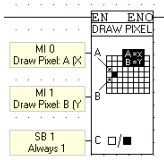
These elements allow Ladder events to color pixels or draw lines on the controller's LCD display.
Both Draw Pixel and Draw line are located on the HMI toolbar.
Draw Pixel enables you to color a single pixel located on the x,y axis.
Input |
Purpose |
Comments |
Input A |
X location |
|
Input B |
Y location |
|
Input C |
Pixel color |
If the value of the linked bit is 1 (set), the pixel will be black, if 0 (reset), the pixel will be negative. SB 1 may used to color the pixel black, SB 0 to color it negative, or an MB may be used. |
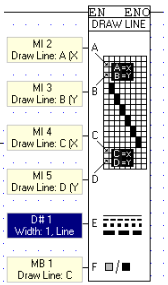
Draw line enables you to draw lines in different widths and formats.
Input |
Purpose |
Comments |
Input A |
Start Xlocation |
|
Input B |
Start Y location |
|
Input C |
End X location |
|
Input D |
End Y location |
|
Input E |
Format |
Select line width: 1 to 4 pixels wide, and line style: solid, dot. or dash. |
Input E |
Pixel color |
If the value of the linked bit is 1 (set), the line will be black, if 0 (reset), the line will be negative. SB 1 may used to color the line black, SB 0 to color it negative, or an MB may be used. |
Input |
Purpose |
Comments |
Input A |
Type |
Select Cartesian or Polar |
Input B |
Start X location |
|
Input C |
Start Y location |
|
Input D |
End X location |
|
Input E |
End Y location |
|
Input F |
Width |
Select line width: 1 to 20 pixels |
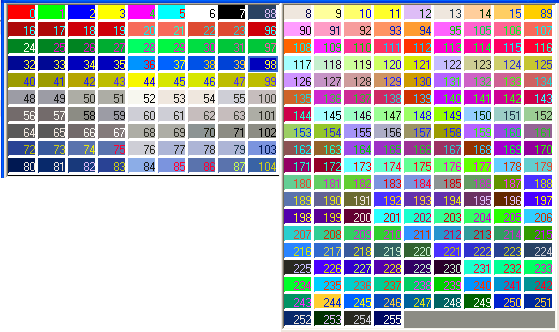
Input G |
Pixel color |
Use the values according to the following figure.
|
 .
.