-
Com>TCP/IP>Socket Init function, set to UDP_RAW. You can use any socket except Socket 0.
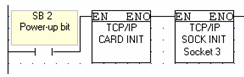
These functions are located on the COM>TCP/IP>UDP menu. Use them to send a vector of raw data to a remote Vision, broadcast the data to the entire network, or receive a stream of data and write it to a vector of registers.
The number of bytes a message can comprise varies according to Vision model:
Configure Ethernet in your application by building a net that comprises the following elements:
|
|
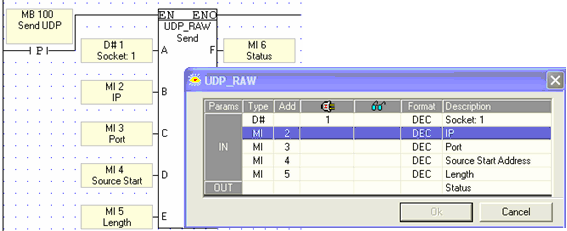
Configure a UDP RAW Send function to determine the data to send to a specific PLC.
|
Note ♦ |
Use a Send condition; do not place it directly on the left Ladder rail. |
|
Parameter Name |
Purpose |
|
Sending Socket |
The PLC sends the data through this socket. Select a socket that is initialized to UPD_RAW |
|
IP of remote PLC |
The IP of the remote device
|
|
Sending Port |
The PLC sends the data through this port |
|
Source Start Address |
Start address of the vector containing the data |
|
Vector Length |
Determines the vector length |
|
Status |
Shows the status of the message that is sent Value Message 0 Data Sent Successfully -2 Illegal IP address -3 Data vector exceeds the range for that data type |
The Scan function enables a PLC to receive data from a specified remote PLC and write it to a vector of registers.
Configure the application in the PLC that receives the data by building a net that comprises a Card Init function and a Socket Init function, set to UDP_RAW.
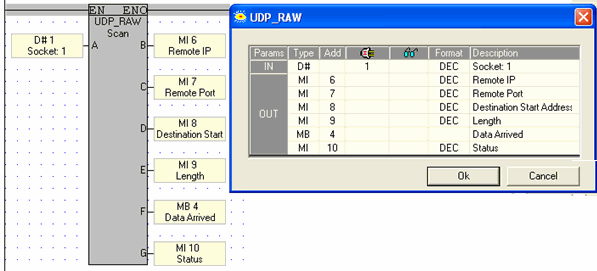
Configure a UDP RAW Scan function to receive the data.
|
Note ♦ |
In most applications, Scan should be active all the time. To accomplish this, place the Scan function in the main routine, directly on the left Ladder rail. |
|
Parameter Name |
Purpose |
|
Socket |
This is the socket that receives the data. This socket must be initialized to UPD_RAW |
|
IP of remote PLC |
The IP of the device that sent the data Note that this will user a vector of 4 MI |
|
Remote Port |
The port of the device that sent the data |
|
Destination Start Address |
Start address of the vector to which the received data is written |
|
Vector Length |
The number of bytes received. Is reset by OS when the element activates. |
|
Data Arrived |
Use this to monitor message status. Is reset by OS when the element activates. |
|
Status |
Value Message -3 Data vector exceeds the range for that data type |
 To broadcast the data to the network, send to IP255.255.255.255