A Positive Transition Contact gives a single one-shot pulse when the bit operand it is linked to rises from OFF (logic 0) to ON (logic 1).A Negative Transition Contact gives a single one-shot pulse when the bit operand it is linked to falls from ON (logic 1) to OFF (logic 0). You can link them to any of the following bit operands:
A cellular phone keypad key is an example of a Positive Transition Contact. When you push a key a number is displayed on the screen. It does not matter if you push the key quickly or hold it down for several seconds. The number will only appear once on the screen.
The cellular phone registers the transition from key NOT pressed to key pressed. The length of time the key is pressed is not relevant. You must release the key and press it again to repeat the number on the cellular phone screen.
During the system scan, a Positive Transition Contact address is evaluated for a transition from OFF to ON. A transition allows power to flow through the Positive Transition Contact for one scan.
At the end of a scan, the Positive Transition Contact is reset to ON (logic 1). The Positive Transition Contact is re-activated when the linked signal turns from OFF to ON.
|
Note ♦ |
Execution time for Positive and Negative Transition contacts is considerably greater than the execution time for direct and indirect contacts. However, you can decrease the amount of transitional contacts in your program. |
|
|
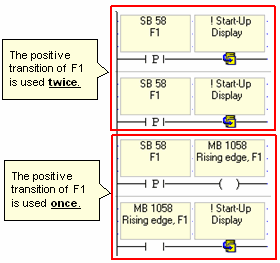
You can use the coil of a bit operand to save the positive transition of a contact, and then use the direct contact of the operand in your program. |
|
|
|
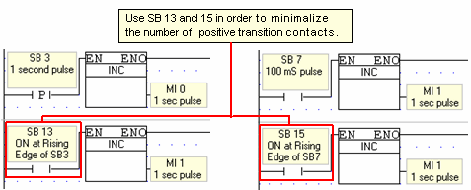
You can use the Direct Contact of SB 13 instead of using the Positive Transition Contact of SB 3, and the Direct Contact of SB 15 instead of using the Positive Transition Contact of SB 7. SB 3 is a pulse generator, with a cycle time of 1 second and a duty cycle of 50% (0.5 seconds ON, 0.5 seconds OFF). SB 13 is the Positive Transition (rising edge) contact of SB 3. SB 7 is a also a pulse generator, with a cycle time of 0.1 second. SB 15 is the Positive Transition (rising edge) contact of SB 7.
|
|
|
The maximum number of Rise/Fall elements that is allowed in a project depends on the controller model. To ascertain how many elements of each type are in the project, use the Rise/Fall utility on the View menu. The sum of the results must not exceed:
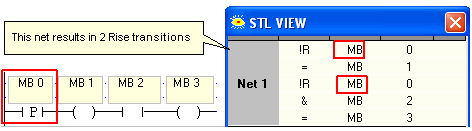
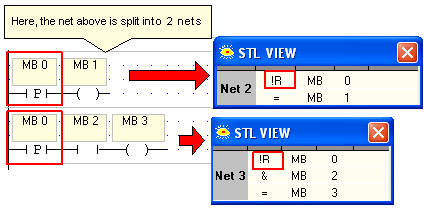
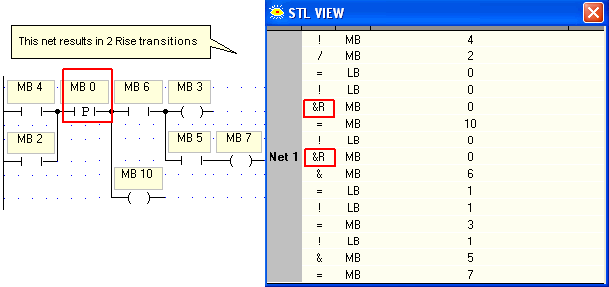
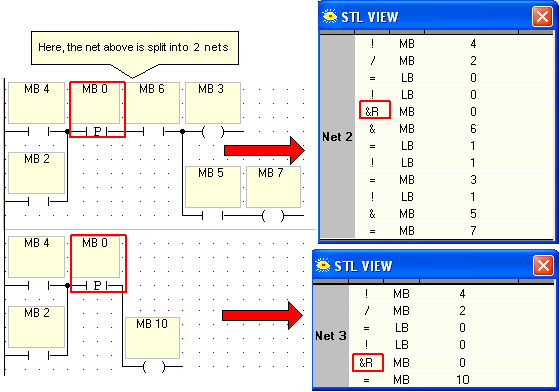
If a program exceeds this number, Error 1017 results. However, in certain cases, the actual compiled number of Rise/Fall elements is greater than the total that is shown in the Summary. Examples are shown below. Example 1Example 2
|