Open a Display.
Click on a Jump Condition field, and select an operand.
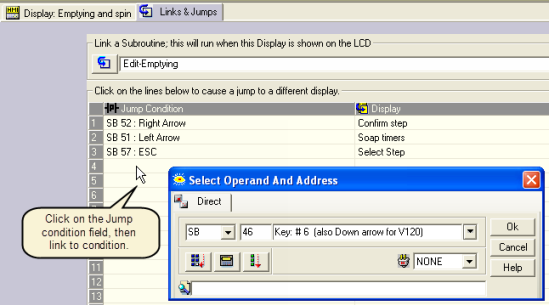
Click on Display field, and select a destination Display.
To change between Displays, set Jumps. A Jump contains a Jump condition, which is linked to a bit operand, and a destination Display. You can also load a Display by placing a function in a Ladder net.
Open a Display.
Click on a Jump Condition field, and select an operand.
Click on Display field, and select a destination Display.
To edit a Jump, click the desired field and make a new selection.
|
Notes ♦ |
When an HMI keypad entry variable is active, and the Enter key is pressed on the controller keypad, SB 30 HMI Keypad Entries Completed turns ON. This can be used as a Jump condition. |
|
♦ |
To see a list of Displays in a project together with their Display numbers, select HMI Information from the View menu. |
