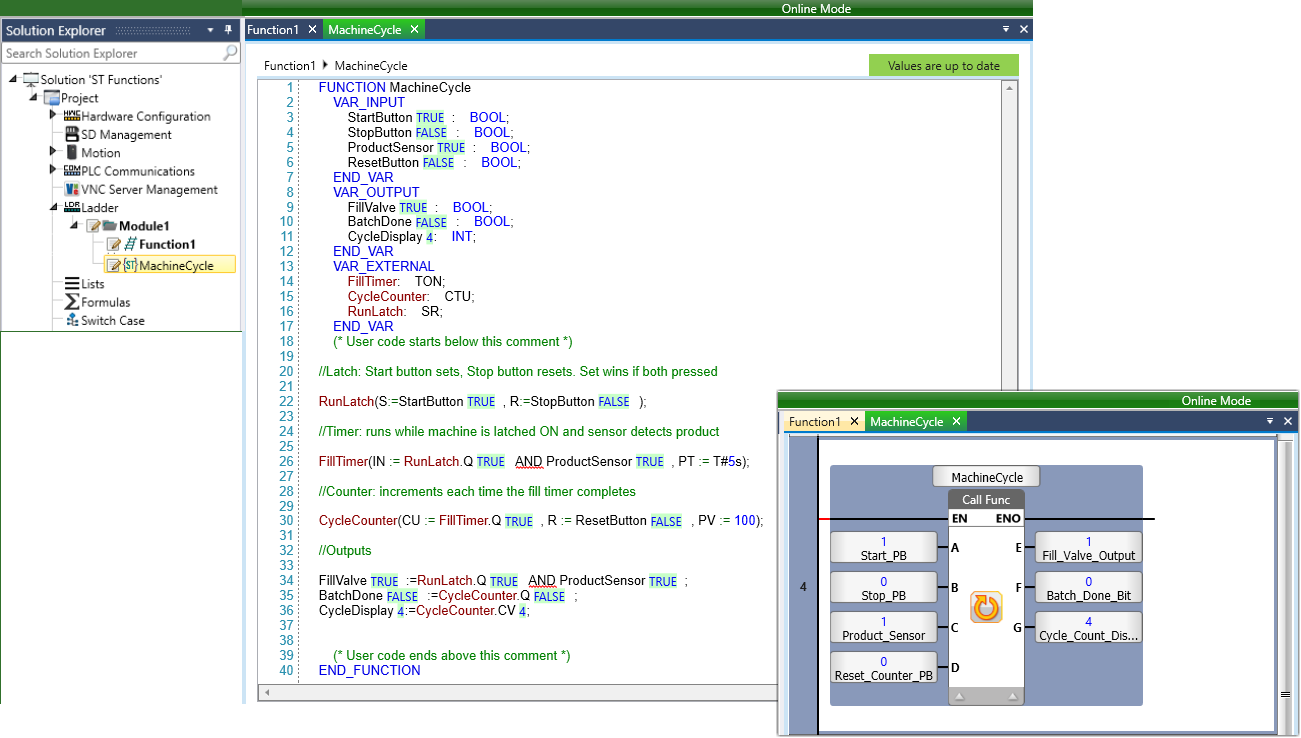
UniLogic offers a Structured Text editor that enables you to create functions.
Use these functions in the same way you use standard Ladder functions - you can call them just like standard Ladder functions, reuse them, and export/import them via the Library. You can also refer to Ladder functions.
The ST editor supports the IEC 61131-3 Structured Text language. You can declare local and global variables directly from the editor, benefit from IntelliSense as you type, and edit code while the controller is online in QuickSync mode. When connected, the editor displays live variable values inline - including formatted TIME and DATE_AND_TIME values - making it straightforward to monitor and debug your logic without leaving the code view.
For working with time and date values, the editor supports the TIME data type using Duration Literals (T#5s, T#1h30m), as well as DATE_AND_TIME, TIME_OF_DAY and DATE types with their respective literal syntax. Arithmetic operators enable you to add and subtract these values directly in your code.
The built-in ST Function Library provides type conversion, math, string manipulation, and selection functions - including MOVE, MUX, SEL, LIMIT, FIND, and the full set of trigonometric and logarithmetic functions.
In addition, UniLogic supports the IEC 61131-3 standard function blocks; bistable latches (RS, SR), edge detection (R_TRIG, F_TRIG), counters (CTU, CTD, CTUD), timers (TON, TOF, TP), and real-time clock (RTC) - all fully usable from the ST editor alongside your own functions.
The following example shows a complete ST function that uses a timer, a counter, and a bistable latch together.
It represents a simple machine cycle: a sensor triggers a fill timer, counts completed cycles, and a latch keeps the machine running until a stop button is pressed.