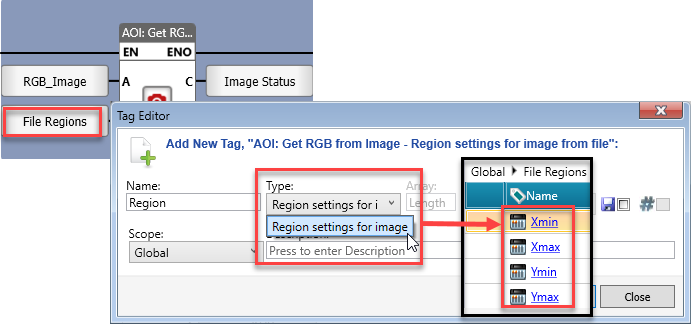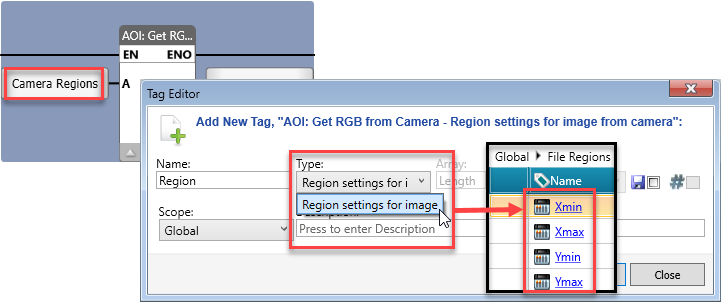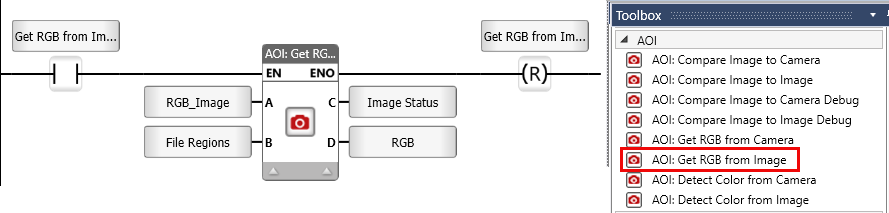
UniStream's AOI functionality supports color recognition. The AOI Get RGB Ladder Function provides tools for real-time and static image processing.
Notes:
This function enables extracting Red, Green, and Blue (RGB) color values from a pre-captured image stored on the SD card file.
By specifying a Region of Interest (ROI) within the image, this feature efficiently isolates the desired section for analysis.
|
|
Parameter Name |
Purpose |
|
A |
Image |
Link a tag to provide the stored image path on the SD card, relative to /Media/Camera/ This parameter is used to locate and load the image for processing. |
|
B |
Region settings for image from file |
Defines the region of interest (ROI) within the image that is used for RGB extraction. This can include coordinates, dimensions (width and height), or predefined areas of the image. This allows processing only on specific sections of the image. If you do not use this parameter, the entire image is processed.
|
|
C |
Status |
0 = Success |
|
D |
RGB |
Returns in percentage the struct containing three REAL tags for the red, green, an blue channel values. |
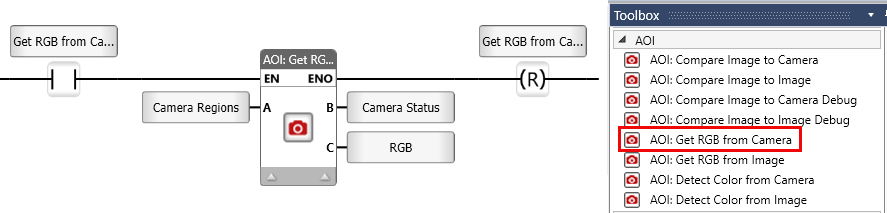
This function refers to capturing and processing live image data directly from a camera connected to the controller and extracting the Red, Green, and Blue (RGB) color values from specific pixels or regions of interest.
|
|
Parameter Name |
Purpose |
|
A |
Region settings for image from camera |
Defines the region of interest (ROI) within the live camera feed for RGB extraction. This can include coordinates, dimensions (width and height), or predefined areas of the image. This allows processing only on specific sections of the image from the camera. If you do not use this parameter, the entire image is compared.
|
|
B |
Status |
0 = Success |
|
C |
RGB |
Returns in percentage the struct containing three REAL tags for the red, green, an blue channel values. |