Redfish Events
UniStream PLCs support Redfish Events, enabling the system to generate, log, distribute, and monitor Redfish-compliant alerts according to the Redfish Event Service standard.
Redfish Events provide a standardized mechanism for communicating system conditions or changes to Redfish clients.
Events are generated from Ladder Logic, logged locally, and delivered to subscribed destinations.
|
Notes
|
-
Redfish Events require an SD card.
-
Max 50 subscriptions and 1000 logged events.
-
Up to 16 events can be processed simultaneously.
|
Redfish Event Service Struct
Automatically created when Redfish is enabled.
|
Parameter Name
|
Type
|
Purpose
|
|
Service Enabled
|
BIT
|
Is event service enabled or not
|
|
Delivery Retry Attempts
|
UINT32
|
The number of event retry attempts
|
|
Delivery Retry Interval (Seconds)
|
UINT32
|
The interval between retries in seconds
|
Event Subscription Management
The Redfish Event Service maintains a list of active subscribers, each defining where and how event notifications are sent.
While subscriptions are created and deleted through the Redfish interface, UniLogic provides Ladder access for monitoring and diagnostics.
Use the Get All Subscriptions Ladder element to retrieve details for all configured subscribers and store them in a Data Table.
This allows you to inspect each subscriber’s destination URI, filters, and retry configuration directly from the PLC application.
Event Service Behavior
The Event Service defines how the PLC communicates events to subscribed Redfish clients.
When enabled, it monitors all Redfish Event triggers from Ladder Logic, applies filters, and delivers notifications to each destination according to its configuration.
Supported Subscriber Settings
Each subscriber (destination) can define the following parameters, as specified by the Redfish standard:
|
Parameter
|
Description
|
|
Destination
|
The target URI to which events are sent (HTTP/HTTPS)
|
|
MessageIds
|
Optional list of Redfish Message IDs. Only matching events are sent
|
|
OriginResources
|
Identifies the Redfish resource that generated the event
|
|
ResourceTypes
|
Filters events by resource type (for example, Chassis, Power, Thermal)
|
|
Severity
|
Optional filter: OK, Warning, Critical
|
|
DeliveryRetryPolicy
|
Defines behavior on failure:
- RetryForever - Server retries based on the subscription's retry policy
- TerminateAfterRetries - After max attempts, it either disables the subscription (Suspend) or stops trying (Terminate)
- SuspendRetries - If successful, the event is removed from the retry queue
|
|
Note: UniStream supports filtering by MessageIds, Severity, OriginOfCondition, and ResourceTypes.
Filters not supported by the subscriber are ignored by the PLC during event delivery.
|
Event Delivery Sequence
-
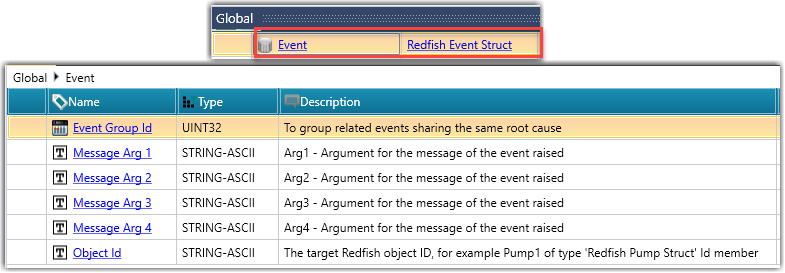
Configure the Redfish Event Struct with the required arguments (Object / Resource ID, and Message Arguments).
-
Trigger a Redfish Event from the Ladder application.
-
The Event Service builds the event payload in JSON format.
-
The payload is logged locally to /mnt/sd/Redfish/RedfishLog.json.
-
The Event Service sends the event to all active subscribers whose filters match the payload.
-
If a delivery fails, it is retried according to the subscriber's retry policy and the Delivery Rate Interval defined in the Event Service Struct.
Note that to modify retry parameters dynamically, use the Set Service Property Ladder element.
Related Topics
Redfish
Redfish Update and Task Services
Redfish Ladder Functions