Redfish

UniStream Built-in PLCs support Redfish, a highly scalable RESTful API protocol, as a server.

The Redfish Scalable Platforms Management API, developed by the Distributed Management Task Force (DMTF), is a modern standard for systems management interfaces. It offers a scalable, secure, and open method for managing servers, utilizing RESTful interface semantics to access model-based data for out-of-band management.

  • Redfish requires a license purchase. For more information, please contact your Unitronics' sales representative.

  • One-hour Trial Offer: this free, fully functional trial offer enables you to explore UniStream's Redfish for 60 minutes at a time. Click here for Trial activation instructions.


Enabling Redfish

Redfish General Struct

Parameter Name

Type

Purpose

Process Status

UINT8

These indicate the status of the process

0 - Redfish Initialization in Progress

1- Redfish is Running

2 - Certificate Expired

3 - Bad Configuration

4 - Internal Error

5 - Server Restarting after creating new certificate

6 - No SD, Server Down

User Name

String ASCII

Last username accessed 

Num of Access to Server

UINT32

Number of times the object or resource has been accessed

Server Event UTC Time

UINT32

Timestamp of the event in Coordinated Universal Time (UTC)

Server Event Type

UINT8

These indicate the event type codes

0 - Invalid User Request

1- User GET Request

2 - User PATCH Request

3 - Unauthorized Access

4 - Internal Error

5 - User POST Request

Number of Events Subscribers

UINT32

Number of subscribers to the Server Events

Last Accessed URI

String ASCII

This shows the last accessed URI 


Redfish Event Service Struct

Parameter Name

Type

Purpose

Service Enabled

BIT

Is event service enabled or not

Delivery Retry Attempts

UINT32

Number of retry attempts for event delivery

Delivery Retry Interval (Seconds)

UINT32

Interval between retries in seconds


Redfish Update Service Struct

Parameter Name

Type

Purpose

Service Enabled

BIT

Is update service enabled or not

Trigger Simple Update

String ASCII

Set when client triggers SimpleUpdate action

Trigger Start Update

String ASCII

Set when client triggers StartUpdate/Activation action

ID

String ASCII

Unique UpdateService ID

Image URI

String ASCII

Path to the update file (FTP/SFTP only)

Username

String ASCII

Username for the FTP/SFTP access

Transfer Protocol

String ASCII

Transfer protocol (FTP/SFTP)

Targets

String ASCII

Optional targets for update

Exclude Targets

String ASCII

Optional targets to exclude

Force Update

BIT

Forces immediate update installation

Stage

BIT

Indicates staged update; waits for Activate / StartUpdate

Max Image Size (Bytes)

UINT32

Maximum supported file size

Current Task ID

UINT32

Active task identifier

Last Operation Status

UINT8

Last update operation status

Last Operation Progress

UINT8

Percentage complete of last operation

Total Bytes Download

UINT32

Total bytes downloaded for current update

Last Download Duration (Seconds)

UINT32

Duration of last download

Staged Inventory Count

UINT32

Number of staged update inventories

Active Inventory Count

UINT32

Number of active update inventories


Redfish Task Service Struct

Parameter Name

Type

Purpose

Service Enabled

BIT

Is task service enabled or not

Completed Task Overwrite Policy

UINT8

Policy for completed tasks

Task Auto Delete Timeout (Minutes)

UINT32

Timeout before auto-deleting completed tasks

Life Cycle Event On Task State Change

BIT

Sends lifecycle event on task state change

ID

String ASCII

Task identifier

Date Time

String ASCII

Task creation timestamp

Current Active Tasks

UINT32

Number of active tasks

Current Completed Tasks

UINT32

Number of completed tasks

Max Tasks

UINT32

Maximum allowed tasks


Server Configuration

Settings

The setting shown below are the default settings.

You may edit these except for End Point; this is automatically generated by UniLogic.

The End Point is the identifier the client will use to identify the server; you can copy and paste the identifier into your client.

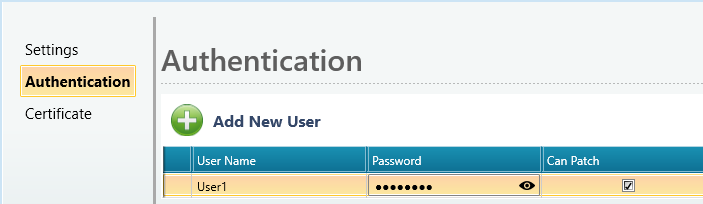
Authentication

Click Add New User.

Click the fields and enter the User Name and Password 

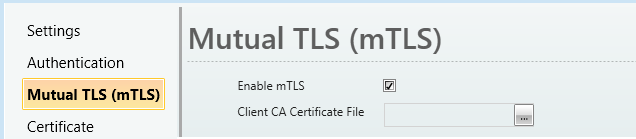
Mutual TLS (mTLS)

To enable mutual TLS authentication:

  • Select Enable mTLS 

  • Client CA Certificate File: Import the ca_client.crt file; a public CA certificate used to verify client certificates

When Enable mTLS is selected, the Redfish server accepts connections only from clients that present a valid certificate signed by the imported CA.

Certificate

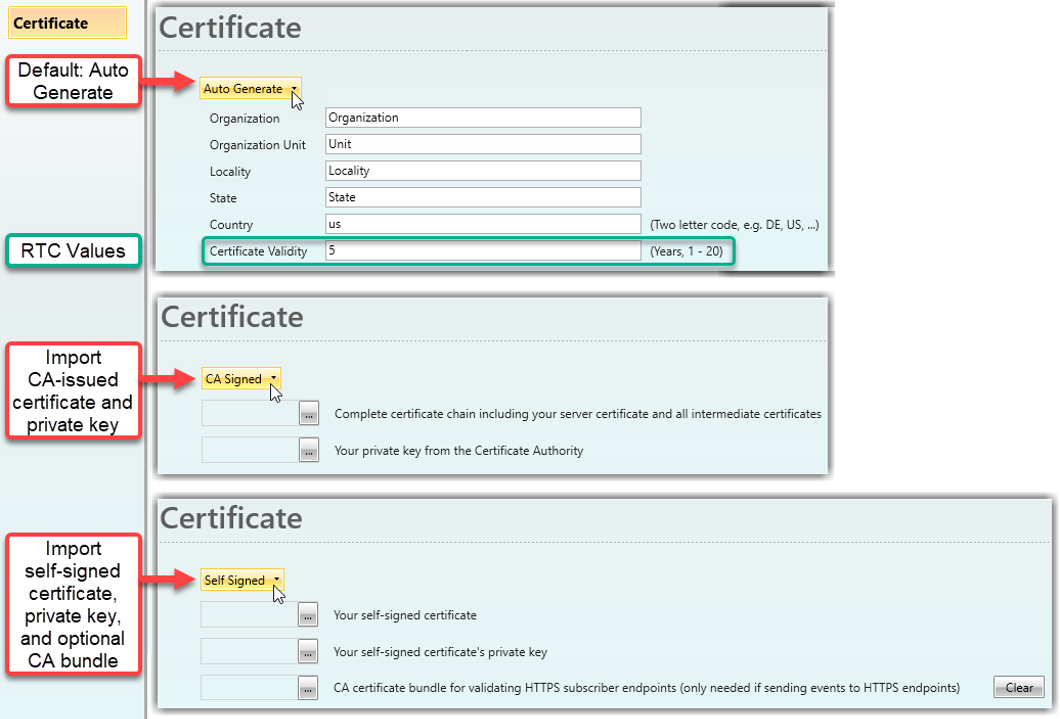
Select the certificate type:

Auto Generate (Default): Certificate is auto-generated for users with an SD card and saved in "/ExternalSD/Redfish/RedfishUniStreamCert.crt"

Note that a new Certificate is generated whenever an IP address changes, therefore, upon changing the PLC Panel IP, download the Certificate again from the SD card.

Note that the RTC in the PLC must be set correctly in order to correctly implement the Certificate Validity.

CA Signed: Import certificates signed by a Certificate Authority. 

Self Signed: Import user-generated self-signed certificates.

Note that projects upgraded from previous versions are automatically mapped to CA Signed certificates. If Self Signed certificates are used, events will not be sent until an additional CA bundle is supplied.


Redfish Data Modeling 

Responses to Redfish requests consist of JSON packets containing key/value properties defined by the DMTF in a schema file.

The schema defining the root of the Redfish tree is the #ServiceRoot. 

Links contained in the Redfish root tree, do not provide direct access to the properties of the server subsystems. Instead, they point to resource collections.

A resource collection is a core concept in Redfish. A resource collection is a group of like resources where the number of instances in the group can shrink or grow depending on the scope of the Redfish service or the configuration of the devices being managed. Every resource collection contains the same set of supported properties, and all contain Collections in the name of their schema. Every resource linked in the Members array within a resource collection will have the same resource type with the same major version, but can vary in minor schema versions.

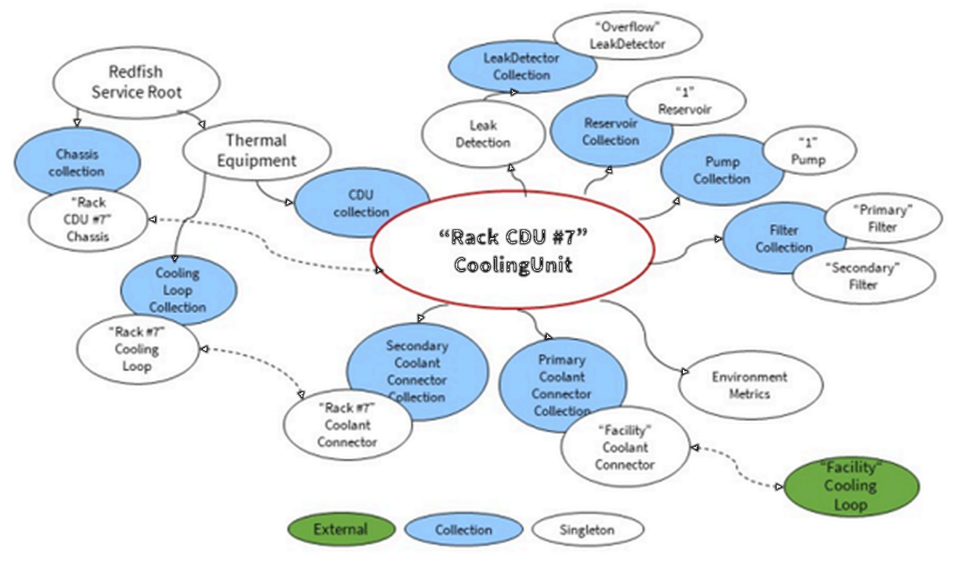
 Below is an example diagram of the resource tree, starting at the Redfish Service Root, containing all resources used to model a rack-based Cooling Distribution Unit (CDU). Other types of cooling systems, such as immersion cooling units, follow the same model.

Creating a Rack-Based CDU (Cooling Distribution Unit)

The Redfish CoolingUnit schema supports different types of gear, such as Cooling Distribution Units (CDUs), connected through Cooling Loops that service the equipment in a single rack. Cooling Loop definitions contain product information and show the connections  to and from the loop. This  enables software to follow the flow of coolant through its entire cycle in a facility-level cooling system as well as providing basic inventory functions.

The example below shows how UniLogic can both control coolant flow and regulate temperature. To interface with Redfish, a communication bridge or gateway is used to translate industrial protocols into Redfish-compliant RESTful commands.

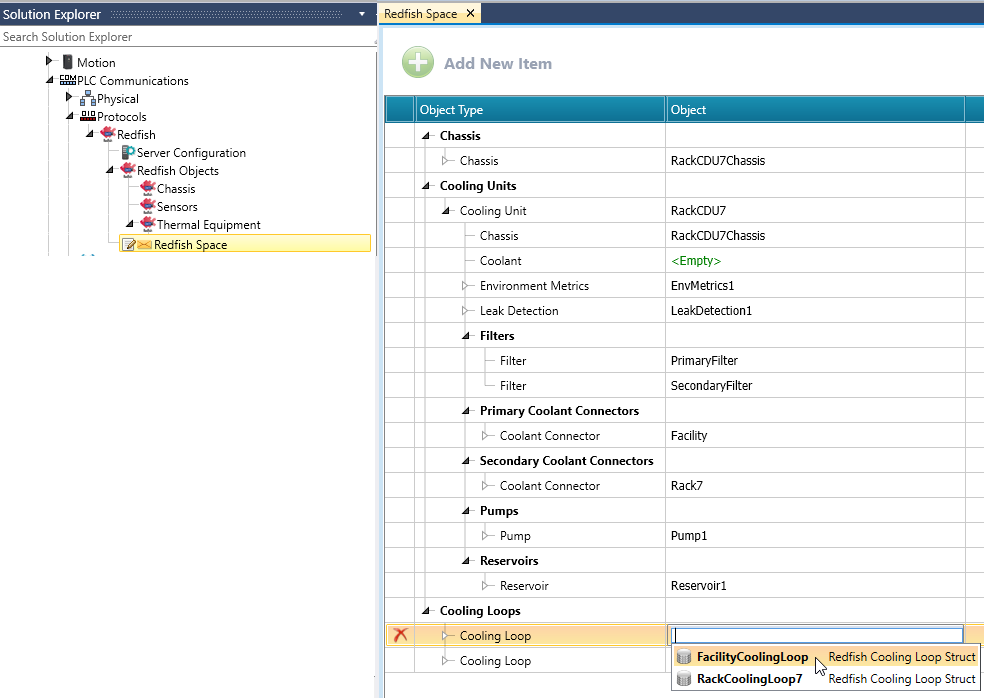
Redfish Objects - where you configure all resources, for example, all resources used to model a rack-based Cooling Distribution Unit (CDU).

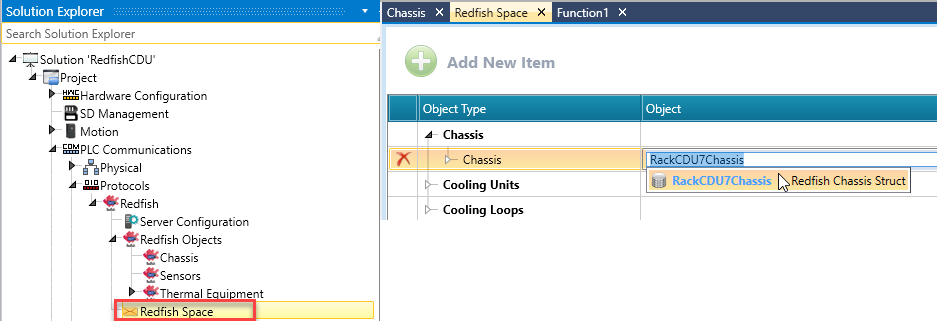
Redfish Space - where you link your resources accordingly.


Redfish Objects


Notes

  • An ID is a unique identifier throughout the entire project and can be used on only one resource.

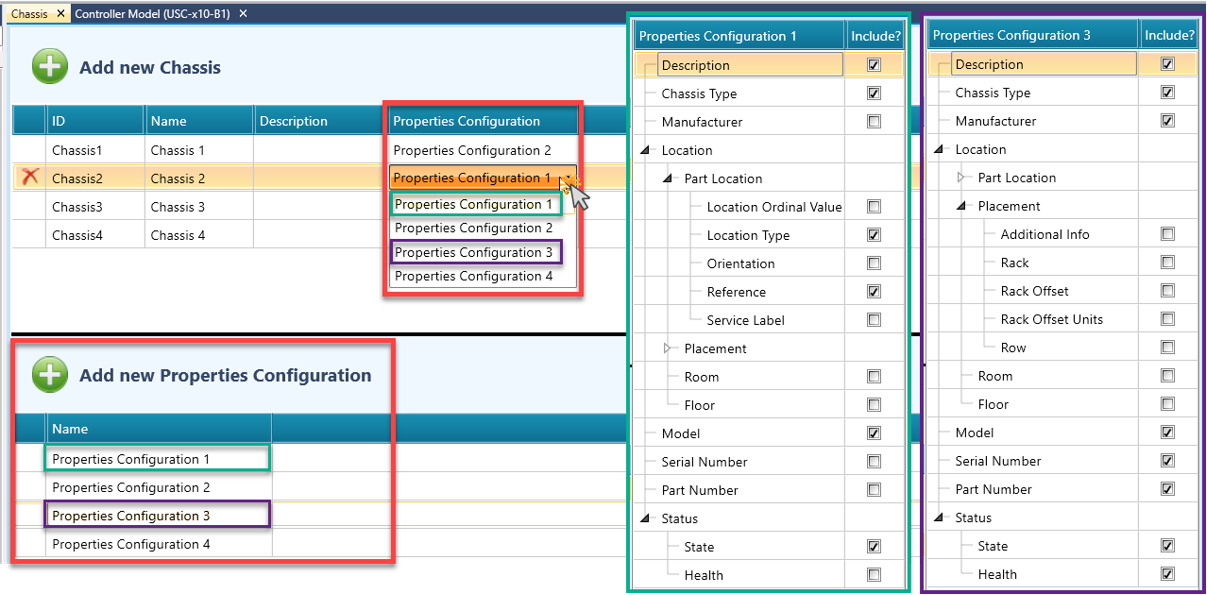
  • Each Redfish Object can have its own set of selected properties using a Properties Configuration template.

  • After defining Redfish Objects, make sure to link the object within the Redfish Space.


 Properties Configuration

Each Redfish Object can have its own set of properties by using a Properties Configuration template.
This enables different objects of the same type to include different fields, and the JSON generated for each object reflects the selected properties.
Note: The supporting struct for each object retains all defined properties, regardless of whether they are selected in the Properties Configuration template.

  1. In the Solution Explorer, add a new Redfish Object (for example, Chassis, Sensors, or any other supported object).

  2. In the Add New <Object> section, enter the required ID, Name, and Description.

  3. From the Properties Configuration drop-down list, select an existing configuration template or choose to create a new one.

  4. In the Add New Properties Configuration section:
    - Enter a name for the configuration (optional).
    - Select the properties to include by checking or unchecking the available property options.
    - Create new templates by clicking Add New Properties Configuration.

  5. The object uses the selected Properties Configuration template, and the generated JSON for the object includes only the properties defined in that configuration. 


Chassis

  1. Select Chassis on the Solution Explorer and click Add new Chassis.

  2. UniLogic automatically assigns editable ID, Name and Description fields. 

  3. Use the check-boxes to include or exclude the required Properties for this specific Chassis object.
    Note: Different Chassis objects can have different sets of properties.

  4. UniLogic creates the Chassis along with a supporting Chassis Struct.

  5. Select Redfish Space on the Solution Explorer, click Chassis > Add New Chassis and link your Chassis struct.


Sensors

  1. Select Sensors on the Solution Explorer and click Add new Sensor.

  2. UniLogic automatically assigns editable ID, Name and Description fields.

  3. Select to include or exclude the required Properties by checking/unchecking the Properties check-boxes.

  4. UniLogic creates the Sensor along with a supporting Sensor Struct.

  5. Select Redfish Space on the Solution Explorer, click Sensors > Add New Sensor and link your Sensor struct.


Controls

The Control Object includes the following capabilities:

Notes

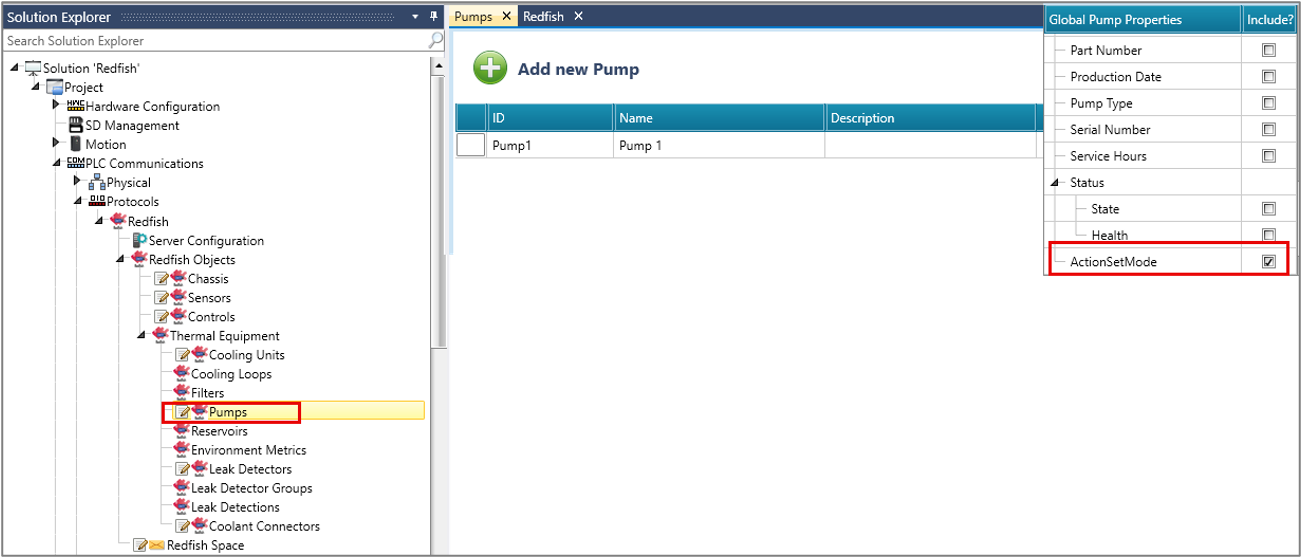
  • Set Mode Action functionality is only available for Pumps and Cooling Units.

  • To enable this feature, check the "ActionSetMode" field in the Properties window

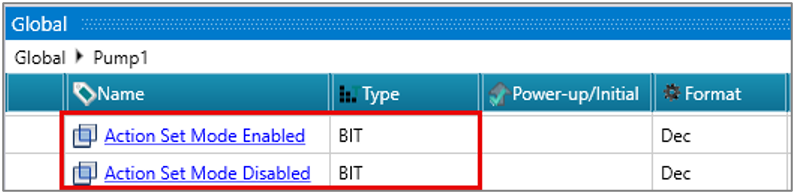
  • Action Set Mode Enabled and Action Set Mode Disabled states are now included as members of the CoolingUnit and Pump structs.

  • Users are responsible for tracking these enabled/disabled states.

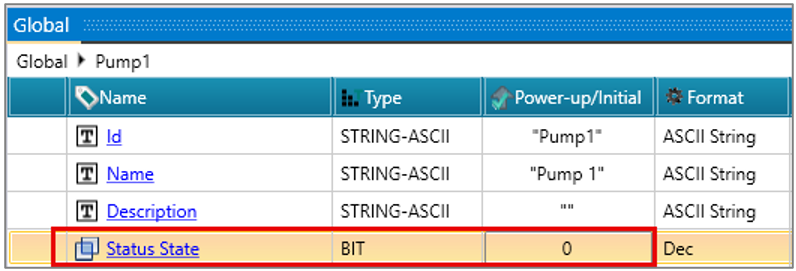
  • To enable/disable, set the BIT to 0 in the Status State.


To configure Controls:

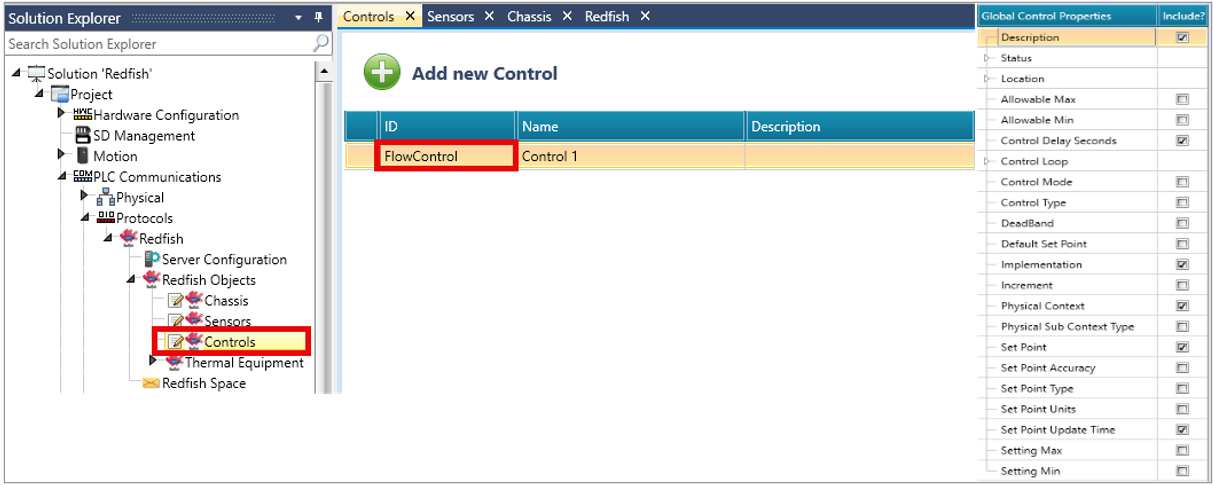
  1. Select Controls on the Solution Explorer and click Add new Control.

  2. UniLogic automatically assigns editable ID, Name and Description fields. 

  3. Select to include or exclude the required Properties by checking/unchecking the Properties check-boxes.

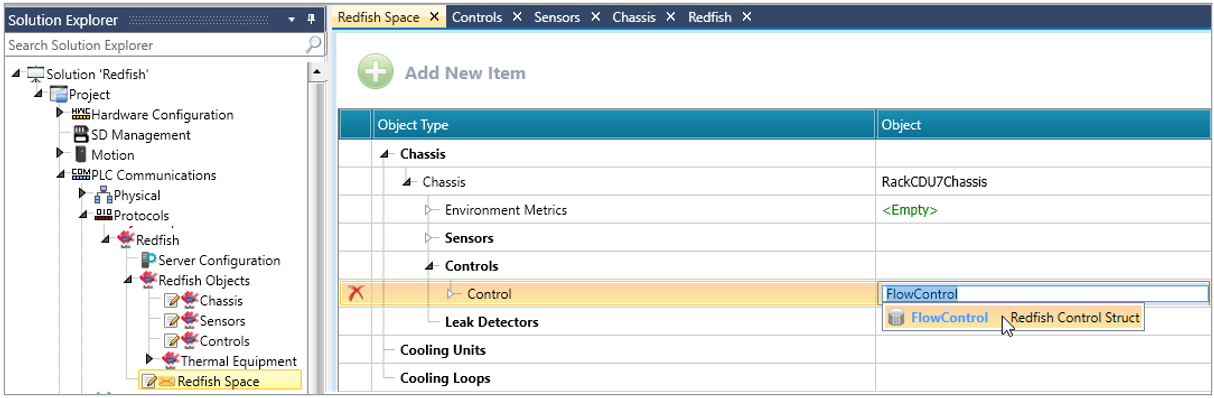
  1. UniLogic Creates the Control along with a supporting Control Struct.

  2. Select Redfish Space on the Solution Explorer, click Control > Add New Control and link your Control struct.


Thermal Equipment - Cooling Units

  1. Select Thermal Equipment on the Solution Explorer > Cooling Units > Add new CDU.

  2. UniLogic automatically assigns editable ID, Name and Description fields. 

  3. Select to include or exclude the required Properties by checking/unchecking the Properties check-boxes.

  4. UniLogic Creates the Cooling Unit along with a supporting Cooling Unit Struct.

  5. Select Redfish Space on the Solution Explorer, click Cooling Units > Add New Cooling Unit and link your Cooling Unit struct.


Thermal Equipment - Cooling Loops

  1. Select Thermal Equipment on the Solution Explorer > Cooling Loops > Add new Cooling Loop.

  2. UniLogic automatically assigns editable ID, Name and Description fields. 

  3. Select to include or exclude the required Properties by checking/unchecking the Properties check-boxes.

  4. UniLogic creates two Cooling Loops with supporting Cooling Loop structs.  

  5. Select Redfish Space on the Solution Explorer, click Cooling Loops > Add New Cooling Loops and link your Cooling Loop structs.

Thermal Equipment - Filters

  1. Select Thermal Equipment on the Solution Explorer > Filters > Add new Filter.

  2. UniLogic automatically assigns editable ID, Name and Description fields. 

  3. Select to include or exclude the required Properties by checking/unchecking the Properties check-boxes.

  4. UniLogic creates two Filters with supporting Filter structs.  

  5. Select Redfish Space on the Solution Explorer > Cooling Units > Cooling Unit > Filters > Add New Filter and link your Filter structs.

Thermal Equipment - Pumps

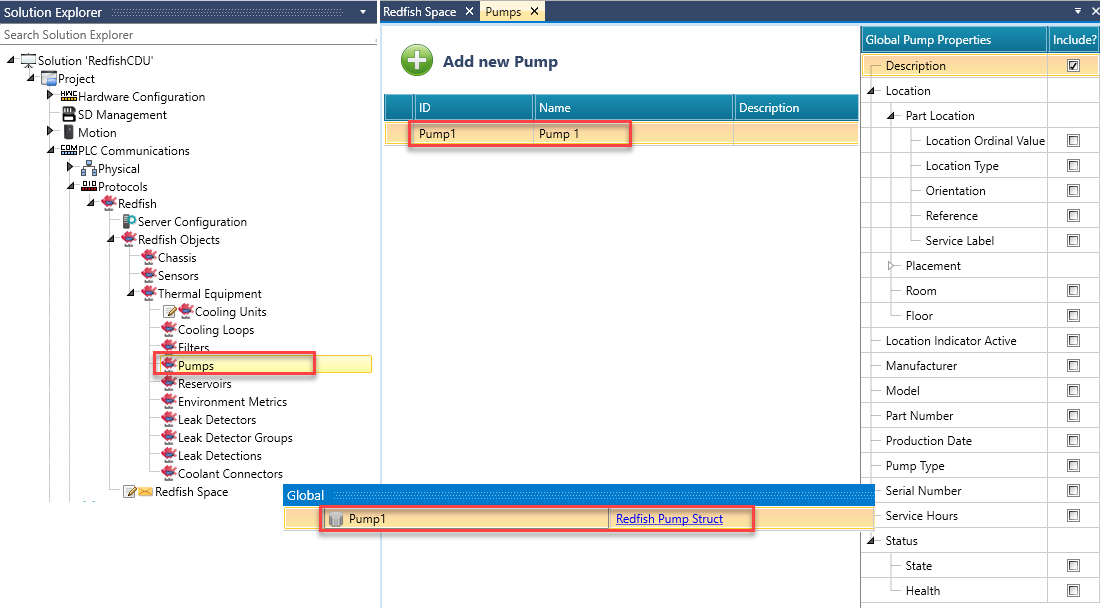
  1. Select Thermal Equipment on the Solution Explorer > Pumps > Add new Pump.

  2. UniLogic automatically assigns editable ID, Name and Description fields. 

  3. Select to include or exclude the required Properties by checking/unchecking the Properties check-boxes.

  4. UniLogic creates the Pump with supporting Pump struct.

  5. Select Redfish Space on the Solution Explorer > Cooling Units > Cooling Unit > Pumps > Add New Pump and link your Pump struct.

Thermal Equipment - Reservoirs

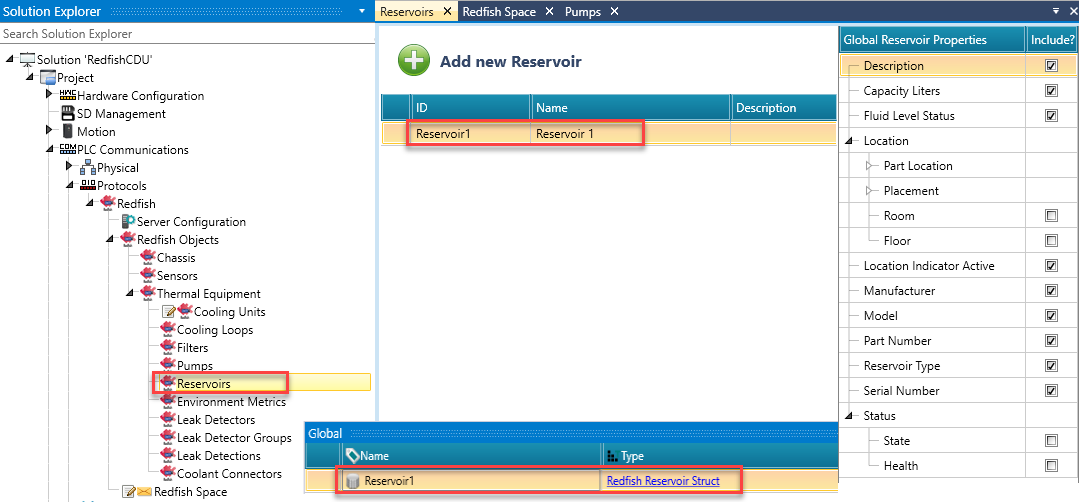
  1. Select Thermal Equipment on the Solution Explorer > Reservoirs > Add new Reservoir.

  2. UniLogic automatically assigns editable ID, Name and Description fields. 

  3. Select to include or exclude the required Properties by checking/unchecking the Properties check-boxes.

  4. UniLogic creates the Reservoir with the supporting Reservoir struct.

  5. Select Redfish Space on the Solution Explorer > Cooling Units > Cooling Unit > Reservoirs > Add New Reservoir and link your Reservoir struct.

Thermal Equipment - Environment Metrics

  1. Select Thermal Equipment on the Solution Explorer > Environment Metrics > Add new Environment Metrics.

  2. UniLogic automatically assigns editable ID, Name and Description fields. 

  3. Select to include or exclude the required Properties by checking/unchecking the Properties check-boxes.

  4. UniLogic creates the Environment Metrics with the supporting Environment Metrics struct.

  5. Select Redfish Space on the Solution Explorer > Cooling Units > Cooling Unit > Environment Metrics and link your Environment Metrics struct.

Thermal Equipment - Leak Detectors

  1. Select Thermal Equipment on the Solution Explorer > Leak Detectors > Add new Leak Detector.

  2. UniLogic automatically assigns editable ID, Name and Description fields. 

  3. Select to include or exclude the required Properties by checking/unchecking the Properties check-boxes.

  4. UniLogic creates the Leak Detector with the supporting Leak Detector struct.

  5. Select Redfish Space on the Solution Explorer > Cooling Units > Cooling Unit > Leak Detection > Leak Detectors > Add New Leak Detector and link your Leak Detector struct.

Thermal Equipment - Leak Detections

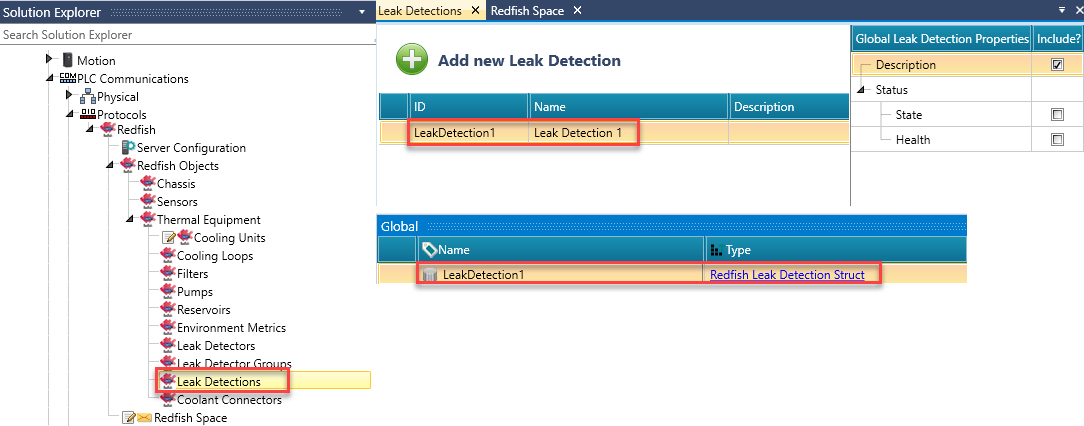
  1. Select Thermal Equipment on the Solution Explorer > Leak Detections > Add new Leak Detection.

  2. UniLogic automatically assigns editable ID, Name and Description fields. 

  3. Select to include or exclude the required Properties by checking/unchecking the Properties check-boxes.

  4. UniLogic creates the Leak Detection with the supporting Leak Detection struct.

  5. Select Redfish Space on the Solution Explorer > Cooling Units > Cooling Unit >  Leak Detection and link your Leak Detection struct.

Thermal Equipment - Coolant Connectors

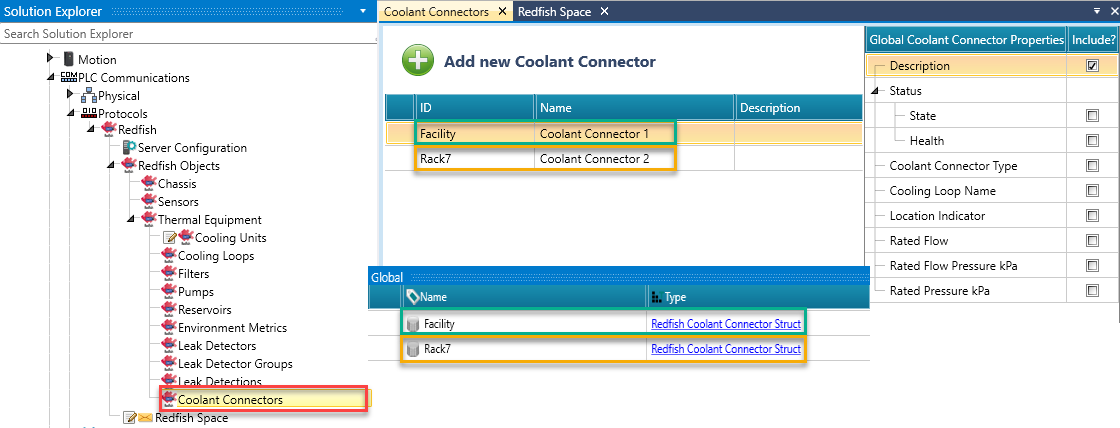
  1. Select Thermal Equipment on the Solution Explorer > Coolant Connectors > Add new Coolant Connector.

  2. UniLogic automatically assigns editable ID, Name and Description fields. 

  3. Select to include or exclude the required Properties by checking/unchecking the Properties check-boxes.

    Notes

    • Check to enable the Valve Control Action. This action allows remote valve state management.

    • UniLogic automatically creates two tags in the Coolant Connector Struct for these parameters, both initialized to 0. When invoked by a Redfish client, the tags update based on supplied parameters.

    • Users must implement logic to execute the valve action and reset both tags to 0 after completion.

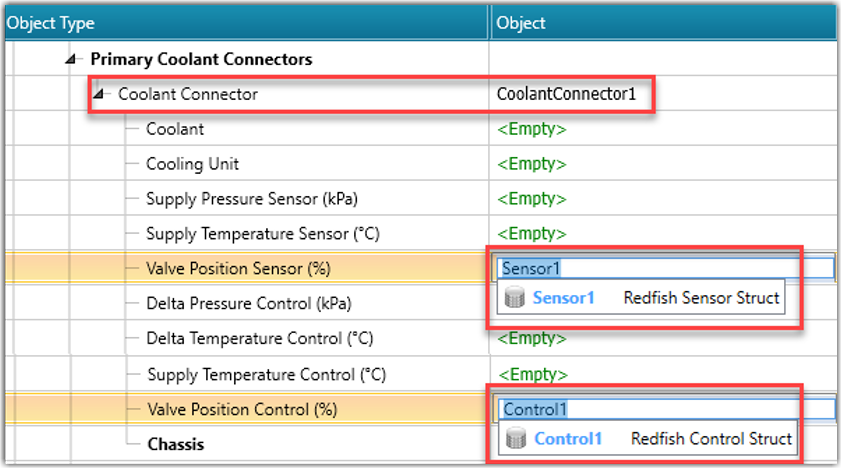
    • The Coolant Connector enables valve-related connectivity in Redfish Space:
      - Valve Position Sensor (%); as a Sensor Object
      - Valve Position Control (%); as a Control Object


  4. UniLogic creates two Coolant Connectors with their supporting Coolant Connector structs.

  5. Select Redfish Space on the Solution Explorer > Cooling Units > Cooling Unit > Primary Coolant Connectors > Add New Coolant Connector and link your "Facility" Coolant Connector Struct.

  6. Select Redfish Space on the Solution Explorer > Cooling Units > Cooling Unit > Secondary Coolant Connectors > Add New Coolant Connector and link your "Rack7" Coolant Connector Struct.


Redfish Space

This is where you link complete resource collection structs as well as members array within a resource collection.

  1. Select Redfish Space on the Solution Explorer.

  2. Click on an Object Type to expand the resource tree and link the required resource configured in the Redfish Objects.
    Bolded Object Types allow for adding new objects and for linking both resource collections and individual resources.


Licensing: Activating Redfish 

 Trial Activation

To activate the Redfish Manager Trial license:

  1. Create a UniLogic project.

  2. Enable and configure Redfish as shown above; include Objects, Thermal Equipment, and other items according to your project needs.

  3. Download your Redfish project to a UniStream controller.
    At the end of the download, the One-hour Trial will automatically start.

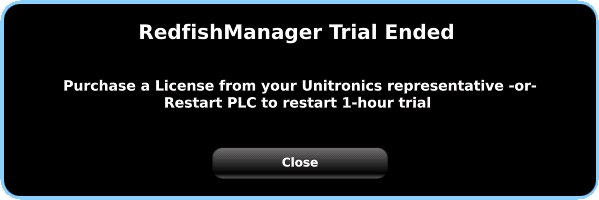
  4. When the trial hour completes, UniStream will display this HMI screen:

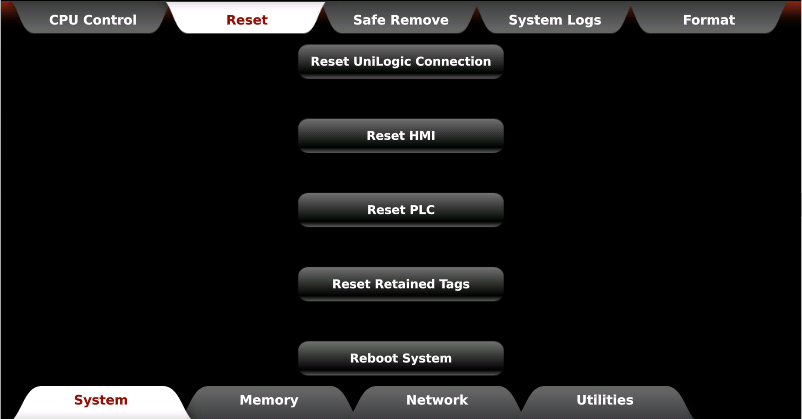
You can reactivate the 1-hour Trial by restarting the PLC or HMI, or by selecting the Reset HMI or Reset PLC option in UniApps.
 

Full Activation

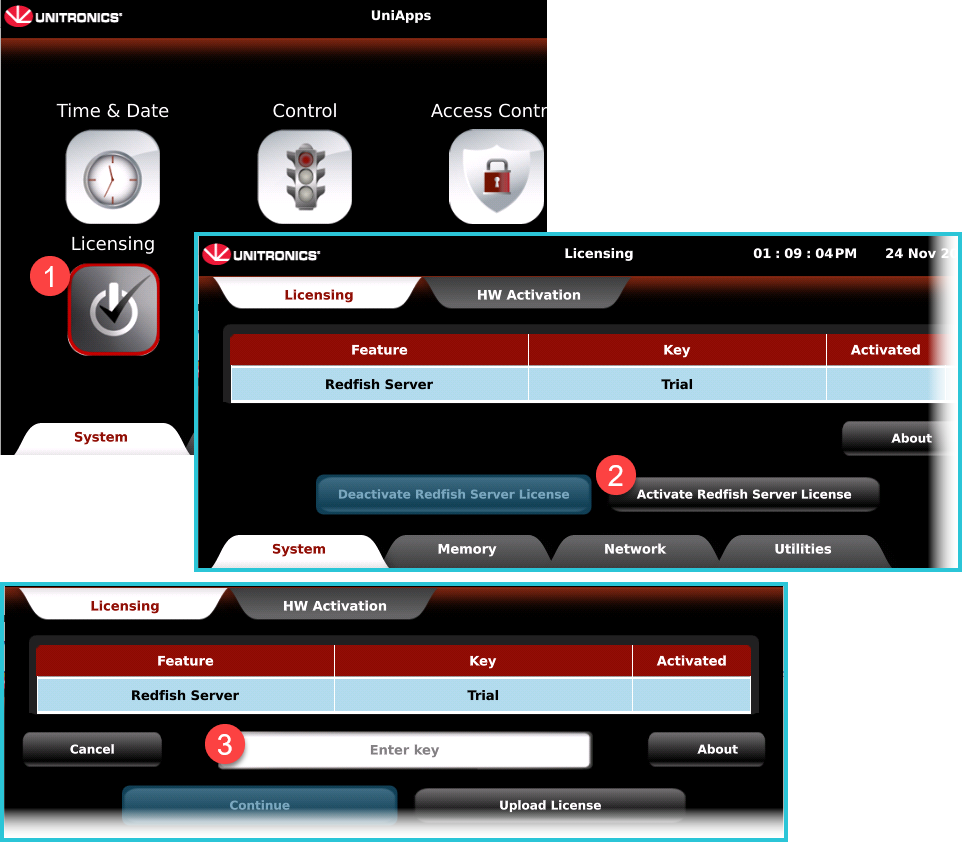
When you purchase a license from your Unitronics sales representative, you receive a license key number.

In UniApps, select Licensing > Activate Redfish Server License > Enter Key and follow the on-screen instructions for Activation.


Redfish Chassis Struct values

Name

Data Type

Definition

ID

STRING-ASCII

This is a unique ID name

Name

STRING-ASCII

This is a name that you assign for your own reference.

Description

STRING-ASCII

A brief textual explanation of the object or resource.

Chassis Type


UINT8


The type of physical form factor of the chassis

0= Blade

An enclosed or semi-enclosed, typically vertically-oriented, system chassis that must be plugged into a multi-system chassis to function normally

1= Card

A loose device or circuit board intended to be installed in a system or other enclosure

2= Cartridge

A small self-contained system intended to be plugged into a multi-system chassis

3= Component

A small chassis, card, or device that contains devices for a particular subsystem or function

4= Drawer

An enclosed or semi-enclosed, typically horizontally-oriented, system chassis that can be slid into a multisystem chassis

5= Enclosure

A generic term for a chassis that does not fit any other description

6= Expansion

A chassis that expands the capabilities or capacity of another chassis

7= HeatExchanger

A heat exchanger (v1.23+)

8= ImmersionTank

An immersion cooling tank (v1.23+)

9= IPBasedDrive

A chassis in a drive form factor with IP-based network connections (v1.3+)

10= Module

A small, typically removable, chassis or card that contains devices for a particular subsystem or function

11= Other

A chassis that does not fit any of these definitions

12= Pod

A collection of equipment racks in a large, likely transportable, container

13= PowerStrip

A power strip, typically placed in the zero-U space of a rack (v1.25+)

14= Rack

An equipment rack, typically a 19-inch wide freestanding unit

15= RackGroup

A group of racks that form a single entity or share infrastructure (v1.4+)

16= RackMount

A single-system chassis designed specifically for mounting in an equipment rack

17= Row

A collection of equipment racks

18= Shelf

An enclosed or semi-enclosed, typically horizontally-oriented, system chassis that must be plugged into a multi-system chassis to function normally

19= Sidecar

A chassis that mates mechanically with another chassis to expand its capabilities or capacity

20= Sled

An enclosed or semi-enclosed, system chassis that must be plugged into a multi-system chassis to function normally similar to a blade type chassis

21= StandAlone

A single, free-standing system, commonly called a tower or desktop chassis

22= StorageEnclosure

A chassis that encloses storage (v1.6+)

23= Zone

A logical division or portion of a physical chassis that contains multiple devices or systems that cannot be physically separated

Manufacturer

STRING-ASCII

The manufacturer of this chassis

Location Ordinal Value

UINT32

The number that represents the location of the part

Location Type


UINT8


The type of location of the part

0= Backplane

A backplane (v1.12+)

1= Bay

A bay

2= Connector

A connector or port

3= Embedded

Embedded within a part (v1.13+)

4= Slot

A slot

5= Socket

A socket

Orientation


UINT8


The orientation for the ordering of the slot enumeration

0= BackToFront

The ordering for the LocationOrdinalValue is back to front

1= BottomToTop

The ordering for LocationOrdinalValue is bottom to top

2= FrontToBack

The ordering for LocationOrdinalValue is front to back

3= LeftToRight

The ordering for the LocationOrdinalValue is left to right

4= RightToLeft

The ordering for the LocationOrdinalValue is right to left

Reference


UINT8


The reference point for the part location. Provides guidance about the general location of the part

0= Bottom

The part is in the bottom of the unit

1= Front

The part is in the front of the unit

2= Left

The part is on the left side of the unit

3= Middle

The part is in the middle of the unit

4= Rear

The part is in the rear of the unit

5= Right

The part is on the right side of the unit

6= Top

The part is in the top of the unit

Service Label

STRING-ASCII

Used to identify or describe a service

Location Info

STRING-ASCII

Used to provide information about a location

Location Rack

STRING-ASCII

Identifies the specific rack or slot location within a system or physical environment

Location Row

STRING-ASCII

Indicates the row within a physical structure

Location Offset

INT32

Represents an offset or positional adjustment within a location

Rack Offset Units


UINT8


The type of rack units in use

0= EIA_310

A rack unit that is equal to 1.75 in (44.45 mm)

1= OpenU

A rack unit that is equal to 48 mm (1.89 in)

Room

STRING-ASCII

Provides the name or identifier of a room

Floor

STRING-ASCII

Specifies the floor or level where a location or item is situated

Model

STRING-ASCII

Provides the model name or number for a product or component

Serial Number

STRING-ASCII

Used to uniquely identify the serial number

Part Number

STRING-ASCII

Provides a unique identifier for a specific part or component

Status State

BIT

Indicates the current status or state of the object

Status Health


UINT8


Represents the health status of the object or resource

0= Critical

A critical condition requires immediate attention

1= OK

Normal

2= Warning

A condition requires attention


 Redfish Sensors Struct values

Name

Data Type

Definition

ID

STRING-ASCII

This is a unique ID name

Name

STRING-ASCII

This is a name that you assign for your own reference.

Description

STRING-ASCII

A brief textual explanation of the object or resource.

Status State

BIT

Indicates the current status or state of the object

Status Health


UINT8


Represents the health status of the object or resource

0= Critical

A critical condition requires immediate attention

1= OK

Normal

2= Warning

A condition requires attention

Enabled

BIT

Indicates whether the sensor is enabled and provides a reading

Reading

REAL

The sensor value

Reading Units

STRING-ASCII

The units of the reading, thresholds, and other reading-related properties in UCUM c/s format

Reading Type


UINT8


The type of the sensor

0= AbsoluteHumidity

Indicates the absolute (volumetric) humidity, measured in grams per cubic meter (g/m³)(v1.5+)

1= AirFlow

Indicates the gas volume per unit of time flowing through a junction, measured in cubic feet per minute (ft³/min)(deprecated v1.7)

2= AirFlowCMM

Indicates the gas volume per unit of time flowing through a junction, measured in cubic meters per minute (m³/min)(v1.7+)

3= Altitude

Indicates the elevation above sea level, measured in meters (m)

4= Barometric

Indicates barometric pressure, measured in millimeters of mercury (mmHg)

5= ChargeAh

Indicates the total electric charge (integral of current over time), measured in ampere-hours (A·h). Reflects consumption since the last sensor reset (v1.4+)

6= Current

Indicates RMS current measured over complete line cycles, expressed in amperes (A)

7= EnergyJoules

Indicates energy (integral of real power over time), measured in joules (J). Used for device-level energy consumption; for large-scale measurements, use EnergykWh (v1.23+)

8= EnergykWh

ndicates energy (integral of real power over time), measured in kilowatt-hours (kW·h). Used for large-scale energy consumption; for device-level measurements, use EnergyJoules or EnergyWh

9= EnergyWh 

Indicates energy (integral of real power over time), measured in watt-hours (W·h). Used for device-level energy consumption; for large-scale measurements, use EnergykWh (v1.4+)

10= Frequency

Indicates frequency, measured in hertz (Hz)

11= Heat 

Indicates heat measurement, expressed in kilowatts (kW) (v1.7+)

12= Humidity

Indicates relative humidity, expressed as a percentage (%)

13= LiquidFlow

Indicates liquid flow rate, measured in liters per second (L/s) (deprecated v1.7)

14= LiquidFlowLPM

Indicates liquid flow rate, measured in liters per minute (L/min) (v1.7+)

15= LiquidLevel

Indicates fluid height, measured in centimeters (cm) relative to a reference datum

16= Percent

Indicates a percentage value (%). The reading typically ranges from 0–100 but may exceed 100 for rate-of-change or similar values (v1.1+)

17= Power

Indicates average power (product of instantaneous voltage and current), measured in watts (W)

18= Pressure

Indicates applied force per unit area, measured in pascals (Pa) (deprecated v1.7)

19= PressurekPa

Indicates pressure relative to atmospheric pressure, measured in kilopascals (kPa) (v1.5+)

20= PressurePa

Indicates pressure relative to atmospheric pressure, measured in pascals (Pa) (v1.7+)

21= Rotational

Indicates rotational speed, measured in revolutions per minute ({rev}/min). RPM is a deprecated unit format

22= Temperature

Indicates temperature, measured in degrees Celsius (°C)

23= Voltage

Indicates RMS voltage measured over complete line cycles, expressed in volts (V)

Reading Time

STRING-ASCII

This property shall contain the date and time that the reading data was acquired from the sensor

Reading Range Min

INT32

The minimum possible value for this sensor

Reading Range Max

INT32

The maximum possible value for this sensor

Accuracy

REAL

The estimated percent error of measured versus actual values. Deprecated in v1.8 and later. 

Precision

REAL

The number of significant digits in the reading

Sensor Reset Time

STRING-ASCII

The date and time when the time-based properties were last reset

Reading: Upper Critical Limit

REAL

A user-defined value at which the reading is considered above normal range but not yet fatal

Activation: Upper Critical Limit


UINT8


The value at which the reading is above normal range but not yet fatal

0= Activation

The direction of crossing that activates this threshold

1= DwellTime

The duration the sensor value must violate the threshold before the threshold is activated

2= HysteresisDuration

The duration the sensor value must not violate the threshold before the threshold is deactivated

3= HysteresisReading

The reading offset from the threshold value required to clear the threshold

4= Reading

The threshold value

Reading: Lower Caution Limit

REAL

A user-defined value at which the reading is considered below normal range

Activation: Lower Caution Limit


UINT8


The value at which the reading is below normal range

0= Activation

The direction of crossing that activates this threshold

1= DwellTime

The duration the sensor value must violate the threshold before the threshold is activated

2= HysteresisDuration

The duration the sensor value must not violate the threshold before the threshold is deactivated

3= HysteresisReading

The reading offset from the threshold value required to clear the threshold

4= Reading

The threshold value

Reading: Lower Critical Limit

REAL

A user-defined value at which the reading is considered below normal range but not yet fatal

Activation: Lower Critical Limit


UINT8


The value at which the reading is below normal range but not yet fatal

0= Activation

The direction of crossing that activates this threshold

1= DwellTime

The duration the sensor value must violate the threshold before the threshold is activated

2= HysteresisDuration

The duration the sensor value must not violate the threshold before the threshold is deactivated

3= HysteresisReading

The reading offset from the threshold value required to clear the threshold

4= Reading

The threshold value

Reading: Lower Fatal Limit

REAL

A user-defined value at which the reading is below normal range and fatal

Activation: Lower Fatal Limit


UINT8


The value at which the reading is below normal range and fatal

0= Activation

The direction of crossing that activates this threshold

1= DwellTime

The duration the sensor value must violate the threshold before the threshold is activated

2= HysteresisDuration

The duration the sensor value must not violate the threshold before the threshold is deactivated

3= HysteresisReading

The reading offset from the threshold value required to clear the threshold

4= Reading

The threshold value

Reading: Upper Caution Limit

REAL

A user-defined value at which the reading is considered above normal range

Activation: Upper Caution Limit


UINT8


The value at which the reading is above normal range

0= Activation

The direction of crossing that activates this threshold

1= DwellTime

The duration the sensor value must violate the threshold before the threshold is activated

2= HysteresisDuration

The duration the sensor value must not violate the threshold before the threshold is deactivated

3= HysteresisReading

The reading offset from the threshold value required to clear the threshold

4= Reading

The threshold value

Reading: Upper Fatal Limit

REAL

A user-defined value at which the reading is above normal range and fatal

Activation: Upper Fatal Limit


UINT8


The value at which the reading is above normal range and fatal

0= Activation

The direction of crossing that activates this threshold

1= DwellTime

The duration the sensor value must violate the threshold before the threshold is activated

2= HysteresisDuration

The duration the sensor value must not violate the threshold before the threshold is deactivated

3= HysteresisReading

The reading offset from the threshold value required to clear the threshold

4= Reading

The threshold value

Adjusted Max Allowable Operating Value

REAL

The adjusted maximum allowable operating value for this equipment based on the environmental conditions

Adjusted Min Allowable Operating Value

REAL

The adjusted minimum allowable operating value for this equipment based on the environmental conditions

Apparent VA

REAL

The product of voltage and current for an AC circuit, in volt-ampere units

Apparent kVAh

REAL

This property shall contain the apparent energy, in kilovolt-amperehour units, for an electrical energy measurement

Average Reading

REAL

The average sensor value

Averaging Interval

STRING-ASCII

The interval over which the average sensor value is calculated

Averaging Interval Achieved

BIT

Indicates that enough readings were collected to calculate the average sensor reading over the averaging interval time

Calibration

REAL

This property shall contain the offset applied to the raw sensor value to provide a calibrated value for the sensor as returned by the Reading property. The value of this property shall follow the units of the Reading property for this sensor instance. Updating the value of this property shall not affect the value of the CalibrationTime property

Calibration Time

STRING-ASCII

The date and time that the sensor was last calibrated

Electrical Context


UINT8


The combination of current-carrying conductors

0= Line1

The circuits that share the L1 current-carrying conductor

1= Line1ToLine2

The circuit formed by L1 and L2 current-carrying conductors

2= Line1ToNeutral

The circuit formed by L1 and neutral current-carrying conductors

3= Line1ToNeutralAndL1L2

The circuit formed by L1, L2, and neutral current-carrying conductors

4= Line2

The circuits that share the L2 current-carrying conductor

5= Line2ToLine3

The circuit formed by L2 and L3 current-carrying conductors

6= Line2ToNeutral

The circuit formed by L2 and neutral current-carrying conductors

7= Line2ToNeutralAndL1L2

The circuit formed by L1, L2, and Neutral current-carrying conductors

8= Line2ToNeutralAndL2L3

The circuits formed by L2, L3, and neutral current-carrying conductors

9= Line1ToNeutralAndL1L2

The circuit formed by L1, L2, and neutral current-carrying conductors

10= Line3

The circuits that share the L3 current-carrying conductor

11= Line3ToLine1

The circuit formed by L3 and L1 current-carrying conductors

12= Line3ToNeutral

The circuit formed by L3 and neutral current-carrying conductors

13=Line3ToNeutralAndL3L1

The circuit formed by L3, L1, and neutral current-carrying conductors

14=LineToLine

The circuit formed by two current-carrying conductors

15=LineToNeutral

The circuit formed by a line and neutral current-carrying conductor

16=Neutral

The grounded current-carrying return circuit of current-carrying conductors

17=Total

The circuit formed by all current-carrying conductors

Implementation


UINT8


The implementation of the sensor

0= PhysicalSensor

The reading is acquired from a physical sensor

1= Reported

The reading is obtained from software or a device

2= Synthesized

The reading is obtained by applying a calculation on one or more properties or multiple sensors. The calculation is not provided

Lowest Reading

REAL

The lowest sensor value

Lowest Reading Time

STRING-ASCII

The time when the lowest sensor value occurred

Lifetime Reading

REAL

The total accumulation value for this sensor

Manufacturer

STRING-ASCII

The manufacturer of this sensor

Min Allowable Operating Value

REAL

The minimum allowable operating value for this equipment

Max Allowable Operating Value

REAL

The maximum allowable operating value for this equipment

Model

STRING-ASCII

The model number of the sensor

Part Number

STRING-ASCII

The part number of the sensor

Peak Reading

REAL

The peak sensor value

Peak Reading Time

STRING-ASCII

The time when the peak sensor value occurred

Physical Context


UINT8


The area or device to which this sensor measurement applies

0= Accelerator

An accelerator

1= ACInput

An AC input

2= ACMaintenanceBypassInput

An AC maintenance bypass input

3= ACOutput

An AC output

4= ACStaticBypassInput

An AC static bypass input

5= ACUtilityInput

An AC utility input

6= ASIC

An ASIC device, such as a networking chip or chipset component

7= Back

The back of the chassis

8= Backplane

A backplane within the chassis

9= Battery

A battery

10= Board

A circuit board

11= Chassis

The entire chassis

12= ComputeBay

Within a compute bay

13= CoolingSubsystem

The entire cooling, or air and liquid, subsystem

14= CPU

A processor (CPU)

15= CPUSubsystem

The entire processor (CPU) subsystem

16= DCBus

A DC bus

17= Exhaust

The air exhaust point or points or region of the chassis

18= ExpansionBay

An expansion bay

19= ExpansionSubsystem

A group of expansion bays

20= Fan

A fan

21= Filter

A filter

22= FPGA

An FPGA

23= Front

The front of the chassis

24= GPU

A graphics processor (GPU)

25= GPUSubsystem

The entire graphics processor (GPU) subsystem

26= Intake

The air intake point or points or region of the chassis

27= LiquidInlet

The liquid inlet point of the chassis

28= LiquidOutlet

The liquid outlet point of the chassis

29= Lower

The lower portion of the chassis

30= Manager

A management controller, such as a BMC (baseboard management controller).

31= Memory

A memory device

32= MemorySubsystem

The entire memory subsystem

33= Motor

A motor

34= NetworkBay

Within a networking bay

35= NetworkingDevice

A networking device

36= PowerOutlet

An electrical outlet

37= PowerSubsystem

The entire power subsystem

38= PowerSupply

A power supply

39= PowerSupplyBay

A power supply bay

40= Pump

A pump

41= Rectifier

A rectifier device

42= Reservoir

A reservoir

43= Room

The room

44= StorageBay

Within a storage bay

45= StorageDevice

A storage device

46=StorageSubsystem

A storage subsystem

47=Switch

A switch device

48= SystemBoard

The system board (PCB)

49= Transceiver

A transceiver

50= Transformer

A transformer

51= TrustedModule

A trusted module

52= Upper

The upper portion of the chassis

53= VoltageRegulator

A voltage regulator device

Physical Sub Context


UINT8


The usage or location within a device to which this sensor measurement applies

0= Input

The input

1= Output

The output

Power Factor

REAL

The power factor for this sensor

Reactive VAR

REAL

This property shall contain the arithmetic mean of product terms of instantaneous voltage and quadrature current measurements calculated over an integer number of line cycles for a circuit

Reactive kVARh

REAL

This property shall contain the reactive energy, in kilovolt-amperehours (reactive) units, for an electrical energy measurement

Reading Accuracy

REAL

This property shall contain the accuracy of the value of the Reading property for this sensor

Reading Basis


UINT8


The basis for the reading of this sensor

0= Delta

A reading that reports the difference between two measurements

1= Headroom

A reading that decreases as it approaches a defined reference point

2= Zero

A zero-based reading

Sensing Interval

STRING-ASCII

The time interval between readings of the sensor

Serial Number

STRING-ASCII

The serial number of the sensor

Spare Part Number

STRING-ASCII

The spare part number of the sensor

Speed RPM

REAL

This property shall contain a reading of the rotational speed of the device in revolutions per minute (RPM) units

THD Percent

REAL

This property shall contain the total harmonic distortion of the Reading property in percent units, typically 0 to 100

Location Ordinal Value

UINT32

The number that represents the location of the sensor

Location Type


UINT8


The type of location of the part

0= Backplane

A backplane (v1.12+)

1= Bay

A bay

2= Connector

A connector or port

3= Embedded

Embedded within a part (v1.13+)

4= Slot

A slot

5= Socket

A socket

Orientation


UINT8


The orientation for the ordering of the slot enumeration

0= BackToFront

The ordering for the LocationOrdinalValue is back to front

1= BottomToTop

The ordering for LocationOrdinalValue is bottom to top

2= FrontToBack

The ordering for LocationOrdinalValue is front to back

3= LeftToRight

The ordering for the LocationOrdinalValue is left to right

4= RightToLeft

The ordering for the LocationOrdinalValue is right to left

Reference


UINT8


The reference point for the part location. Provides guidance about the general location of the part

0= Bottom

The part is in the bottom of the unit

1= Front

The part is in the front of the unit

2= Left

The part is on the left side of the unit

3= Middle

The part is in the middle of the unit

4= Rear

The part is in the rear of the unit

5= Right

The part is on the right side of the unit

6= Top

The part is in the top of the unit

Service Label

STRING-ASCII

Used to identify or describe a service

Location Info

STRING-ASCII

Used to provide information about a location

Location Rack

STRING-ASCII

Identifies the specific rack or slot location within a system or physical environment

Location Row

STRING-ASCII

Indicates the row within a physical structure

Location Offset

INT32

Represents an offset or positional adjustment within a location

Rack Offset Units


UINT8


The type of rack units in use

0= EIA_310

A rack unit that is equal to 1.75 in (44.45 mm)

1= OpenU

A rack unit that is equal to 48 mm (1.89 in)

Room

STRING-ASCII

Provides the name or identifier of a room

Floor

STRING-ASCII

Specifies the floor or level where a location or item is situated

Voltage Type


UINT8


The type of input voltage the sensor monitors

0= AC

Alternating current

1= DC

Direct current


Redfish Control Struct values

Name

Data Type

Definition

ID

STRING-ASCII

This is a unique ID name

Name

STRING-ASCII

This is a name that you assign for your own reference.

Description

STRING-ASCII

A brief textual explanation of the object or resource.

Status State

BIT

Indicates the current status or state of the object

Status Health


UINT8


Represents the health status of the object or resource

0= Critical

A critical condition requires immediate attention

1= OK

Normal

2= Warning

A condition requires attention

Location Ordinal Value

UINT32

The number that represents the location of the control

Location Type


UINT8


The type of location of the part

0= Backplane

A backplane (v1.12+)

1= Bay

A bay

2= Connector

A connector or port

3= Embedded

Embedded within a part (v1.13+)

4= Slot

A slot

5= Socket

A socket

Orientation


UINT8


The orientation for the ordering of the slot enumeration

0= BackToFront

The ordering for the LocationOrdinalValue is back to front

1= BottomToTop

The ordering for LocationOrdinalValue is bottom to top

2= FrontToBack

The ordering for LocationOrdinalValue is front to back

3= LeftToRight

The ordering for the LocationOrdinalValue is left to right

4= RightToLeft

The ordering for the LocationOrdinalValue is right to left

Reference


UINT8


The reference point for the part location. Provides guidance about the general location of the part

0= Bottom

The part is in the bottom of the unit

1= Front

The part is in the front of the unit

2= Left

The part is on the left side of the unit

3= Middle

The part is in the middle of the unit

4= Rear

The part is in the rear of the unit

5= Right

The part is on the right side of the unit

6= Top

The part is in the top of the unit

Service Label

STRING-ASCII

Used to identify or describe a service

Location Info

STRING-ASCII

Used to provide information about a location

Location Rack

STRING-ASCII

Identifies the specific rack or slot location within a system or physical environment

Location Row

STRING-ASCII

Indicates the row within a physical structure

Location Offset

INT32

Represents an offset or positional adjustment within a location

Rack Offset Units


UINT8


The type of rack units in use

0= EIA_310

A rack unit that is equal to 1.75 in (44.45 mm)

1= OpenU

A rack unit that is equal to 48 mm (1.89 in)

Room

STRING-ASCII

Provides the name or identifier of a room

Floor

STRING-ASCII

Specifies the floor or level where a location or item is situated

Allowable Max

REAL

The maximum possible setting for this control. This property shall indicate the maximum possible value of the SetPoint or SettingMax properties for this control. Services shall not accept values for SetPoint or SettingMax above this value.

Allowable Min

REAL

The minimum possible setting for this control. This property shall indicate the minimum possible value of the SetPoint or SettingMin properties for this control. Services shall not accept values for SetPoint or SettingMin below this value.

Control Delay Seconds

REAL

The time delay in seconds before the control will activate once the value has deviated from the set point. This property shall contain the time in seconds that will elapse after the control value deviates above or below the value of SetPoint before the control will activate.

Coefficient Update Time

STRING-ASCII

The date and time that the control loop coefficients were changed. This property shall contain the date and time that any of the coefficients for the control loop were last changed.

Differential

REAL

The differential coefficient. This property shall contain the coefficient for the differential factor in a control loop.

Integral

REAL

The integral coefficient. This property shall contain the coefficient for the integral factor in a control loop.

Proportional

REAL

The proportional coefficient. This property shall contain the coefficient for the proportional factor in a control loop.

Control Mode


UINT8


The current operating mode of the control.

0=Automatic

Automatically adjust control to meet the set point.

1=Disabled

The control has been disabled.

2=Manual

No automatic adjustments are made to the control.

3=Override

User override of the automatic set point value.

Control Type


UINT8


The type of control

0=DutyCycle (v1.5+)

Duty cycle (%) control. This value shall indicate a control used to adjust the duty cycle, such as a PWM-based control, in percent units. The SetPointUnits property shall contain % .

1=Frequency

Frequency (Hz) control. This value shall indicate a control used to limit the operating frequency, in hertz units, of a device, either to a single set point or within a range. The SetPointUnits property shall contain Hz.

2=FrequencyMHz (v1.1+)

Frequency (MHz) control. This value shall indicate a control used to limit the operating frequency, in megahertz units, of a device, either to a single set point or within a range. The SetPointUnits property shall contain MHz .

3=LiquidFlowLPM (v1.6+)

Liquid flow (L/min) control. This value shall indicate a control used to adjust the volume of liquid per unit of time, in liters per minute units, that flows through a particular junction. The SetPointUnits property shall contain L/ min .

4=Percent (v1.5+)

Percent-based control. This value shall indicate a percent-based control, in percent units. The SetPointUnits property shall contain % .

5=Power

Power (W) control or power limit. This value shall indicate a control used to regulate or limit maximum power consumption, in watt units, either to a single set point or within a range. The SetPointUnits property shall contain W .

6=PressurekPa (v1.3+)

Pressure (kPa) control. This value shall indicate a control used to adjust pressure in a system, in kilopascal units. The SetPointUnits property shall contain kPa .

7=Temperature

Temperature (C) control or thermostat. This value shall indicate a control used to regulate temperature, in degree Celsius units, either to a single set point or within a range. The SetPointUnits property shall contain Cel .

8=Valve (v1.3+)

Valve (% open) control. This value shall indicate a control used to adjust a valve in a system, in percent units. The SetPointUnits property shall contain % . A value of 100 shall indicate the valve is completely open, and a value of 0 shall indicate the valve is completely closed.

Dead Band

REAL

The maximum deviation from the set point allowed before the control will activate.

Default Set Point

REAL

The default set point of the control.

Implementation


UINT8


The The implementation of the control.

0=Direct

The set point directly affects the control value.

1=Monitored

A physical control that cannot be adjusted through this interface.

2=Programmable

The set point can be adjusted through this interface.

Increment

REAL

The smallest increment supported for the set point.

Physical Context


UINT8


The area or device to which this control applies

0= Accelerator

An accelerator

1= ACInput

An AC input

2= ACMaintenanceBypassInput

An AC maintenance bypass input

3= ACOutput

An AC output

4= ACStaticBypassInput

An AC static bypass input

5= ACUtilityInput

An AC utility input

6= ASIC

An ASIC device, such as a networking chip or chipset component

7= Back

The back of the chassis

8= Backplane

A backplane within the chassis

9= Battery

A battery

10= Board

A circuit board

11= Chassis

The entire chassis

12= ComputeBay

Within a compute bay

13= CoolingSubsystem

The entire cooling, or air and liquid, subsystem

14= CPU

A processor (CPU)

15= CPUSubsystem

The entire processor (CPU) subsystem

16= DCBus

A DC bus

17= Exhaust

The air exhaust point or points or region of the chassis

18= ExpansionBay

Within an expansion bay

19= Fan

A fan

20= FPGA

An FPGA

21= Front

The front of the chassis

22= GPU

A graphics processor (GPU)

23= GPUSubsystem

The entire graphics processor (GPU) subsystem

24= Intake

The air intake point or points or region of the chassis

25= LiquidInlet

The liquid inlet point of the chassis

26= LiquidOutlet

The liquid outlet point of the chassis

27= Lower

The lower portion of the chassis

28= Memory

A memory device

29= MemorySubsystem

The entire memory subsystem

30= Motor

A motor

31= NetworkBay

Within a networking bay

32= NetworkingDevice

A networking device

33= PowerSubsystem

The entire power subsystem

34= PowerSupply

A power supply

35= PowerSupplyBay

Within a power supply bay

36= Pump

A pump

37= Rectifier

A rectifier device

38= Room

The room

39= StorageBay

Within a storage bay

40= StorageDevice

A storage device

41=StorageSubsystem

A storage subsystem

42=Switch

A switch device

43= SystemBoard

The system board (PCB)

44= Transceiver

A transceiver

45= Transformer

A transformer

46= TrustedModule

A trusted module

47= Upper

The upper portion of the chassis

48= VoltageRegulator

A voltage regulator device

Physical Sub Context


UINT8


The usage or location within a device to which this control applies.

0=Input

The input.

1=Output

The output.

Set Point

REAL

The desired set point of the control.

Set Point Accuracy

REAL

Accuracy (+/-) of the set point. This property shall contain the accuracy of the value of the SetPoint for this control. The value shall be the absolute value of the maximum deviation of the SetPoint from its actual value. The value shall be in units that follow the SetPointUnits for this control.

Set Point Type


UINT8


The set point type used to operate the control.

0=Range

Control uses a range of values. This value shall indicate the control utilizes a set point range for its operation. The SettingMin and SettingMax properties shall be present for this control type. The SetPoint property shall not be present for this control type

1=Single

Control uses a single set point. This value shall indicate the control utilizes a single set point for its operation. The SetPoint property shall be present for this control type. The SettingMin and SettingMax properties shall not be present for this control type.

Set Point Units

STRING-ASCII

The units of the set point and related properties in UCUM c/s format.

Set Point Update Time

STRING-ASCII

The date and time that the set point was changed.

Setting Max

REAL

The maximum set point in the allowed range.

Setting Min

REAL

The minimum set point in the allowed range.


Redfish Cooling Unit Struct values

Name

Data Type

Definition

ID

STRING-ASCII

This is a unique ID name

Name

STRING-ASCII

This is a name that you assign for your own reference

Description

STRING-ASCII

A brief textual explanation of the object or resource

Status State

BIT

Indicates the current status or state of the object

Status Health


UINT8


Represents the health status of the object or resource

0= Critical

A critical condition requires immediate attention

1= OK

Normal

2= Warning

A condition requires attention

Cooling Capacity Watts

UINT32

Specifies the maximum cooling capacity of a system or component

Equipment Type


UINT8


Equipment Type Options

0= CDU

A coolant distribution unit (CDU)

1= HeatExchanger

A heat exchanger

2= ImmersionUnit

An immersion cooling unit

Firmware Version

STRING-ASCII

The firmware version of this equipment

Location Ordinal Value

UINT32

The number that represents the location of the part

Location Type


UINT8


The type of location of the part

0= Backplane

A backplane (v1.12+)

1= Bay

A bay

2= Connector

A connector or port

3= Embedded

Embedded within a part (v1.13+)

4= Slot

A slot

5= Socket

A socket

Orientation


UINT8


The orientation for the ordering of the slot enumeration

0= BackToFront

The ordering for the LocationOrdinalValue is back to front

1= BottomToTop

The ordering for LocationOrdinalValue is bottom to top

2= FrontToBack

The ordering for LocationOrdinalValue is front to back

3= LeftToRight

The ordering for the LocationOrdinalValue is left to right

4= RightToLeft

The ordering for the LocationOrdinalValue is right to left

Reference


UINT8


The reference point for the part location. Provides guidance about the general location of the part

1= Bottom

The part is in the bottom of the unit

2= Front

The part is in the front of the unit

3= Left

The part is on the left side of the unit

4= Middle

The part is in the middle of the unit

5= Rear

The part is in the rear of the unit

6= Right

The part is on the right side of the unit

7= Top

The part is in the top of the unit

Service Label

STRING-ASCII

Used to identify or describe a service

Location Info

STRING-ASCII

Used to provide information about a location

Location Rack

STRING-ASCII

Identifies the specific rack or slot location within a system or physical environment

Location Row

STRING-ASCII

Indicates the row within a physical structure

Location Offset

INT32

Represents an offset or positional adjustment within a location.

Rack Offset Units


UINT8


The type of rack units in use

0= EIA_310

A rack unit that is equal to 1.75 in (44.45 mm)

1= OpenU

A rack unit that is equal to 48 mm (1.89 in)

Room

STRING-ASCII

Provides the name or identifier of a room

Floor

STRING-ASCII

Specifies the floor or level where a location or item is situated

Manufacturer

STRING-ASCII

The manufacturer of this equipment

Model

STRING-ASCII

Provides the model name or number for a product or component

Part Number

STRING-ASCII

Provides a unique identifier for a specific part or component

Serial Number

STRING-ASCII

Used to uniquely identify the serial number

Action Set Mode Enabled

BIT

An indicator allowing an operator to physically locate this resource

Action Set Mode Disabled

BIT

An indicator allowing an operator to physically locate this resource

Rated Thermal Loss to Air (Watts)

INT32

The rated maximum amount of heat, in watt units, lost to the surrounding environment during normal operation

User Label

STRING-ASCII

A user-assigned label

Version

STRING-ASCII

The hardware version of this equipment

Production Date

STRING-ASCII

The production or manufacturing date of this equipment


Redfish Cooling Loops Struct values

Name

Data Type

Definition

ID

STRING-ASCII

This is a unique ID name

Name

STRING-ASCII

This is a name that you assign for your own reference.

Description

STRING-ASCII

A brief textual explanation of the object or resource.

Additive Name

STRING-ASCII

Provides the name of an additive

Additive Percent

REAL

Indicates the proportion of an additive relative to the total mixture

Coolant Type


UINT8


Specifies the type of coolant

0= Dielectric

Dielectric fluid

1= Fluorocarbon

Fluorocarbon-based

2= Hydrcarbon

Hydrocarbon-based

3= Water

Water or glycol mixture, including additives

Density Kg Per Cubic Meter

REAL

Specifies the density of a substance

Rated Service Hours

REAL

Indicates the expected or recommended number of operational hours before maintenance or replacement is needed

Service Date

STRING-ASCII

Provides the date when service or maintenance was performed

Service Hours

REAL

Indicates the total time dedicated to service or maintenance tasks

Specific Heat kJoules Per KgK

REAL

Represents the specific heat capacity of a substance, measured in kilojoules per kilogram-kelvin (kJ/kg·K)

Coolant Level Status


UINT8


Indicates the current status or level of coolant

0= Critical

A critical condition requires immediate attention

1= OK

Normal

2= Warning

A condition requires attention

Coolant Quality


UINT8


Indicates the quality or condition of the coolant

0= Critical

A critical condition requires immediate attention

1= OK

Normal

2= Warning

A condition requires attention

Location Indicator Active

BIT

Used to represent a simple binary state or condition related to location

Rated Flow

REAL

Specifies the designed or nominal flow rate that the system or component is rated to handle

Rated Pressure kPa

Real

Specifies the maximum or nominal pressure that a system or component is rated to handle

Status State

BIT

Indicates the current status or state of the object

Status Health


UINT8


Represents the health status of the object or resource

0= Critical

A critical condition requires immediate attention

1= OK

Normal

2= Warning

A condition requires attention

Cooling Loop Type


UINT8


Represents the type of cooling loop

0= FWS

Facility Water System (FWS)

1= Row TCS

A loop connecting to one or more racks or similar scope. May connect to multiple TCS loops

2= TCS

Technology Cooling System (TCS)


Redfish Filter Struct values

Name

Data Type

Definition

ID

STRING-ASCII

This is a unique ID name

Name

STRING-ASCII

This is a name that you assign for your own reference.

Description

STRING-ASCII

A brief textual explanation of the object or resource.

Status State

BIT

Indicates the current status or state of the object

Status Health


UINT8


Represents the health status of the object or resource

0= Critical

A critical condition requires immediate attention

1= OK

Normal

2= Warning

A condition requires attention

Hot Pluggable

BIT

Indicates whether a component or device can be inserted or removed while the system is operating without needing to power down

Location Ordinal Value

UINT32

The number that represents the location of the part

Location Type


UINT8


The type of location of the part

0= Backplane

A backplane (v1.12+)

1= Bay

A bay

2= Connector

A connector or port

3= Embedded

Embedded within a part (v1.13+)

4= Slot

A slot

5= Socket

A socket

Orientation


UINT8


The orientation for the ordering of the slot enumeration

0= BackToFront

The ordering for the LocationOrdinalValue is back to front

1= BottomToTop

The ordering for LocationOrdinalValue is bottom to top

2= FrontToBack

The ordering for LocationOrdinalValue is front to back

3= LeftToRight

The ordering for the LocationOrdinalValue is left to right

4= RightToLeft

The ordering for the LocationOrdinalValue is right to left

Reference


UINT8


The reference point for the part location. Provides guidance about the general location of the part

0= Bottom

The part is in the bottom of the unit

1= Front

The part is in the front of the unit

2= Left

The part is on the left side of the unit

3= Middle

The part is in the middle of the unit

4= Rear

The part is in the rear of the unit

5= Right

The part is on the right side of the unit

6= Top

The part is in the top of the unit

Service Label

STRING-ASCII

Used to identify or describe a service

Location Info

STRING-ASCII

Used to provide information about a location

Location Rack

STRING-ASCII

Identifies the specific rack or slot location within a system or physical environment

Location Row

STRING-ASCII

Indicates the row within a physical structure

Location Offset

INT32

Represents an offset or positional adjustment within a location.

Rack Offset Units


UINT8


Represents the units used for the rack offset

0= EIA_310

A rack unit that is equal to 1.75 in (44.45 mm)

1= OpenU

A rack unit that is equal to 48 mm (1.89 in)

Room

STRING-ASCII

Provides the name or identifier of a room

Floor

STRING-ASCII

Specifies the floor or level where a location or item is situated

Location Indicator

BIT

Used to represent a simple binary state or condition related to location

Manufacturer

STRING-ASCII

The name of the manufacturer

Model

STRING-ASCII

Provides the model name or number for a product or component

Part Number

STRING-ASCII

Provides a unique identifier for a specific part or component

Physical Context


UINT8


The area or device to which this leak filter applies

0= Accelerator

An accelerator

1= ACInput

An AC input

2= ACMaintenanceBypassInput

An AC maintenance bypass input

3= ACOutput

An AC output

4= ACStaticBypassInput

An AC static bypass input

5= ACUtilityInput

An AC utility input

6= ASIC

An ASIC device, such as a networking chip or chipset component

7= Back

The back of the chassis

8= Backplane

A backplane within the chassis

9= Battery

A battery

10= Board

A circuit board

11= Chassis

The entire chassis

12= ComputeBay

Within a compute bay

13= CoolingSubsystem

The entire cooling, or air and liquid, subsystem

14= CPU

A processor (CPU)

15= CPUSubsystem

The entire processor (CPU) subsystem

16= DCBus

A DC bus

17= Exhaust

The air exhaust point or points or region of the chassis

18= ExpansionBay

Within an expansion bay

19= Fan

A fan

20= FPGA

An FPGA

21= Front

The front of the chassis

22= GPU

A graphics processor (GPU)

23= GPUSubsystem

The entire graphics processor (GPU) subsystem

24= Intake

The air intake point or points or region of the chassis

25= LiquidInlet

The liquid inlet point of the chassis

26= LiquidOutlet

The liquid outlet point of the chassis

27= Lower

The lower portion of the chassis

28= Memory

A memory device

29= MemorySubsystem

The entire memory subsystem

30= Motor

A motor

31= NetworkBay

Within a networking bay

32= NetworkingDevice

A networking device

33= PowerSubsystem

The entire power subsystem

34= PowerSupply

A power supply

35= PowerSupplyBay

Within a power supply bay

36= Pump

A pump

37= Rectifier

A rectifier device

38= Room

The room

39= StorageBay

Within a storage bay

40= StorageDevice

A storage device

41= SystemBoard

The system board (PCB)

42= Transceiver

A transceiver

43= Transformer

A transformer

44= TrustedModule

A trusted module

45= Upper

The upper portion of the chassis

46= VoltageRegulator

A voltage regulator device

Rated Service Hours

REAL

The number of hours a device or component is rated to operate under normal conditions

Replaceable

BIT

Indicates whether a component or part can be replaced

Service Date

STRING-ASCII

Represents the date on which the service was performed.

Service Hours

REAL

Represents the total number of hours spent on service or maintenance.


Redfish Pump Struct values

Name

Data Type

Definition

ID

STRING-ASCII

This is a unique ID name

Name

STRING-ASCII

This is a name that you assign for your own reference.

Description

STRING-ASCII

A brief textual explanation of the object or resource.

Status State

BIT

Indicates the current status or state of the object

Status Health


UINT8


Represents the health status  of the object or resource

0= Critical

A critical condition requires immediate attention

1= OK

Normal

2= Warning

A condition requires attention

Firmware Version

STRING-ASCII

Represents the version of the firmware

Location Ordinal Value

UINT32

The number that represents the location of the part

Location Type


UINT8


The type of location of the part

0= Backplane

A backplane (v1.12+)

1= Bay

A bay

2= Connector

A connector or port

3= Embedded

Embedded within a part (v1.13+)

4= Slot

A slot

5= Socket

A socket

Orientation


UINT8


The orientation for the ordering of the slot enumeration

0= BackToFront

The ordering for the LocationOrdinalValue is back to front

1= BottomToTop

The ordering for LocationOrdinalValue is bottom to top

2= FrontToBack

The ordering for LocationOrdinalValue is front to back

3= LeftToRight

The ordering for the LocationOrdinalValue is left to right

4= RightToLeft

The ordering for the LocationOrdinalValue is right to left

Reference


UINT8


The reference point for the part location. Provides guidance about the general location of the part

0= Bottom

The part is in the bottom of the unit

1= Front

The part is in the front of the unit

2= Left

The part is on the left side of the unit

3= Middle

The part is in the middle of the unit

4= Rear

The part is in the rear of the unit

5= Right

The part is on the right side of the unit

6= Top

The part is in the top of the unit

Service Label

STRING-ASCII

Used to identify or describe a service

Location Info

STRING-ASCII

Used to provide information about a location

Location Rack

STRING-ASCII

Identifies the specific rack or slot location within a system or physical environment

Location Row

STRING-ASCII

Indicates the row within a physical structure

Location Offset

INT32

Represents an offset or positional adjustment within a location.

Rack Offset Units


UINT8


Represents the units used for the rack offset

0= EIA_310

A rack unit that is equal to 1.75 in (44.45 mm)

1= OpenU

A rack unit that is equal to 48 mm (1.89 in)

Room

STRING-ASCII

Provides the name or identifier of a room

Floor

STRING-ASCII

Specifies the floor or level where a location or item is situated

Location Indicator

BIT

Used to represent a simple binary state or condition related to location

Manufacturer

STRING-ASCII

The name of the manufacturer

Model

STRING-ASCII

Provides the model name or number for a product or component

Part Number

STRING-ASCII

Provides a unique identifier for a specific part or component

Physical Context


UINT8


The area or device to which this pump applies

0= Accelerator

An accelerator

1= ACInput

An AC input

2= ACMaintenanceBypassInput

An AC maintenance bypass input

3= ACOutput

An AC output

4= ACStaticBypassInput

An AC static bypass input

5= ACUtilityInput

An AC utility input

6= ASIC

An ASIC device, such as a networking chip or chipset component

7= Back

The back of the chassis

8= Backplane

A backplane within the chassis

9= Battery

A battery

10= Board

A circuit board

11= Chassis

The entire chassis

12= ComputeBay

Within a compute bay

13= CoolingSubsystem

The entire cooling, or air and liquid, subsystem

14= CPU

A processor (CPU)

15= CPUSubsystem

The entire processor (CPU) subsystem

16= DCBus

A DC bus

17= Exhaust

The air exhaust point or points or region of the chassis

18= ExpansionBay

Within an expansion bay

19= Fan

A fan

20= FPGA

An FPGA

21= Front

The front of the chassis

22= GPU

A graphics processor (GPU)

23= GPUSubsystem

The entire graphics processor (GPU) subsystem

24= Intake

The air intake point or points or region of the chassis

25= LiquidInlet

The liquid inlet point of the chassis

26= LiquidOutlet

The liquid outlet point of the chassis

27= Lower

The lower portion of the chassis

28= Memory

A memory device

29= MemorySubsystem

The entire memory subsystem

30= Motor

A motor

31= NetworkBay

Within a networking bay

32= NetworkingDevice

A networking device

33= PowerSubsystem

The entire power subsystem

34= PowerSupply

A power supply

35= PowerSupplyBay

Within a power supply bay

36= Pump

A pump

37= Rectifier

A rectifier device

38= Room

The room

39= StorageBay

Within a storage bay

40= StorageDevice

A storage device

41= SystemBoard

The system board (PCB)

42= Transceiver

A transceiver

43= Transformer

A transformer

44= TrustedModule

A trusted module

45= Upper

The upper portion of the chassis

46= VoltageRegulator

A voltage regulator device

Production Date

STRING-ASCII

Represents the date when a product was manufactured

Pump Type


UINT8


Specifies the  type  or model of a pump

0= Compressor

A compressor

1= Liquid

A water or liquid pump

Service Number

STRING-ASCII

Represents a unique identifier for a service event or record

Service Hours

REAL

Represents the total number of hours dedicated to service or maintenance

Version

STRING-ASCII

Provides the version number or identifier for software


Redfish Reservoir Struct values

Name

Data Type

Definition

ID

STRING-ASCII

This is a unique ID name

Name

STRING-ASCII

This is a name that you assign for your own reference.

Description

STRING-ASCII

A brief textual explanation of the object or resource.

Status State

BIT

Indicates the current status or state of the object

Status Health


UINT8


Represents the health status of the object or resource

0= Critical

A critical condition requires immediate attention

1= OK

Normal

2= Warning

A condition requires attention

Capacity Liters

REAL

Specifies the total volume or capacity of a container

Fluid Level Status


UINT8


Indicates the current status or level of fluid within a container or system

0= Critical

A critical condition requires immediate attention

1= OK

Normal

2= Warning

A condition requires attention

Location Ordinal Value

UINT32

The number that represents the location of the part

Location Type


UINT8


The type of location of the part

0= Backplane

A backplane (v1.12+)

1= Bay

A bay

2= Connector

A connector or port

3= Embedded

Embedded within a part (v1.13+)

4= Slot

A slot

5= Socket

A socket

Orientation


UINT8


The orientation for the ordering of the slot enumeration

0= BackToFront

he ordering for the LocationOrdinalValue is back to front

1= BottomToTop

The ordering for LocationOrdinalValue is bottom to top

2= FrontToBack

The ordering for LocationOrdinalValue is front to back

3= LeftToRight

The ordering for the LocationOrdinalValue is left to right

4= RightToLeft

The ordering for the LocationOrdinalValue is right to left

Reference


UINT8


The reference point for the part location. Provides guidance about the general location of the part

0= Bottom

The part is in the bottom of the unit

1= Front

The part is in the front of the unit

2= Left

The part is on the left side of the unit

3= Middle

The part is in the middle of the unit

4= Rear

The part is in the rear of the unit

5= Right

The part is on the right side of the unit

6= Top

The part is in the top of the unit

Service Label

STRING-ASCII

Used to identify or describe a service

Location Info

STRING-ASCII

Used to provide information about a location

Location Rack

STRING-ASCII

Identifies the specific rack or slot location within a system or physical environment

Location Row

STRING-ASCII

Indicates the row within a physical structure

Location Offset

INT32

Represents an offset or positional adjustment within a location.

Rack Offset Units


UINT8


Represents the units used for the rack offset

0= EIA_310

A rack unit that is equal to 1.75 in (44.45 mm)

1= OpenU

A rack unit that is equal to 48 mm (1.89 in)

Room

STRING-ASCII

Provides the name or identifier of a room

Floor

STRING-ASCII

Specifies the floor or level where a location or item is situated

Location Indicator

BIT

Used to represent a simple binary state or condition related to location

Manufacturer

STRING-ASCII

The name of the manufacturer

Model

STRING-ASCII

Provides the model name or number for a product or component

Part Number

STRING-ASCII

Provides a unique identifier for a specific part or component

Physical Context


UINT8


The area or device to which this leak detector applies

0= Accelerator

An accelerator

1= ACInput

An AC input

2= ACMaintenanceBypassInput

An AC maintenance bypass input

3= ACOutput

An AC output

4= ACStaticBypassInput

An AC static bypass input

5= ACUtilityInput

An AC utility input

6= ASIC

An ASIC device, such as a networking chip or chipset component

7= Back

The back of the chassis

8= Backplane

A backplane within the chassis

9= Battery

A battery

10= Board

A circuit board

11= Chassis

The entire chassis

12= ComputeBay

Within a compute bay

13= CoolingSubsystem

The entire cooling, or air and liquid, subsystem

14= CPU

A processor (CPU)

15= CPUSubsystem

The entire processor (CPU) subsystem

16= DCBus

A DC bus

17= Exhaust

The air exhaust point or points or region of the chassis

18= ExpansionBay

Within an expansion bay

19= Fan

A fan

20= FPGA

An FPGA

21= Front

The front of the chassis

22= GPU

A graphics processor (GPU)

23= GPUSubsystem

The entire graphics processor (GPU) subsystem

24= Intake

The air intake point or points or region of the chassis

25= LiquidInlet

The liquid inlet point of the chassis

26= LiquidOutlet

The liquid outlet point of the chassis

27= Lower

The lower portion of the chassis

28= Memory

A memory device

29= MemorySubsystem

The entire memory subsystem

30= Motor

A motor

31= NetworkBay

Within a networking bay

32= NetworkingDevice

A networking device

33= PowerSubsystem

The entire power subsystem

34= PowerSupply

A power supply

35= PowerSupplyBay

Within a power supply bay

36= Pump

A pump

37= Rectifier

A rectifier device

38= Room

The room

39= StorageBay

Within a storage bay

40= StorageDevice

A storage device

41= SystemBoard

The system board (PCB)

42= Transceiver

A transceiver

43= Transformer

A transformer

44= TrustedModule

A trusted module

45= Upper

The upper portion of the chassis

46= VoltageRegulator

A voltage regulator device

Reservoir Type


UINT8


Identifies the type  or classification of  a reservoir

0= Immersion

An immersion cooling tank

1= Inline

An inline or integrated reservoir

2= Overflow

An overflow reservoir for excess fluid

3= Reserve

A reservoir providing reserve fluid capacity

Serial Number

STRING-ASCII

Used to uniquely identify the serial number


Redfish Environment Metrics Struct values

Name

Data Type

Definition

ID

STRING-ASCII

This is a unique ID name

Name

STRING-ASCII

This is a name that you assign for your own reference.

Description

STRING-ASCII

A brief textual explanation of the object or resource.


Redfish Leak Detector Struct values

Name

Data Type

Definition

ID

STRING-ASCII

This is a unique ID name

Name

STRING-ASCII

This is a name that you assign for your own reference.

Description

STRING-ASCII

A brief textual explanation of the object or resource.

Status State

BIT

Indicates the current status or state of the object

Status Health


UINT8


Represents the health status of the object or resource

0= Critical

A critical condition requires immediate attention

1= OK

Normal

2= Warning

A condition requires attention

Detector State


UINT8


Indicates the operational state or status of a detector

0= Critical

A critical condition requires immediate attention

1= OK

Normal

2= Warning

A condition requires attention

Leak Detector Type


UINT8


Specifies the type or model of a leak detector

0= FloatSwitch

A float switch

1= Moisture

A moisture sensor

Location Ordinal Value

UINT32

The number that represents the location of the part

Location Type


UINT8


The type of location of the part

0= Backplane

A backplane (v1.12+)

1= Bay

A bay

2= Connector

A connector or port

3= Embedded

Embedded within a part (v1.13+)

4= Slot

A slot

5= Socket

A socket

Orientation


UINT8


The orientation for the ordering of the slot enumeration

0= BackToFront

he ordering for the LocationOrdinalValue is back to front

1= BottomToTop

The ordering for LocationOrdinalValue is bottom to top

2= FrontToBack

The ordering for LocationOrdinalValue is front to back

3= LeftToRight

The ordering for the LocationOrdinalValue is left to right

4= RightToLeft

The ordering for the LocationOrdinalValue is right to left

Reference

UINT8


The reference point for the part location. Provides guidance about the general location of the part

0= Bottom

The part is in the bottom of the unit

1= Front

The part is in the front of the unit

2= Left

The part is on the left side of the unit

3= Middle

The part is in the middle of the unit

4= Rear

The part is in the rear of the unit

5= Right

The part is on the right side of the unit

6= Top

The part is in the top of the unit

Service Label

STRING-ASCII

Used to identify or describe a service

Location Info

STRING-ASCII

Used to provide information about a location

Location Rack

STRING-ASCII

Identifies the specific rack or slot location within a system or physical environment

Location Row

STRING-ASCII

Indicates the row within a physical structure

Location Offset

INT32

Represents an offset or positional adjustment within a location.

Rack Offset Units


UINT8


Represents the units used for the rack offset

0= EIA_310

A rack unit that is equal to 1.75 in (44.45 mm)

1= OpenU

A rack unit that is equal to 48 mm (1.89 in)

Room

STRING-ASCII

Provides the name or identifier of a room

Floor

STRING-ASCII

Specifies the floor or level where a location or item is situated

Manufacturer

STRING-ASCII

The name of the manufacturer

Model

STRING-ASCII

Provides the model name or number for a product or component

Part Number

STRING-ASCII

Provides a unique identifier for a specific part or component

Physical Context


UINT8


The area or device to which this leak detector applies

0= Accelerator

An accelerator

1= ACInput

An AC input

2= ACMaintenanceBypassInput

An AC maintenance bypass input

3= ACOutput

An AC output

4= ACStaticBypassInput

An AC static bypass input

5= ACUtilityInput

An AC utility input

6= ASIC

An ASIC device, such as a networking chip or chipset component

7= Back

The back of the chassis

8= Backplane

A backplane within the chassis

9= Battery

A battery

10= Board

A circuit board

11= Chassis

The entire chassis

12= ComputeBay

Within a compute bay

13= CoolingSubsystem

The entire cooling, or air and liquid, subsystem

14= CPU

A processor (CPU)

15= CPUSubsystem

The entire processor (CPU) subsystem

16= DCBus

A DC bus

17= Exhaust

The air exhaust point or points or region of the chassis

18= ExpansionBay

Within an expansion bay

19= Fan

A fan

20= FPGA

An FPGA

21= Front

The front of the chassis

22= GPU

A graphics processor (GPU)

23= GPUSubsystem

The entire graphics processor (GPU) subsystem

24= Intake

The air intake point or points or region of the chassis

25= LiquidInlet

The liquid inlet point of the chassis

26= LiquidOutlet

The liquid outlet point of the chassis

27= Lower

The lower portion of the chassis

28= Memory

A memory device

29= MemorySubsystem

The entire memory subsystem

30= Motor

A motor

31= NetworkBay

Within a networking bay

32= NetworkingDevice

A networking device

33= PowerSubsystem

The entire power subsystem

34= PowerSupply

A power supply

35= PowerSupplyBay

Within a power supply bay

36= Pump

A pump

37= Rectifier

A rectifier device

38= Room

The room

39= StorageBay

Within a storage bay

40= StorageDevice

A storage device

41= SystemBoard

The system board (PCB)

42= Transceiver

A transceiver

43= Transformer

A transformer

44= TrustedModule

A trusted module

45= Upper

The upper portion of the chassis

46= VoltageRegulator

A voltage regulator device

Sensing Frequency

REAL

Defines the rate or frequency at which a sensing operation or measurement is performed.

Serial Number

STRING-ASCII

Used to uniquely identify the serial number


Redfish Leak Detection Struct values

Name

Data Type

Definition

ID

STRING-ASCII

This is a unique ID name

Name

STRING-ASCII

This is a name that you assign for your own reference.

Description

STRING-ASCII

A brief textual explanation of the object or resource.

Status State

BIT

Indicates the current status or state of the object

Status Health


UINT8


Represents the health status of the object or resource

0= Critical

A critical condition requires immediate attention

1= OK

Normal

2= Warning

A condition requires attention


Redfish Coolant Connector Struct values

Name

Data Type

Definition

ID

STRING-ASCII

This is a unique ID name

Name

STRING-ASCII

This is a name that you assign for your own reference.

Description

STRING-ASCII

A brief textual explanation of the object or resource.

Status State

BIT

Indicates the current status or state of the object

Status Health


UINT8


Represents the health status of the object or resource

0= Critical

A critical condition requires immediate attention

1= OK

Normal

2= Warning

A condition requires attention

Coolant Connector Type


UINT8


Specifies the type of coolant connector used in the system

0= Closed

A closed or self-contained loop

1= Inline

An inline connection or measurement point

2= Pair

A connection pair

3= Return

A return or outflow connection

4= Supply

A supply or intake connection

Cooling Loop Name

STRING-ASCII

The name assigned to the cooling loop in the system

Location indicator Active

BIT

Indicates the state of the indicator used to physically identify or locate this resource

Rated Flow

REAL

The specified or maximum flow rate for a fluid or gas in the system

Rated Flow Pressure kpa

REAL

The pressure corresponding to the rated flow, measured in kilopascals (kPa)

Rated Pressure kpa

REAL

The maximum allowable pressure for the system, measured in kilopascals (kPa)

Manufacturer

STRING-ASCII

The name of the manufacturer

Model

STRING-ASCII

Provides the model name or number for a product or component

Part Number

STRING-ASCII

Provides a unique identifier for a specific part or component

Serial Number

STRING-ASCII

The serial number of the component

SKU

STRING-ASCII

The The SKU of the component

Spare Part Number

STRING-ASCII

The The spare part number of the component

 Valve Control Action


INT32


This action shall set the operating state of the coolant connector represented by the resource

Valve State

Defines the state of the connector

0= No Action

1= Closed

2= Open

Valve State Reason

Defines the reason for the state of the connector

0= No Action

1= Leak Detected

2= Normal

3= Not In Use


Related Topics

Redfish Events

Redfish Ladder Functions