
UniLogic allows you to call supported Ladder Toolbox functions directly from Structured Text (ST). This lets you use these functions in an ST application without switching to Ladder.
The functions use the same behavior, parameters, and data structures as their Ladder counterparts. For information about what a specific function does and its parameters, see the corresponding Ladder topic.
The following Ladder Toolbox functions are currently supported in ST:
Data Table functions
PID functions
The following sections describe how to call these functions from ST and explain any ST-specific considerations.
Call a Ladder Toolbox function from ST in the same way as any other ST function: FunctionName(Param1, Param2,...)
You can also use named parameters to identify parameters explicitly, reorder them or skip optional ones (NAME:=value)
As you type a Ladder Toolbox function, the ST editor provides the same IntelliSense features available for other ST functions.
Synchronous vs. Asynchronous Functions
Synchronous functions complete during the scan in which they are called and behave the same way as their Ladder equivalents.
Asynchronous functions start an operation that continues after the function call returns. They use the following calling conventions:
ASYNC_INSERT_ROW_TO_DTI uses an Async Flag parameter and does not use the RESULT parameter used by the file-transfer functions.
SD, CSV, and recipe file-transfer functions use a RESULT parameter to report the status of the operation.
For file-transfer functions, RESULT has the following values:
|
Result |
Meaning |
|
0 |
Operation completed successfully |
|
1 |
Operation is in progress |
|
-1 |
Operation failed |
Do not start another file-transfer operation while RESULT is 1.
Structs
Ladder Toolbox functions use the same data structures in ST as their Ladder counterpart. No changes to the existing data structures are required when using these functions from ST.
Online Monitoring
You can monitor supported Ladder Toolbox function calls while the controller is online. In the ST editor, right click the function call and select Monitor; the editor displays the current values of the variables used by the function call.
The following Data Table functions can be called directly from ST.
FIFO and LIFO
FIFO - PUSH_FIFO, FRONT_FIFO, BACK_FIFO, POP_FIFO, CLEAR_FIFO
LIFO - PUSH_LIFO, TOP_LIFO, POP_LIFO, CLEAR_LIFO
For information about FIFO and LIFO Data Tables and the behavior and parameters of these functions, see Ladder DT: LIFO and Ladder DT: FIFO
Example:
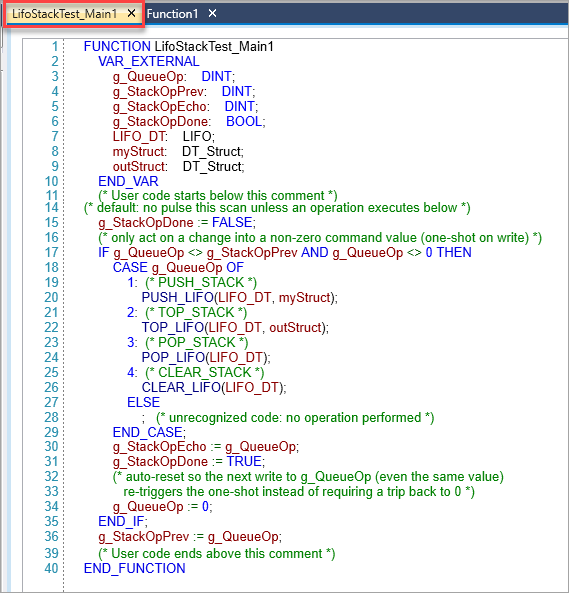
Use the parameter-hints window to view the parameters supported by each function.
Indexed Data Tables (DTI)
The following Indexed Data Table functions are supported:
WRITE_ROW_TO_DTI
READ_ROW_FROM_DTI
INSERT_ROW_TO_DTI
REMOVE_ROW_FROM_DTI
CLEAR_DTI
CLEAR_DTI_ROW
FIND_DTI_ROW_VALUE
COPY_ARRAY_TO_DTI_COLUMN
COPY_DTI_COLUMN_INTO_ARRAY
COPY_COLUMN_TO_COLUMN_IN_DTI
SET_COLUMN_IN_DTI
FIND_DTI_COLUMN_VALUE
For information about Indexed Data Tables and the behavior and parameters of these functions, see Ladder - Data Table: Indexed (DTI)
When a function requires a DTI column reference, IntelliSense displays the columns available for the DTI table used in the call.
Example:
Asynchronous DTI Insert
ASYNC_INSERT_ROW_TO_DTI is supported in ST for asynchronous row insertion.
Example:
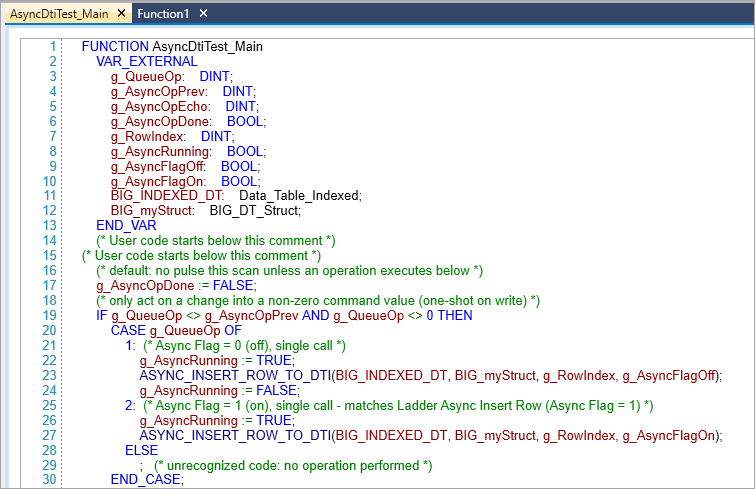
The final BOOL parameter specifies the Async Flag, Use the same setting as the corresponding Ladder Async Insert Row element. ASYNC_INSERT_ROW_TO_DTI does not use the RESULT parameter used by the file-transfer functions.
For information about asynchronous DTI insertion, see Ladder - Insert Row to DTI- Asynchronous
The following PID functions can be called directly from ST:
RUN_PID
RESET_ID_AUTOTUNE
PAUSE_INTEGRAL_AND_DERIVATIVE_CALCULATION
FORCE_ERROR_INTEGRAL
RUN_AUTOTUNE
SAVE_PID_AUTOTUNE_DATA
LOAD_PID_AUTOTUNE_DATA
For information about PID control, autotuning, and the behavior and parameters of these functions, see Ladder - PID
PID functions use the same PID_Config and PID_AT_Params structures as their Ladder counterparts.
RUN_AUTOTUNE
The cycle-count parameter of RUN_AUTOTUNE uses the Cycles enum. The available value are:
Cycles.One
Cycles.Two
Cycles.Three
Use the enum member when calling RUN_autotune:
|
RUN_AUTOTUNE(myPID, Cycles.Two); |
A plain integer cannot be used for the cycle-count parameter:
|
RUN_AUTOTUNE(myPID, 2); |
Use IntelliSense to view and select the available Cycles enum members.
PID Autotune Reset
The supported reset function is RESET_PID_AUTOTUNE. There is no separate general-purpose Reset PID function available in ST.