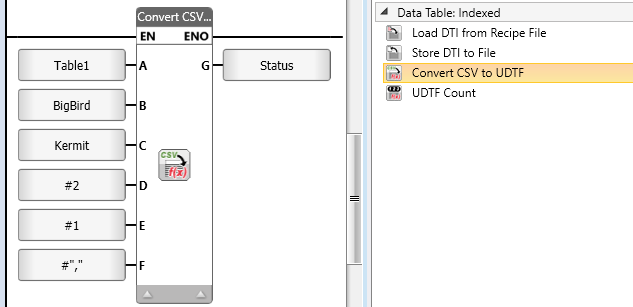
LF: Convert CSV to UDTF

You can use this function to convert a .csv file on an SD card to a .udtf (Data Table file) on an SD card.

  • Parameter B and C, file names, require you to provide only the name of the file. Do not provide the path; UniStream supplies the path automatically.

  • The parameters D and E cannot have values of 0. Use them to remove extra rows, such as table name or column name rows. The default settings are 2 and 1, respectively.

  • Do not include the file extension. Use MyFile, not MyFile.csv.

  • Names are case-sensitive.


Parameter Name

Purpose

A

Data Table to Store

Select the Data Table you wish to save as an external file.

B

Source

This is the CSV file name.

Assign a string to provide the name of the file on the SD card.

C

Target UDTF File Name

Assign a string to provide the name of the file on the SD card.

The data will be stored into this file.

Note that if a file of this name does not exist on the SD card, a file of that name will be created.

D

Number of Rows to discard

Assign a Data Tag to provide the number of rows, or enter a number.

E

Number of Columns to discard

Assign a Data Tag to provide the number of columns, or enter a number.

F

.csv Delimiter

Assign a Data Tag to provide the character, or enter it as a constant. For example, to enter a comma, place the comma between quotation marks:
","

G

Status

Assign a Data Tag to hold the function’s status messages.

0 - No Errors

1 - Function Started

2 - Function in Progress

Less than 0 - Function failed

-1 - The .csv name is an empty string or, contains the '/' character.

-3 - The .udtf name is an empty string or, contains the '/' character.

-4 - Reading the .csv file: failed

-6 - Writing the .udtf file: failed

-8 - .csv delimiter is an invalid character.
      Legal character are: ";/,"

-9 - The .csv file is incompatible with the DT structure, the number of rows in the .csv file does not match the DT

-10 - The current DT signature is different than the signature in the current UDTF file (if exist).

Related Topics

Data Tables

Creating a Data Table

Data Table: Indexed (DTI)

LF: Write Row to DTI

LF: Read Row from DTI to Struct

LF: Insert Row to DTI

LF: Remove Row from DTI

LF: Clear DTI Row

LF: Find Value in DTI Column

LF: Copy DTI Column into Array

LF: Write value to DTI Column

LF: Load DTI File to PLC Data Table (SD)

LF: Clear DTI

SD Management