
Before activating this function, and before removing the SD card, all functions that write data to the SD card must be inactive.
Use SD: Safely Remove to prevent the card from being physically removed while an SD function is in progress.
When SD: Safely Remove is called, it:
Checks to see if any SD functions are running.
If so, Safe to Remove indicates which function is active via the Status DW.
It allows a current task to be completed, but prevents new ones from starting.
When the SD card is completely free, the Safe to Remove bit turns ON. This must be reset by the user.
|
|
Before activating this function, and before removing the SD card, all functions that write data to the SD card must be inactive. |
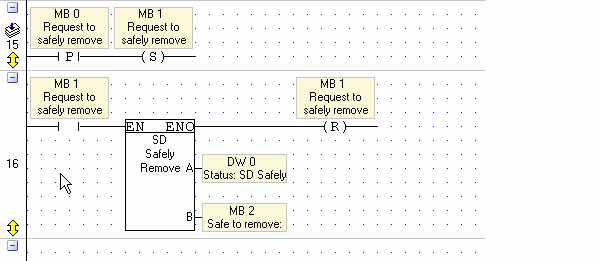
The Status DW is a bitmap.
Bits and their indications are shown in the following table. When a bit is ON, the related function is active.
|
Bit |
Function |
|
0-5 (reserved) |
|
|
6 |
Start Saving to SD is running: SD Trend 8 |
|
7 |
Start Saving to SD is running: SD Trend 7 |
|
8 |
Start Saving to SD is running: SD Trend 6 |
|
9 |
Start Saving to SD is running: SD Trend 5 |
|
10 |
Start Saving to SD is running: SD Trend 4 |
|
11 |
Start Saving to SD is running: SD Trend 3 |
|
12 |
Start Saving to SD is running: SD Trend 2 |
|
13 |
Start Saving to SD is running:SD Trend 1 |
|
14 |
HMI function Trend from SD |
|
15 |
SD File Info |
|
16 |
Delete SD File |
|
17 |
Folder Report: Number of Files |
|
18 |
Create Excel Delimited Line |
|
19 |
SD File Utilities: SD File Write |
|
20 |
SD File Utilities: SD File Read |
|
21 |
SD Block Utilities: Read/Write to Block 3 |
|
22 |
SD Block Utilities: Read/Write to Block 2 |
|
23 |
SD Block Utilities: Read/Write to Block 1 |
|
24 |
SD Block Utilities: Read/Write to Block 0 |
|
25 |
HMI Variable SD Browser |
|
26 |
PC Utility is communicating with SD |
|
27 |
Information Mode is accessing SD |
|
28 |
SD Data Table Utilities: Log DT Row |
|
29 |
SD Data Table Utilities: Read from DT /Search DT for Tag or Index |
|
30 |
SD Data Table Utilities: Write to DT |
|
31 |
Alarm History is being logged to SD |
|
|
|