You can use Windows Explorer to store any type of file onto an SD card, such as .html or .jpg. The SD File Functions enable your Ladder application to read and write these files in 'chunks' of 512 bytes.
|
Note ♦ |
These functions can only run on files that observe the 8.3 naming convention; the file name cannot exceed 8 characters, and the file extension cannot exceed three. |
Each read or write operation requires three functions: Open File, Read or Write, and Close File. The functions are located on SD>SD File Utilities.
Open SD File
Note that there are separate Open File functions for both Read and Write. Open File must be used to activate the correct file in the correct folder before running a read or write function.
Read Next Chunk
Reads a specified file from a specified folder to an operand vector in 'chunks' that are 512 bytes long.
Write Next Chunk
Writes data chunks 512 bytes from an operand vector to a specified file on the SD card.
Close File.
There are separate Close File functions for both Read and Write.
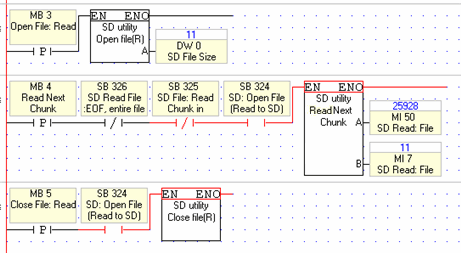
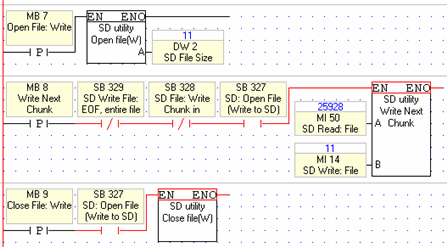
The examples below show the functions and the System operands required to run read and write operations.
Note the use of SBs 324, 325, and 326. These enable the Read Next Chunk function to continue reading data chunks until it has completed reading the entire file.
|
Parameter |
Purpose |
|
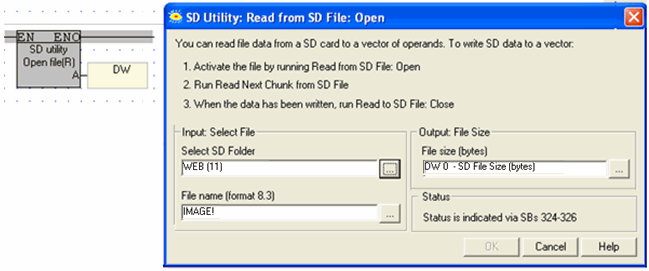
Select Folder |
Select the folder, or use an operand to assign a number at run time using the following values: Alarms: 0 ♦ DT main folder: 1 ♦ DT1–4: 101 to 103 ♦ Log: 3 ♦ System: 4 ♦ User_app: 5 ♦ Trends main folder - 600 ♦ Trends1-4: 600 to 603 ♦ SdBLocks: 9 ♦ Excel main folder: 100 ♦ Excel1-4: 1000 to 1003 ♦ Web: 11 |
|
File name |
Either enter the file name, or provide it via operand. |
|
File size |
When the function runs, this reports the size of the file, in bytes. |
|
Parameter |
Purpose |
|
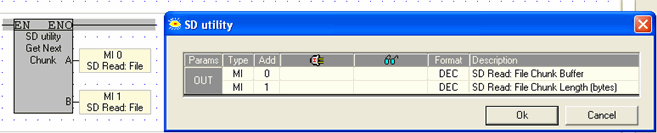
Read: File Chunk Buffer |
This the start of the vector that holds the data read from the file. This vector is 512 bytes long. |
|
Read: File Chunk Length |
This shows the length of the chunk that is currently read. Note that the final chunk, containing the last of the file data, will generally be LESS than 512 bytes. |
Run this when entire files has been read.


|
Parameter |
Purpose |
|
Select Folder |
Select the folder, or use an operand to assign a number at run time using the following values: Alarms: 0 ♦ DT main folder: 1 ♦ DT1–4: 101 to 103 ♦ Log: 3 ♦ System: 4 ♦ User_app: 5 ♦ Trends main folder - 600 ♦ Trends1-4: 600 to 603 ♦ SdBLocks: 9 ♦ Excel main folder: 100 ♦ Excel1-4: 1000 to 1003 ♦ Web: 11 |
|
File name |
Either enter the file name, or provide it via operand. Note that: -If the file does not exist on the SD -and the SD card is Write-enabled the function will create the file. |
|
File size |
When the function runs, this reports the size of the file, in bytes. |

|
Parameter |
Purpose |
|
Write: File Chunk Buffer |
This the start of the vector that holds the data that will be written to the file. The function takes 512 bytes of data. |
|
Write: File Chunk Length |
Enter the number of bytes to be written to the SD file. |
Run this when entire files has been written.

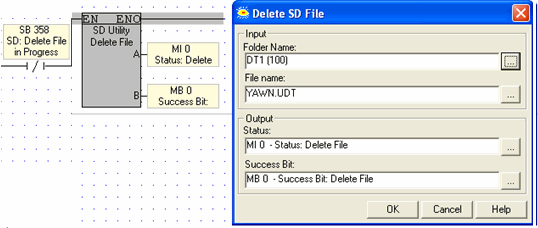
Use this to delete any file on the SD card
|
Note ♦ |
These functions can only run on files that observe the 8.3 naming convention; the file name cannot exceed 8 characters, and the file extension cannot exceed three. |
|
♦ |
Use SB 358, Delete File in Progress, as a condition to running the function |
|
Parameter |
Purpose |
|
Select Folder |
Select the folder, or use an operand to assign a number at run time using the following values: Alarms: 0 ♦ DT main folder: 1 ♦ DT1–4: 101 to 103 ♦ Log: 3 ♦ System: 4 ♦ User_app: 5 ♦ Trends main folder - 600 ♦ Trends1-4: 600 to 603 ♦ SdBLocks: 9 ♦ Excel main folder: 100 ♦ Excel1-4: 1000 to 1003 ♦ Web: 11 |
|
File name |
Either enter the file name, or provide it via operand. |
|
Status Messages |
This MI is a bitmap; a bit turns ON to indicate status. The MI is initialized when the function starts.
|
|
Success Bit
|
Turns ON when the file is deleted. It remains ON until it is reset by the application,. |
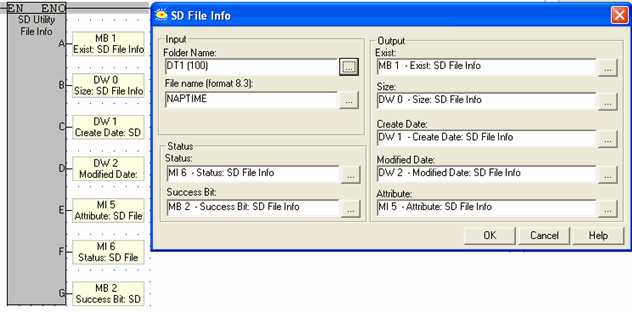
Use this function to check if a specific file is located in a specific SD folder, and get specific file details.
|
Note ♦ |
Use SB 359, File Info function in Progress, as a condition to running the function |
|
Parameter |
Purpose |
|
Select Folder |
Select the folder, or use an operand to assign a number at run time using the following values: Alarms: 0 ♦ DT main folder: 1 ♦ DT1–4: 101 to 103 ♦ Log: 3 ♦ System: 4 ♦ User_app: 5 ♦ Trends main folder - 600 ♦ Trends1-4: 600 to 603 ♦ SdBLocks: 9 ♦ Excel main folder: 100 ♦ Excel1-4: 1000 to 1003 ♦ Web: 11 |
|
File name |
Either enter the file name, or provide it via operand. |
|
Status Messages |
This MI is a bitmap; a bit turns ON to indicate status. The MI is initialized when the function starts.
|
|
Success Bit |
Turns ON when the data is successfully written to the Block. It remains ON until it is reset by the application, or until the application calls the function. |
|
Exists |
0= File was not found 1= File was found
|
|
Size |
Size of the found file |
|
Create Date |
Date the file was created |
|
Modified Date |
Date of last file change |
|
Attribute |
This are the attribute codes: ATTR_FILE = 0x00 ATTR_READ_ONLY = 0x01 ATTR_HIDDEN = 0x02 ATTR_SYSTEM = 0x04 ATTR_VOLUME_LABEL = 0x08 ATTR_LONG_NAME = 0x0F ATTR_SUB_DIR = 0x10 ATTR_ARCIVE = 0x20, ATTR_DEVICE = 0x40 ATTR_UNUSED = 0x80 |
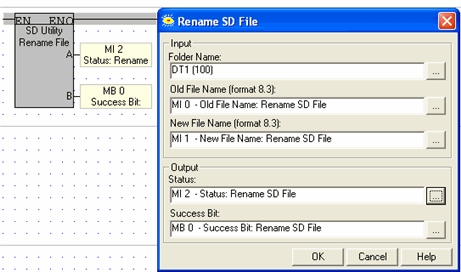
Use this to rename any file on the SD card.
|
Parameter |
Purpose |
|
Select Folder |
Select the folder, or use an operand to assign a number at run time using the following values: Alarms: 0 ♦ DT main folder: 1 ♦ DT1–4: 101 to 103 ♦ Log: 3 ♦ System: 4 ♦ User_app: 5 ♦ Trends main folder - 600 ♦ Trends1-4: 600 to 603 ♦ SdBLocks: 9 ♦ Excel main folder: 100 ♦ Excel1-4: 1000 to 1003 ♦ Web: 11 |
|
Old/New File name |
Either enter the file name, or provide it via operand. |
|
Status Messages |
This MI is a bitmap; a bit turns ON to indicate status. The MI is initialized when the function starts.
|
|
Success Bit
|
Turns ON when the file is successfully renamed . It remains ON until it is reset by the application, or until the application calls the function. |