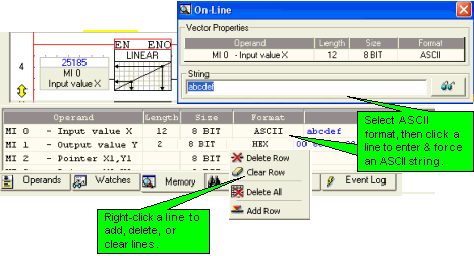
Memory enables you to view a vector according to the length you set and in ASCII, HEX, Binary, or Decimal format.
Click on the 'Memory' tab in the Output Window at the bottom of the VisiLogic screen.
Right-click in the window to add rows.
Click in the Operand column to link operands.
Click in the Length column to assign a vector.
Click in the Size column to select 8, 16, 32 bits.
Click in the Format column to select ASCII, Binary, Hex, Decimal.
Enter Online Test Mode.
When ASCII is the selected format, you can click a line and force a string to the vector. Note that to force the value, you must click the 'eyeglass' symbol in the On-line window.