Check that you have the latest OS by running Live Update. Follow the on-screen instructions to download the OS into VisiLogic.
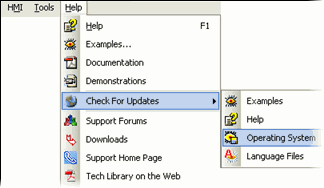
Next, install the OS into the controller:
If you have tried to download a project and received Warning 220: "To complete this operation, a newer O/S version is required. Click the Help button to learn what to do next.", it means your project contains features that exist in VisiLogic, but are not supported by the OS version currently in the controller, such as the Samba 4.3 and Samba 7 memory expansion.
To update the OS:
Check that you have the latest OS by running Live Update. Follow the on-screen instructions to download the OS into VisiLogic.
Next, install the OS into the controller:
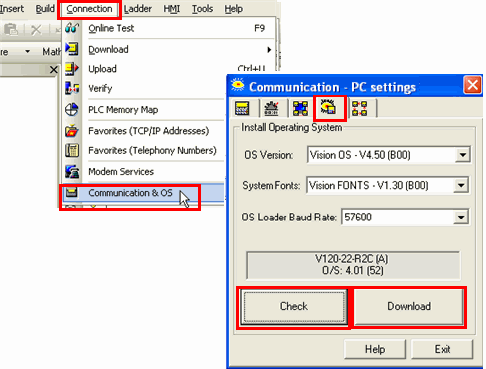
Open Connection>Communication & OS to open Vision Communication - PC Settings.
Click the fourth tab to open Install Operating System.
Click Check to enable VisiLogic to establish communications with the PLC.
To install the OS, click Download; OS installation begins.
If you are connected to an Enhanced Vision controller, a wizard opens and guides you through the steps.
Note that the Advanced button in the wizard enables you to download separate OS sections; this feature is intended for use by advanced users only.