Store allows you to take a value contained in a source operand and load it into a target operand. This value may be either the status of a bit operand or a register value.
Click the Vector menu on the Ladder Toolbar, then select Store.
Place the function in the desired net.
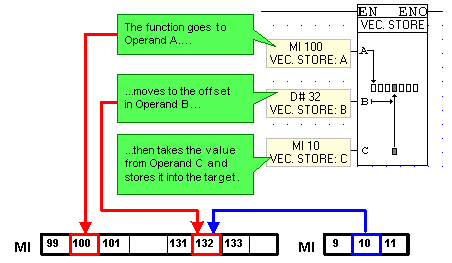
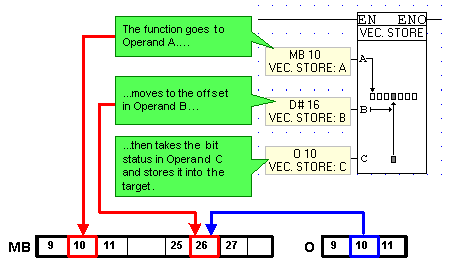
Link the desired Operands and Addresses. Operands A and B determine the location of the target operand. Operand A determines the starting point for the function. Operand B contains the offset value, and the operand linked to Operand C is the source operand.
Example: Registers
Below, the value in MI 10 is loaded into MI 132. If the value in MI 10 is 64, 64 will be stored in MI 132. The previous value in MI 132 is overwritten. The current value in MI 10 remains unchanged.
Example: Bit Operands
Below, the status of O 10 is stored into MB 26. If O 10 is ON, MB 10 will be turned ON. The status of MB 10 is overwritten. The status of O 10 remains unchanged.
Note that:
If you link a bit operand to Operand A, the function will only allow you to link a bit operand to Operand C.
If you link a register to Operand A, the function will only allow you to link a register to Operand C.
If a double register (ML, SL, DW, SDW) is used as the source operand, and a single register (MI), is used as the target, only the first 16 bits will be loaded from the source into the target operand.