The Find function:
searches through a vector,
locates either an integer value or the first bit of a desired status within that vector,
records the location of the operand containing the desired value.
Click the Vector menu on the Ladder Toolbar, then select Find.
Place the function in the desired net.
Link the desired Operands and Addresses.
Operand A, Locate Value in Vector, determines the value or bit status to be found.
Operand B, Locate Start Address, determines from where the function begins to search. If you select MB 3, for example, the function will search through the MB vector, and will begin to search at MB #3.
Operand C, Vector Length, determines the length of the vector to be searched.
Operand D, Value's Location, is where the function records the location of the operand--if the function finds the value. If the function does not find the value, a linked MI will contain the value -1; a long register will contain FFFFFFFF.
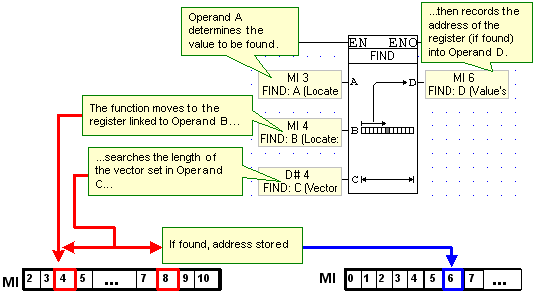
Example: Find Register Value
Below, if MI 3 contains the value 16, the function searches for 16 from MI 4 to MI 8. MI 3. If the value 16 is found in the vector, the address of the operand containing 16 is recorded in MI 6. If the value is not found, MI 6 will contain -1.
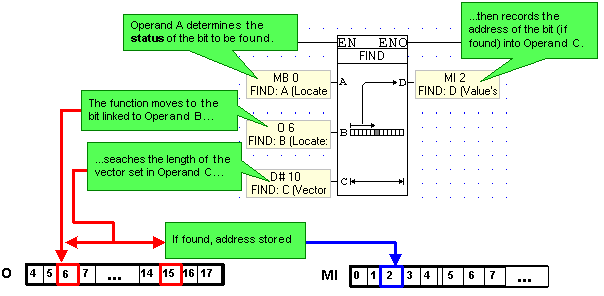
Example: Find Bit Status
Below, if MB 0 is OFF, the function searches from O 6 to O 15. If a bit having OFF status is found, the location of the bit is recorded in MI 2.
Note that:
When the function finds the value, it stops running. This means that if the value is contained by more than one operand in the vector, only the location of the first operand containing that value is recorded.
If the value is not found, the function stops until it is reactivated.