Compare enables you to:
Define 2 vectors of operands,
compare the values or bit status of each corresponding operand within that range,
record the location of the first set of unmatched values found.
The function is located on the Vector menu.
Click the Vector menu on the Ladder Toolbar, then select Compare.
Place the function in the desired net.
Link the desired Operands and Addresses.
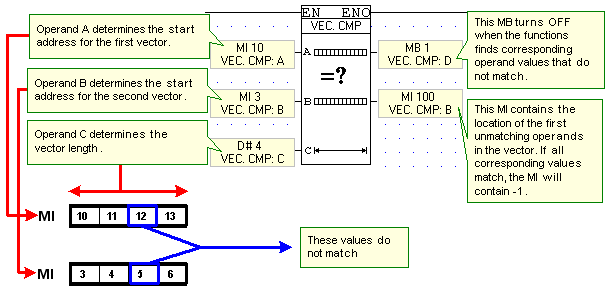
Operand A: this is the start address for the first vector of operands.
Operand B: this is the start address for the second vector of operands.
Operand C: this sets the length of both vectors.
Operand D: this MB turns ON when the corresponding values in both vectors match, and turns OFF when corresponding operand values do not match.
Operand E: this MI contains the location of the first set of unmatched operands in the vector. If all of the corresponding values match, the MI contains -1.
Example:
Below, the values in MI 10 through 13 will be compared to MI 3 through 6. MI 12 and MI 5 occupy corresponding locations in the their respective vectors. When the function finds that the values in MI 12 and MI 5 do not match, the function turns MB 1 turns OFF and stores the location of the operands into MI 100.
Compare (Offset) enables you to:
Define a source vector of operands that is offset from a selected start address,
define a target vector of operands that is offset from a selected start address,
compare the values or bit status of each corresponding operand within that range,
record the location of the first set of unmatched values found.
Click the Vector menu on the Ladder Toolbar, click Use Offset, then select Compare.
Place the function in the desired net.
Link the desired Operands and Addresses.
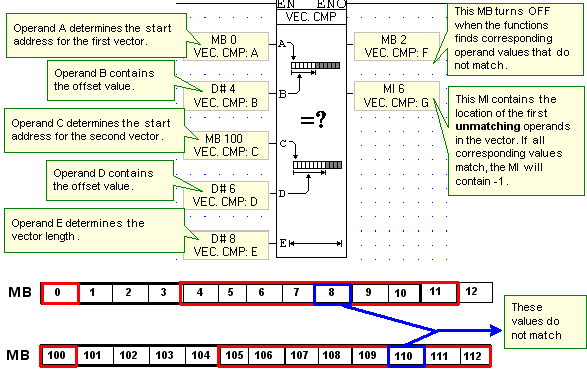
Operand A: this is the start address for the first vector.
Operand B: this is the offset from the start address.
Operand C: this is the start address for the second vector.
Operand D: this is the offset from the start address.
Operand E: this is the vector length.
Operand F: this MB turns ON when the corresponding values in both vectors match, and turns OFF when corresponding operand values do not match.
Operand G: this MI contains the location of the first set of unmatched operands in the vector. If all of the corresponding values match, the MI contains -1.
Example:
Below, the values in MB 4 through MB 11 will be compared to MB 105 through MB 112. MB 12 and MB 110 occupy corresponding locations in the their respective vectors. When the function finds that the values in MB 12 and MB 110 do not match, the function turns MB 2 OFF and stores the location of the operands into MI 6.
