 .
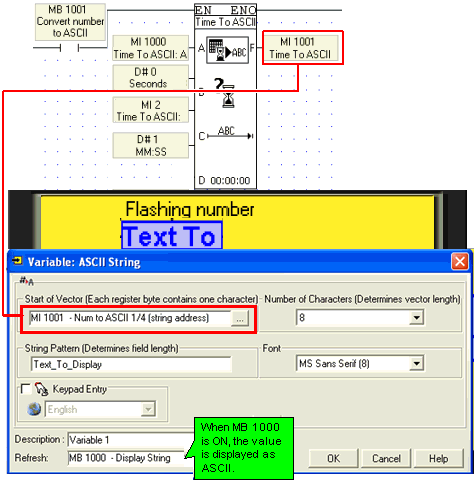
.You can display a value as an ASCII string by using the Num to ASCII function together with the ASCII String variable.
Select Time to ASCII from the String menu on the Ladder toolbar.
Place the function in the net.
In the HMI Display, select ASCII String from the Text Variable menu.
When the program shown below is downloaded, turning MB 1000 ON will display the value on the Vision's LCD.
.
|
Notes ♦ |
If the vector is not long enough, if for example you convert an ML value of “123456” into ASCII and allow only 5 characters, the function returns a string of question marks (???????). |