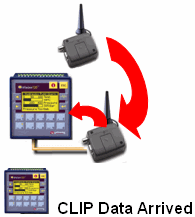
CLIP is supported by:
-
Enhanced Vision: from O/S 42
-
Standard Vision: from O/S 500-19
-
VisiLogic versions 5.15 and later, which contain the CLIP command: AT + CLIP=1.
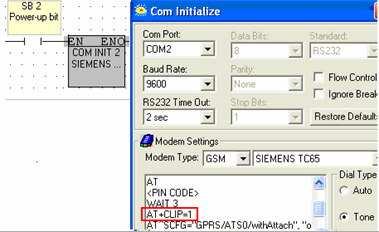
The Last Call Received function is located on the COM> COM Port> menu. This function enables a PLC to identify the caller number of an incoming call. Last Call uses the CLIP (Calling Line Identification and Presentation) feature offered by GSM modems.
|
CLIP is supported by:
|
|
You can use CLIP to identify callers to a PLC modem by:
Using the Last Call function to write the number of an incoming call to a register
Creating a list of authorized numbers in a Data Table
Using the Find Row function to check if that number exists in the Data Table
To see a working example, check the sample application GSM - Prevent Illegal Calls (CLIP).vlp.
|
The PLC must be connected to a GSM modem.
|
|
|
Notes ♦ |
Last Call can store the number when:
|
|
♦ |
If the call number is unidentifiable (meaning set by the caller as private or anonymous), no number will be stored in the Last Call vector. In most cases, Last Call will identify such a call as Type =128. |
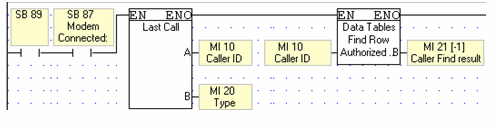
The ladder net that is shown below causes the following events when the PLC's modem receives a call from a remote modem:
SB89 turns ON when caller number is present
The Last Call Received element copies the caller number into a vector of MIs starting at MI10
Find Data Table Row looks up that number in the Data Table.
If no such number exists, Find Row returns a value of -1.
|
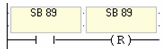
Reset SB 89 in the application. If SB 89 is not reset, you will not be able to write new CLIP data |
|
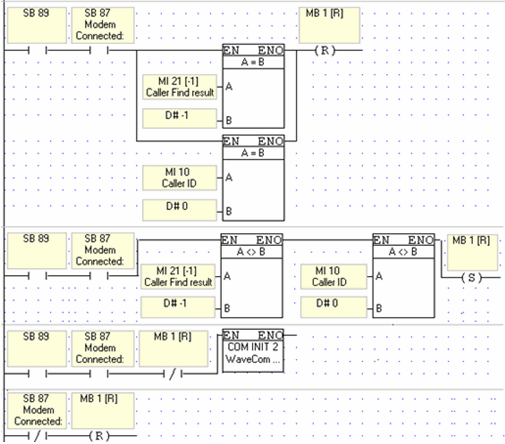
The nets shown below guard against unauthorized callers:
If the caller number is not in the list, the Find Row output, MI21, will contain -1,
OR
If the call number is unidentifiable (meaning set by the caller as private or anonymous), 0 will be stored in the Last Call vector starting at MI 10
In either case, MB1 will turn OFF, breaking the connection by activating COM Init.