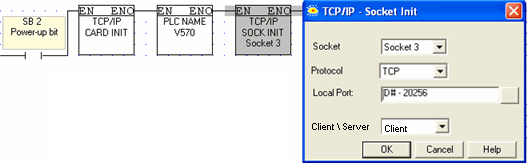
This function is located on the Com>TCP/IP menu.
Vision controllers currently offer 4 sockets. Sockets may be configured to TCP, UDP, UDP RAW, or HTTP.
The default configuration means that, for most applications, you do not need to include a Socket Init FB in the ladder application. However, if, for example, your application requires 4 sockets for TCP, change the default configuration of Socket 0 from UDP to TCP via the Socket Init FBs.
The default socket configuration includes:
|
Socket |
Protocol |
Port Number |
Function |
|
0 |
UDP |
20,000 |
Enables data to be both transmitted and received within a PLC network, via MODBUS. Note ♦ If you are using the default settings for Socket 0, note that data is sent to IP: 255.255.255.255. port: 20,000 plus the last byte of the IP address originally assigned to the device. |
|
1 |
TCP |
20,256 |
Enables PC to PLC communication via UnCmDrv1.dll, including VisiLogic, Remote Access, and other Unitronics communication applications. |
|
2 |
TCP |
502 |
Set to 'listen' as server (slave), enables MODBUS applications such as OPC servers and SCADA systems which use MODBUS TCP over IP. |
|
3 |
TCP |
20,257 |
Set to 'listen' as server (slave), enables non-Unitronics PLCs to access Unitronics PLCs, via MODBUS. |
|
Note ♦
|
UDP Unicast (device to device) - If you set Sockets1-3 to UDP, they will be in Unicast mode. |
|
♦
|
Enabling VisiLogic to communicate with a PLC over UDP -- Socket 0 can be set to work via UDP Unicast by turning SB 159 OFF, and then running Socket Init to initialize Socket 0 to UDP. |
|
♦ |
Select TCP Client (master) to configure a socket to enable the PLC to send e-mail. |
|
♦
|
Select HTTP to configure a socket to enable the PLC to function as a Web Server. |