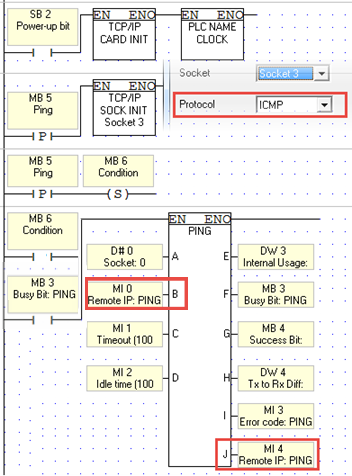
Ping supports the standard ICMPv4 Destination Unreachable Message Subtypes listed in the following table
|
Error Codes (ICMPv4)
|
Purpose
|
|
-2
|
Timeout exceeded– no reply at all
|
|
-1
|
No error
|
|
0
|
Network Unreachable
The datagram could not be delivered to the network specified in the network ID portion of the IP address. Usually means a problem with routing but could also be caused by a bad address.
|
|
1
|
Host Unreachable
The datagram was delivered to the network specified in the network ID portion of the IP address but could not be sent to the specific host indicated in the address. Again, this usually implies a routing issue.
|
|
2
|
Protocol Unreachable
The protocol specified in the Protocol field was invalid for the host to which the datagram was delivered.
|
|
3
|
Port Unreachable
The destination port specified in the UDP or TCP header was invalid.
|
|
4
|
Fragmentation Needed and DF Set
Normally, an IPv4 router will automatically fragment a datagram that it receives if it is too large for the maximum transmission unit (MTU) of the next physical network link the datagram needs to traverse. However, if the DF (Don't Fragment) flag is set in the IP header, this means the sender of the datagram does not want the datagram ever to be fragmented. This puts the router between the proverbial rock and hard place, and it will be forced to drop the datagram and send an error message with this code.
This message type is most often used in a “clever” way, by intentionally sending messages of increasing size to discover the maximum transmission size that a link can handle. This process is called MTU path discovery.
|
|
5
|
Source Route Failed
Generated if a source route was specified for the datagram in an option but a router could not forward the datagram to the next step in the route.
|
|
6
|
Destination Network Unknown
Not used; Code 0 is used instead.
|
|
7
|
Destination Host Unknown
The host specified is not known. This is usually generated by a router local to the destination host and usually means a bad address.
|
|
8
|
Source Host Isolated
Obsolete, no longer used.
|
|
9
|
Communication with Destination Network is Administratively Prohibited
The source device is not allowed to send to the network where the destination device is located.
|
|
10
|
Communication with Destination Host is Administratively Prohibited
The source device is allowed to send to the network where the destination device is located, but not that particular device.
|
|
11
|
Destination Network Unreachable for Type of Service
The network specified in the IP address cannot be reached due to inability to provide service specified in the Type Of Service field of the datagram header.
|
|
12
|
Destination Host Unreachable for Type of Service
The destination host specified in the IP address cannot be reached due to inability to provide service specified in the datagram's Type Of Service field.
|
|
13
|
Communication Administratively Prohibited
The datagram could not be forwarded due to filtering that blocks the message based on its contents.
|
|
14
|
Host Precedence Violation
Sent by a first-hop router (the first router to handle a sent datagram) when the Precedence value in the Type Of Service field is not permitted.
|
|
15
|
Precedence Cutoff In Effect
Sent by a router when receiving a datagram whose Precedence value (priority) is lower than the minimum allowed for the network at that time.
|