Write to Output is located on the More> Immediate menu. This element can be used to immediately update the status of a physical, hardwired output.
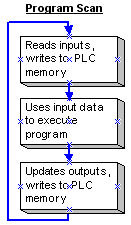
Ordinarily, a PLC program scan runs like this:
When the program encounters Write to Output, the program immediately writes the physical PLC output, then executes the rest of the program.
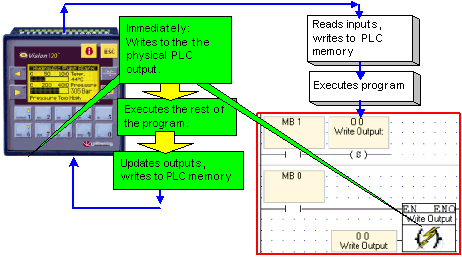
To use Write to Output, place it in a net after an activating condition and select the desired output.
|
Note ♦ |
This function is not supported for outputs located on I/O Expansion modules. |
|
♦ |
Within a net, Write to Output should stand alone except for its activating condition. |
|
♦ |
If, after Write to Output has been executed, the same output is updated as the rest of the program runs, the last update is the one written to the PLC memory at the end of the program scan. |