Read Physical Input is located on the Utils> Immediate menu. Use this element to immediately read the current status of a physical, hardwired input and use the new input status to execute the PLC program.
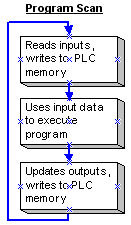
Ordinarily, a PLC program scan runs like this:
When the program encounters Read Physical Input, the program immediately reads the physical PLC input, updates the PLC memory, and executes the rest of the program using the new input data.
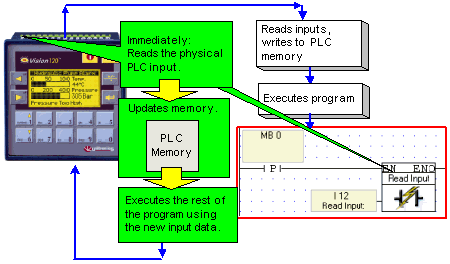
To use Read Physical Input, place it in a net after an activating condition and select the desired input.
|
Note ♦ |
Within a net, Read Physical Input should stand alone except for its activating condition. |