Switch between Run and Stop modes.
Use Single Scan to run a single cycle of the ladder program for debugging purposes. You can stop the scan cycle at any point by placing OnLine Test Points, located on the More menu, in the Ladder.
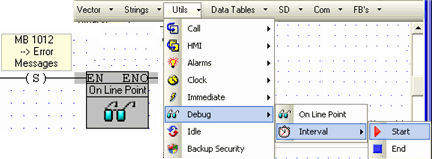
When the scan reaches an OnLine test point that is active (receives RLO), Online Test freezes, enabling you to check element status and values, including Timer values, at that point during Ladder execution. Note that if more than one OnLine test point is activated, SB 35 turns ON.
Measure the time interval between 2 points in the Ladder application, by placing Start and End Interval elements, located on the More menu, anywhere in the application. The time interval, units of 10 micro-seconds, is stored in the DW linked to the End Interval element. Note that Interval elements should not be placed in Interrupt routines. 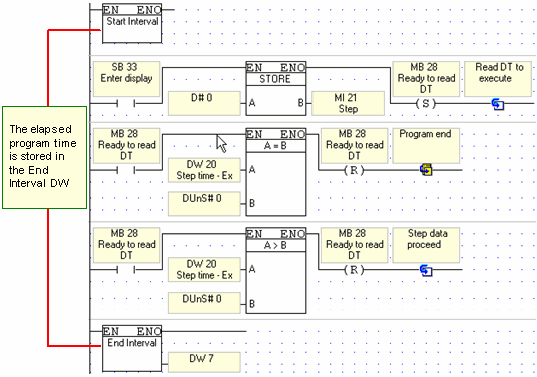
Open Remote Access to debug remote controllers via network or modem connections.
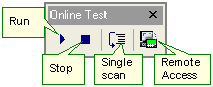
In Online Test mode, you can view the power flow, and view and force operand values and element status. You can also select a controller that is directly connected to the PC, or a PLC's network ID # if the PC is linked to a CANbus or RS485 network.
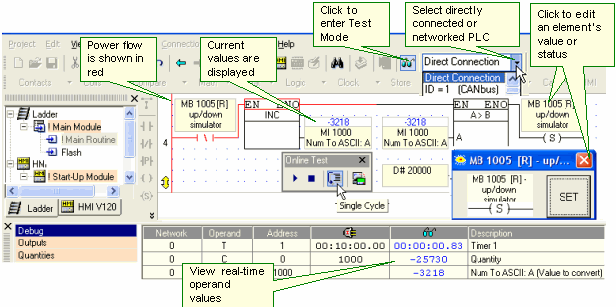
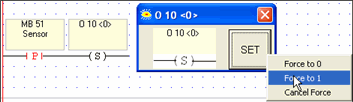
Force I/0, by right-clicking the operand and setting the desired state