Global HMI Variable Bank (Standard Vision only)
The Global HMI Variable bank can contain any type of HMI variable. When you open a VisiLogic project, the bank is empty. You enter variables in the bank by first creating a variable, such as a List of Images variable, and then adding it to the bank. Once a variable is in the bank, you can refer to it from any HMI Display; although you can change the linked operand, the rest of the parameters remain the same.
Why use Global Variables?
Variables take up space in the controller's Flash memory. In some applications, you may copy and paste a variable to a number of Displays, changing operand links where required. In these applications, you can save a great deal of space--and download time--by using a Global Variable, and referring to it as required. No matter how many times you refer to a Global Variable, it is a single variable.
Creating and Using Global Variables
-
Either create a new variable and then right-click on it,
or
right-click on an existing variable,
then select Set As Global Variable.

-
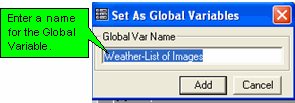
Enter a name for the Global Variable, then click OK.
-
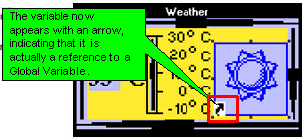
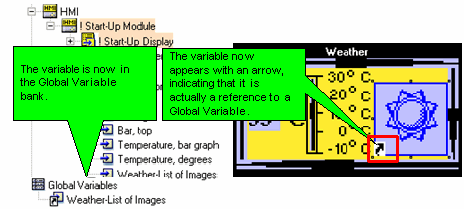
The variable is now part of the Global Variable bank; in the Display, the variable now appears with an arrow, indicating that it is actually a reference to a Global Variable.
Referring to a Global Variable
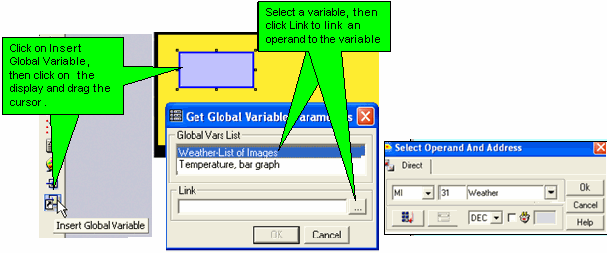
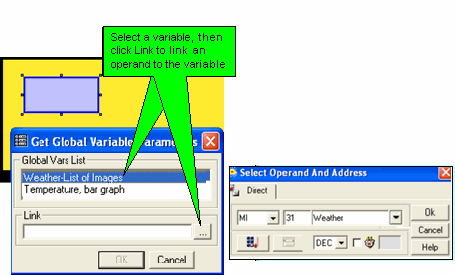
Once the variable is in the bank, you can refer to it from any HMI Display.
|
Note ♦
|
A Global variable cannot be resized.
|
|
♦
|
Deleting the last link to a Global Variable also deletes the Global Variable.
|