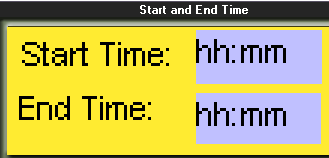
Place Clock Variables in Displays to show times and dates. In addition to showing RTC values, use Clock Variables in conjunction with Indirect time functions to enable an operator to set times via the controller keypad.
A keypad-enabled Clock Variable accepts a number entered via the controller keyboard, and stores the number in the operand linked to the Variable.
Click on the variable in the Variable toolbar, then click on the HMI screen and drag your cursor to create a field for the display of the variable data.
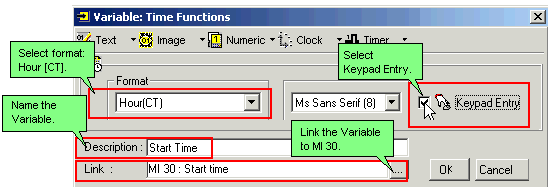
Release the mouse button; a dialog box opens, enabling you to define the source of the variable data.
Check Keypad Entry and select the format and display font.
|
Note ♦ |
Step-by-step instructions on how to use Keypad Entry Clock Variable values are provided in the Indirect Clock function example. |