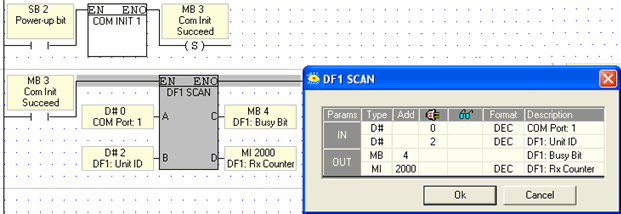
DF1

Use the COM>DF1 Scan function to enable an Enhanced Vision to be accessed by devices using the DF1 AB protocol.

Note that:

 - the Vision can act ONLY as a slave device,

 - communication is half-duplex.

Allen-Bradley project

Controller Properties
Set as follows:

  • System Protocol: DF1 Master, Error Detection: CRC, Polling Mode: Message Based

  • Serial Port Properties:System, 9600, 8, None, 1, No Handshake, 0, 0

Ladder program:
Set up a message call for each data block. The program must toggle messages one by one.

Message Configuration

  • Select SLC typed Read or Write

  • Destination element: note the differences in addressing as shown in the File Number/Type Conversion table.  This shows, for example that A-B N41:# is equivalent to Unitronics' XI memory area. N41:0 is not mapped to XI0; but to XI256. If the destination is set to N7:0, the Unitronics equivalent is MI1792 and up. Floating point data F0 is located to MF0.

Communication:

  • Path: Serial port and Receiving Station


The serial port does not require any specific configuration.


Parameter

Purpose

Com Port

Select any port.

DF1: Unit ID

This must be the ID number assigned in the Allen-Bradley project.

DF1: Busy Bit

ON while communication is active.

DF1 RX Counter

The number of received requests.


Vision supports 7 DF1 commands:

  1.  Echo – the PLC returns the exact data received.

  2. Unprotected Read – from the DT.

  3. Unprotected Write – to DT.

  4.  Protected Write using 2 Address Fields – Write operands vector*.

  5. Protected Read using 2 Address Fields – Read operands vector*.

  6.  Protected Write using 3 Address Fields – Write operands vector.

  7. Protected Read using 3 Address Fields – Read operands vector.

* Does not support Timers and counters


File number / Type conversion table

Unitronics terminology

File Type


File Number

Sub Element

Example using operand index - #

Output

O

0-3

0

O0:#

Inputs

I

0-3

0

I1:#

MB

B

0-39

0

B2:#

XB

B

40-79

0

B43:#

SB

B

80-119

0

B90:#

MI

N

0-39

0

N7:# (N7:0=MI1792)

XI

N

40-79

0

N41:# (N41:0=XI256)

SI

N

80-119

0

N90:#

MF

F

0

0

F0:#(F0=MF0)

ML

L

0-39

0

L9:#

XL

L

40-79

0

L59:#

SL

L

80-119

0

L99:#

MDW

L

120-159

0

L127:#

XDW

L

160-199

0

L177:#

SDW

L

200-239

0

L208:#

Counter Preset

C

0

1

C0:#.PRE

Counter Current

C

0

2

C0:#.ACC

Counter Bit

C

0

13

C0:#.DN

Timer Preset

T

0

1

T0:#.PRE

Timer Current

T

0

2

T0:#.ACC

Timer Bit

T

0

13

T0:#.DN


Notes

In the event that operand types share file types (MI/XI/SI), each operand type receives 40 file numbers.


Commands

Command Name

Purpose

Echo

Tests Link.

Field: Data to be Received.

Unprotected Read

Reads from PLC Data Tables

1 Field:

  • Address – Word.
    The address is WORD address. There is no way to read odd addresses, as most of SLC/5 does.

  • Bytes To Read – Byte
    Maximum: limited to 244 by the protocol, but is not limited by the PLC.

Unprotected Write

Writes to PLC Data Tables

2 Fields:

  • Address – Word.
    The address is WORD address. There is no way to read odd addresses, as most of SLC/5 does.

  • Bytes To Read – Byte
    Maximum: limited to 244 by the protocol, but is not limited by the PLC.

Protected Read,
2 Address Fields

Reads operand vector.

4 fields:

  • Bytes to be read (bytes, not operands number)

  • File Number + File Type (parsed to operand type)

  • Element Number (operand index)

This command cannot read timers and counters (for this, use a command with 3 address fields)

Refer to the table in section 1 for File number / Type details

Protected Write,
2 Address Fields

Writes to operand vector.

5 fields:

  • Bytes to be read (bytes, not operands number)

  • File Number + File Type (parsed to operand type)

  • Element Number (operand index)

  • Data to be written

This command cannot read timers and counters (for this, used command with 3 address fields)

Refer to the table in section 1 for File number / Type details

 Protected Read,
3 Address Fields

Reads operands vector.

5 fields:

  • Bytes to be read (bytes, not operands number)

  • File Number + File Type (parsed to operand type)

  • Element Number (operand index)

  • Sub Element (used for Preset / current / bit. 0 for other operands type)

Refer to the table in section 1 for File number / Type details

 Protected Write,
3 Address Fields

Writes to operands vector.

6 fields:

  • Bytes to be read (bytes, not operands number)

  • File Number + File Type (parsed to operand type)

  • Element Number (operand index)

  • Sub Element (used for Preset / current / bit. 0 for other operands type)

  • Data to be written

Refer to the table in section 1 for File number / Type details