|
Use File Functions to:
|
|
The path syntax must be exactly as shown below.
The maximum number of file name characters is 63, including file extension
The maximum number of path characters is 127.
|
Data Type |
Folder |
Syntax |
|
Data Samples |
Samples/XXX/History |
/Samples/XXX/History/filename.ext |
|
Data Tables |
DT/ |
/DT/filename.ext |
|
Audio |
Media/Audio/ |
/Media/Audio/filename.ext |
|
Video |
Media/Video/ |
/Media/Video/filename.mp4 |
|
Docs |
Media/Docs/ |
/Media/Docs/filename.ext |
|
Screenshots |
Media/Screenshots/ |
/Media/Screenshots/filename.jpg |
|
User Logs |
UserLogs/Bin/ |
/UserLogs/Bin/filename.bin |
|
UserLogs/Csv/ |
/UserLogs/Csv/filename.csv |
|
|
UserLogs/Txt/ |
/UserLogs/txt/filename.txt |
|
|
Alarm Logs |
AlarmLog/AlarmLogs/ |
/AlarmLog/AlarmLogs/filename.ext |
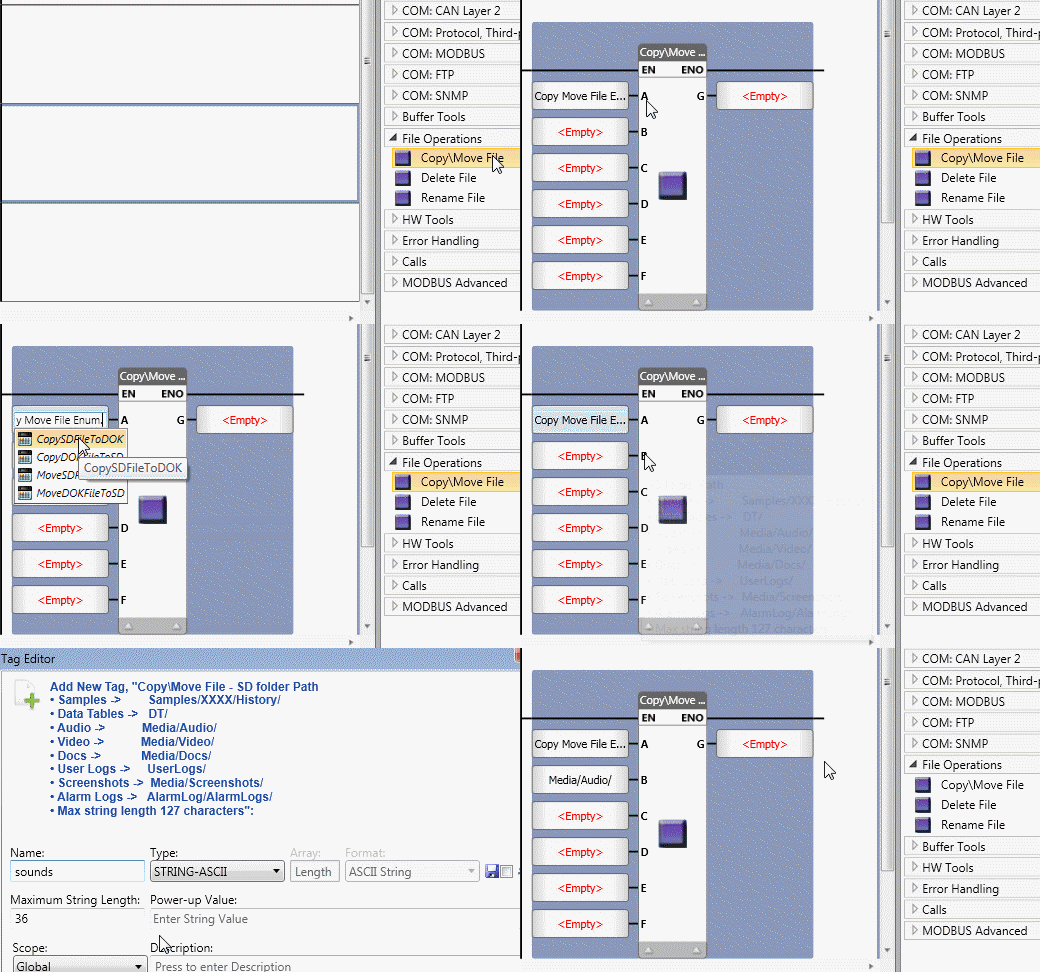
Use this to copy or move a file from the SD card to the DOK, and vice-versa.
|
|
Parameter Name |
Purpose |
|
A |
Action Type |
The default type is Copy File From DOK to SD. To change the default, click in the field, delete the text, and select another Actionclick in the field, delete the text, and select another Action.
The Actions are:
|
|
B |
SD Folder Path |
Link a tag and enter the path as a power-up value, or enter a value into the tag at run-time.
|
|
C |
SD File Name |
Assign a Data Tag or enter a constant. Note that you need to supply both the filename and the extension. The name may not exceed 63 characters. |
|
D |
DOK Folder Path |
Assign a Data Tag or enter a constant. |
|
E |
DOK File Name |
Assign a Data Tag or enter a constant. |
|
F |
Overwrite |
Determines if the file will overwrite a file of the same name 0= No 1= Yes |
|
G |
Status |
0 = No Error 1 = Function started 2 = Function in progress -1 = Invalid SD folder path -2 = Invalid SD file name -3 = Invalid DOK folder path -4 = Invalid DOK file name -5 = Request queue is full -6 = No SD -7 = No DOK -8 = No Source file -9 = No Free space on SD -10 = No free space on DOK -11 = File name already exists -12 = File transfer error -13 = Source file can't be deleted -14 = Can't overwrite destination file -15 = SD is read-only -16 = DOK is read-only -17 = Illegal SD folder -20 = Parameters Error -21 = Internal error |
Use this to delete a file from the SD card.
|
|
Parameter Name |
Purpose |
|
A |
SD Folder Path |
Link a tag and enter the path as a power-up value, or enter a value into the tag at run-time. |
|
B |
SD File Name |
This is the file to be deleted. The name may not exceed 63 characters. |
|
C |
Overwrite |
Determines if the file will overwrite a file of the same name 0= No 1= Yes |
|
D |
Status |
0 = No Error 1 = Function started 2 = Function in progress -1 = Invalid SD folder path -5 = Request queue is full -6 = No SD -8 = No Source file -13 = Source file cannot be deleted -15 = SD is read-only -20 = Parameters Error -21 = Internal error |
Use this to read a line from a file on the SD card.
|
|
Parameter Name |
Purpose |
|
A |
SD Folder Path |
Link a tag and enter the path as a power-up value, or enter a value into the tag at run-time. |
|
B |
Line Number: Source |
This is the row the function reads. Assign a Data Tag to provide the Line Number, or enter a number. |
|
C |
Destination Buffer |
Select the target Buffer. This is the Buffer the function writes the dats to. |
|
D |
Status |
0 = No Error 1 = Function started 2 = Function in progress -1 = No SD -2 = File not found -3 = Line in file not found -4 = Internal error -5 = File name too long |
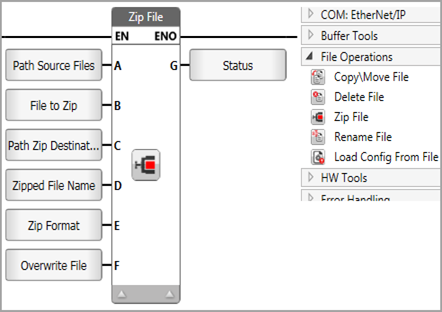
Locate a file in an SD folder, zip it in .zip or gz format, and place it in a destination folder on the SD.
|
|
Parameter Name |
Purpose |
|
A |
SD Source Folder Path |
Link a tag and enter the path as a power-up value, or enter a value into the tag at run-time. |
|
B |
Input File Name |
This is the name of the SD file to zip. Assign a Data Tag or enter a constant. The name may not exceed 63 characters. |
|
C |
SD Folder Path Output |
Link a tag and enter the path as a power-up value, or enter a value into the tag at run-time. |
|
D |
Output File Name |
This is the name for the zipped file. Assign a Data Tag or enter a constant. The name may not exceed 63 characters. |
|
E |
Zip Format |
This bit determines the zip file format. Assign a Data Tag or enter a constant. 1= Yes |
|
F |
Overwrite |
Determines if the file will overwrite a file of the same name 0= .gz 1= .zip |
|
G |
Status |
0 = No Error 1 = Function started 2 = Function in progress -1 = Invalid SD folder path -5 = Request queue is full -6 = No SD -8 = No Source file -11 = File name already exists -14 = Can't overwrite destination file -15 = SD is read-only -17 = Illegal SD folder -18 = Invalid original file name -19 = Invalid new file name -20 = Parameters Error -21 = Internal error |
|
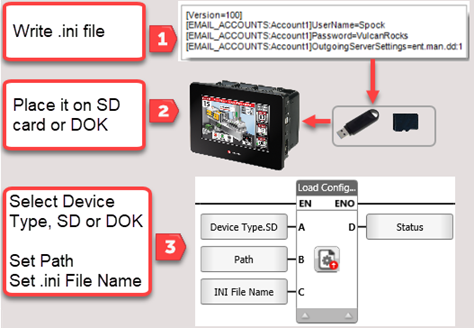
This Ladder function enables you to create an .ini file in a text editor and run it in your application to modify the parameters shown below. Use this Function to zip a source file from an SD folder, into a destination folder on the SD. Note that you can only run a maximum of two such functions during a single program scan.
|
|
File Syntax Example
Note that file begins with version 100.
[Version=100]
[NETWORK_PANEL]IpAddress=192.168.1.1
[NETWORK_PANEL]DefaultGateway=192.168.1.254
[DNS_PANEL]DNS1=8.8.8.8
[DNS_PANEL]DNS2=8.8.8.8
[DNS_PANEL]DNS3=8.8.8.8
|
Function |
Editable Parameters |
|
Email Accounts |
User Name, Password, Outgoing Server Settings, From User Name: [EMAIL_ACCOUNTS:Account1]UserName=fyodordostoyevsky Outgoing Server Settings: [EMAIL_ACCOUNTS:Account1]OutgoingServerSettings=fedya.man.dd:1 |
|
FTP / SFTP Clients |
User Name, Password, Port, Remote IP User Name: [FTP_CLIENT:FTP Client1]UserName=PrinceMyshkin Password: [FTP_CLIENT:FTP Client1]Password=lee1987WWWnEW1 [FTP_CLIENT:dimanewclient]Password=lee1987WWW Port: [FTP_CLIENT:dimarnewclient]Port=1212 Remote IP: [FTP_CLIENT:dimanewclient]RemoteIp=10.1.30.252 |
|
FTP Server |
User Name, Password, Port, Read Only Password: [FTP_SERVER:FTP Server1]Password=fF1s3New1 Port: [FTP_SERVER:FTP Server1]Port=23 |
|
FTP RAM Server |
User Name, Password, Port User Name: [FTP_RAM_SERVER:FTP RAM Server1]UserName=bruceisthekingNew |
|
Network Panel |
IP Address, Subnet Mask, Default Gateway IP Address: [NETWORK_PANEL]IpAddress=192.168.1.1 Subnet Mask: [NETWORK_PANEL]SubnetMask=255.255.255.0 Default Gateway: [NETWORK_PANEL]DefaultGateway=192.168.1.254 |
|
DNS |
[DNS_PANEL]DNS1=8.8.8.8 |
|
COM Modbus |
Baud Rate, Data Bit, Parity Bit, Stop Bit BaudRate values: 1200/2400/4800/9600/19200/38400/57600/115200 [MODBUS_MASTER_TCP:SlaveName1]Ip=172.16.10.162 [MODBUS_MASTER_TCP:SlaveName2]Port=502 |
|
COM txrx/com |
DataBit values:8/7/6/5 ParityBit values: N,E,O StopBit values: 1,2 |
|
SQL Connector |
This is case-sensitive. File syntax is as follows: [SQL_CONNECTOR:SQL-Server_Connector]HostName=hostName or [SQL_CONNECTOR:SQL-Server_Connector]InstanceName=instanceName [SQL_CONNECTOR:SQL-Server_Connector]DatabaseName=dbName [SQL_CONNECTOR:SQL-Server_Connector]UserName=userName [SQL_CONNECTOR:SQL-Server_Connector]Password=password |
|
BACnet |
[BACNET]InstanceNumber=1234 [BACNET]TcpIpPort=888 |
|
MQTT Broker |
[MQTT_Broker:1]CAFileName=MyNewCA.pem |
|
[URB_IP:CURRENT_IP]IpAddress=NEW_IP |
|
|
SNMP Trap |
File syntax is as follows: [SNMP_IP:CURRENT_IP]IpAddress=NEW_IP e.g., [SNMP_IP:1.2.3.4]IpAddress=172.16.10.162 |
|
CANBus |
File syntax is as follows: [CANBUS:BaudRate]BaudRate=1000 BaudRate options: "10", "20", "50", "100", "125", "250", "500", "800", "1000" |
|
PLC Name |
File syntax is as follows: [PLC_NAME:Name]Name=MyPLC123 |
Load Config - .ini from SD Ladder Element
|
|
Parameter Name |
Purpose |
|
A |
Device |
The default is SD. Click to select DOK. |
|
B |
Source Folder Path |
Link a tag and enter the path as a power-up value, or enter a value into the tag at run-time. |
|
C |
*.ini File Name |
This is the name of the .ini file. Assign a Data Tag or enter a constant. The name may not exceed 63 characters. |
|
D |
Status |
0 = No Error 1 = Function started 2 = Function in progress -1 = Internal error - contact support -2 = Internal error - contact support -3 = .ini file not found -4 = .ini file version illegal -5 = .ini file parsing delimiters error -6 = Internal error - contact support -7 = Illegal port configured as Modbus -8 = Modbus port not found -9 = Internal error - contact support -10 = Illegal port configured as TxRx -11 = TxRx port not found -12 = Com syntax error -13 = Com illegal value -14 = Internal error - contact support -15 = FTP client not found -16 = FTP client syntax error -17 = FTP client value error -18 = Internal error - contact support -19 = FTP server not found -20 = FTP server syntax error -21 = FTP server value error -22 = Internal error - contact support -23 = FTP RAM server not found -24 = FTP RAM syntax error -25 = FTP RAM server value error -26 = Internal error - contact support -27 = Network syntax error -28 = Network value error -29 = Internal error - contact support -30 = Email account not found -31 = Email account syntax error -32 = Email account value error -33 = IniFileSqlConnectorInternalError -34 = IniFileSqlConnectorNotFound -35 = IniFileESqlConnectorKeyError -36 = IniFileESqlConnectorValueError -37 = IniFileMqttBrokerGetCertsInternalError -38 = IniFileMqttBrokerGetCertsNotFound -39 = IniFileEMqttBrokerGetCertsKeyError -40 = IniFileEMqttBrokerGetCertsValueError -41 = IniFileEMqttBrokerGetCertBadBrokerIdError -42 = IniFileDNSInternalError -43 = IniFileDNSKeyError -44 = IniFileDNSValueError -45 = IniFileBACNETInternalError -46 = IniFileBACNETNotFound -47 = IniFileBACNETKeyError -48 = IniFileBACNETValueError -53 = IniFileModbusMasterTcpInternalError -54 = IniFileModbusMasterTcpKeyError -55 = IniFileModbusMasterTcpSlaveNotFound -56 = IniFileModbusMasterTcpPortError, Validation of port failed -57 = IniFileModbusMasterTcpIpError, Validation of IP failed -58= URB not found -59 = IP validation failed -60 = IP Address not found -61 = Current IP from user was not found in the file -62 = IniFileSNMPChangeIpInternalError, Internal Error -63 = IniFileSNMPChangeIpError, Invalid IP address -64 = IniFileSNMPChangeIpKeyError, Internal Error -65 = IniFileSNMPChangeIpNotFoundError, The provided IP address could not be located -66 = IniFileCanBusInternalError, Internal Error -67 = IniFileCanBusKeyError, Syntax Error -68 = IniFileCanBusValueError, Invalid CanBus BaudeRate Value -69 = IniFilePLCChangeNameInternalError, Internal Error -70 = IniFilePLCChangeNameKeyError, Syntax Error -71 = IniFilePLCChangeNameValueError, Invalid PLC Name Value |
Use this to rename a file on the SD card.
|
|
Note that you cannot use this function to rename a file that is located in the Alarm Log folder |
|
|
Parameter Name |
Purpose |
|
A |
SD Folder Path |
Link a tag and enter the path as a constant, power-up value, or enter a value into the tag at run-time. |
|
B |
Original File Name |
This is the file to be renamed. The name may not exceed 63 characters. |
|
C |
New File Name |
The file will be renamed. The name may not exceed 63 characters. |
|
D |
Status |
0 = No Error 1 = Function started 2 = Function in progress -1 = Invalid SD folder path -5 = Request queue is full -6 = No SD -8 = No Source file -11 = File name already exists -14 = Can't overwrite destination file -15 = SD is read-only -17 = Illegal SD folder -18 = Invalid original file name -19 = Invalid new file name -20 = Parameters Error -21 = Internal error |
Use this to copy or move a file from the SD card to the DOK, and vice-versa.
|
|
Parameter Name |
Purpose |
|
A |
Action |
Link a bit or enter a constant value: 0=Import 1=Export |
|
B |
SD Folder Path |
Link a tag and enter the path as a power-up value, or enter a value into the tag at run-time. |
|
C |
SD File Name |
Assign a Data Tag or enter a constant. Note that you need to supply both the filename and the extension. The name may not exceed 63 characters. |
|
G |
Status |
0 = No Error 1 = Function started 2 = Function in progress -1 = Invalid SD folder path -2 = Invalid SD file name -3 = Invalid DOK folder path -4 = Invalid DOK file name -5 = Request queue is full -6 = No SD -7 = No DOK -8 = No Source file -9 = No Free space on SD -10 = No free space on DOK -11 = File name already exists -12 = File transfer error -13 = Source file can't be deleted -14 = Can't overwrite destination file -15 = SD is read-only -16 = DOK is read-only -17 = Illegal SD folder -20 = Parameters Error -21 = Internal error -22 = Dir name already exists -23 = Generic error -24 = String length error -25 = Retained tags do not match the application -26 = CPU timeout -27 = No retained tags file |
Use this to add a digital signature to a file on the SD card or DOK.
|
|
Parameter Name |
Purpose |
|
A |
Device |
The default is SD. Click to select DOK. |
|
B |
Source Folder Path |
Link a tag and enter the path as a power-up value, or enter a value into the tag at run-time. |
|
C |
Status |
0 = finished 1 = CPU in Progress 2 = Panel in progress -1 = Internal error - contact support -2 = Internal error - contact support -3 = Internal error - contact support -4 = File to sign not found | Please check target file used to sign. -5 = Target directory does not exist | Please check target directory used to sign -6 = Internal error - contact support -7 = Bad file name | Please check target file name used to sign |