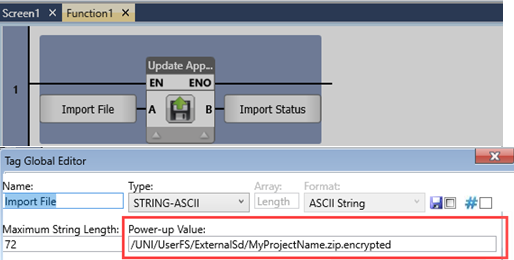
You can use the Update Application function to install a project file in order to upgrade an existing application, or application and firmware from a compressed, encrypted project file on an SD card or USB flash drive that is installed in a controller.
To learn how to create these files, refer to the topic Export a project as a File.
Note that the controller model, OS, and Hardware Configuration are part of the project file, and it must match that of the controller you wish to upgrade.
LF: Update Application
|
|
Parameter Name |
Purpose |
|||||||||||||||||||||||||
|
A |
Project File path |
This is the location and name of the file to install. The file path contains a preface, the type of drive, the file name, and the extension, separated by slashes.
|
|||||||||||||||||||||||||
|
B |
Status |
The value indicates the status of the function: 0 - No error 1 - Function started 2 - Function in Progress -1 - No USB removable drive -2 - No External SD Card -3 - Invalid path -4 -File does not exist -5 - Model name does not exist -6 - Wrong password -7 -Model type does not match -8 -Password does not match -9 -Serial number in project does not match the controller's serial number |
|||||||||||||||||||||||||
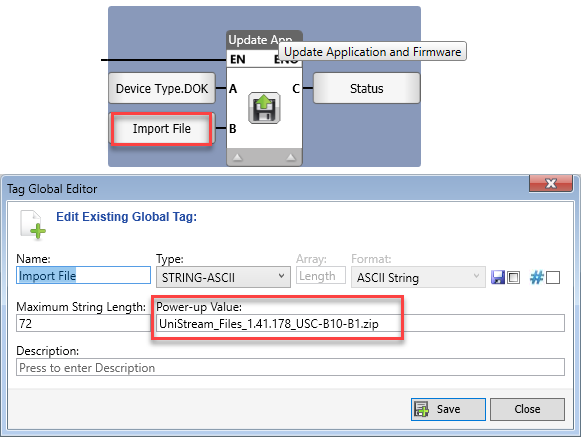
LF: Update Application and Firmware
|
|
Parameter Name |
Purpose |
|
A |
Device Type |
Select SD card or DOK (USB Flash Drive) |
|
B |
Project File path |
The full path and file name of the upgrade package. Legal path:
Examples: 1. UniStream_Files_1.33.128_USP-070-B10.zip 2. SomeDirectory/UniStream_Files_1.33.128_USP-070-B10.zip |
|
C |
Status |
The value indicates the status of the function: 0 - No error 1 - Function started 2 - Upgrade started 3 - Unzip file 4 - Validate BIN 5 - Validate APP -1 - Bad files on device -2 - No need for upgrade -7 - Downgrade limit panel 070 B08 -8 - Device format not supported -9 - Downgrade limit panel US7 BXX -10 - Downgrade limit panel USC BXX -11 - Downgrade limit panel USL BXX -12 - FS Integrity fail -13 - App file does not exist -14 - Model name does not exist -15 - Wrong app password -16 - Model type does not match -17 - Password does not match -18 - Import not allowed for this SN -19 - Upgrade ZIP not found -21 - Downgrade limit panel USL BXX |