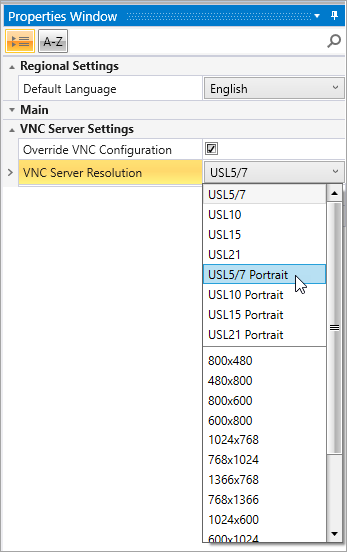
To streamline setup, choose a VNC Server Resolution based on the connected UniStream Display.
UniStream Display panels are resistive color touch-screens that support VNC client, and are available in different dimensions and orientationsdimensions and orientations.
To streamline setup, choose a VNC Server Resolution based on the connected UniStream Display.
In addition to HMI screens, Displays support UniApps, a built-in system that enables the user to access communication settings, and manage the device.
These displays are suitable for use with UniStream PLCs. The factory default IP addresses are given below.
|
UniStream PLC default IP |
UniStream Display default IP |
|
IP: 192.168.1.4 Subnet mask: 255.255.255.0 Default Gateway: 192.168.1.1 |
IP: 192.168.1.5 Subnet mask: 255.255.255.0 Default Gateway: 192.168.1.1 |
|
|
To enable VNC Server on a UniStream Controller and set Passwords via UniLogic, click Passwords on the Solution Explorer. Note that you can also apply a password via UniApps that will be saved to the PLC as described below. |
|
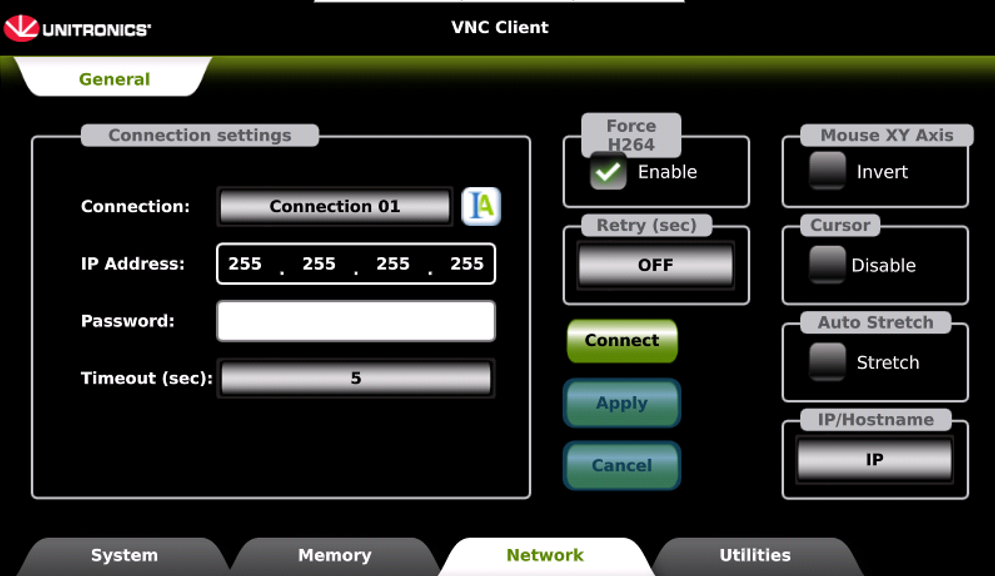
Connection Settings
To add connections, tap the Connection scroller and repeat the steps above.
|
|
|
|
Force H264 When enabled, the panel connects only to VNC Servers that transmit H.264. If the server does not use H.264, the connection will not succeed - clear this option to connect to such servers. These models have no automatic fallback. |
||
|
Cursor Select to Disable visible cursor pointer control and touch input functionality. |
||
|
Auto Stretch Selecting the Stretch option optimizes display scaling for seamless viewing across different screen configurations. |
||
|
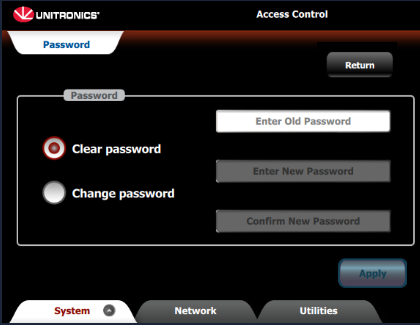
To apply a password via UniApps that will be saved to the PLC as described select the System> Password, and use the displayed options. |
|
|
Note that via UniApps, you can enable UniStream to register when a connected VNC client screen is touched; this allows the use of UAC with idle time and screen saver. To implement this feature, in UniApps, access the Network tab-> VNC Server -> General. Press the Set 'Touch Bit' check box and press apply. The VNC server will restart with the "touch" identification option.