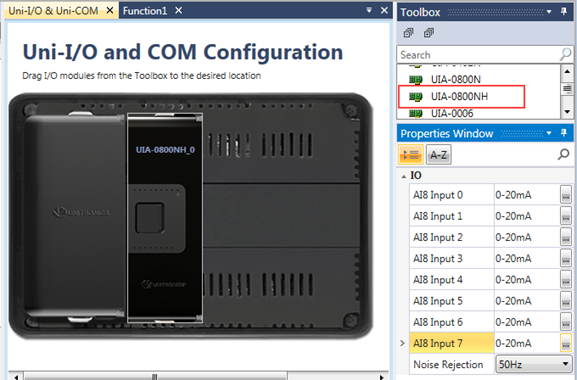
The UNI-I/O model UIA-0800NH offers 8 analog channels that support HART communication.
In order to communicate with an end device that supports HART, select the Uni-IO module UIA-0800NHselect the Uni-IO module UIA-0800NH in Hardware Configuration.
You can implement HART messaging via the HART ladder functions Build Hart Command, Send HART Command, and Parse HART Message.
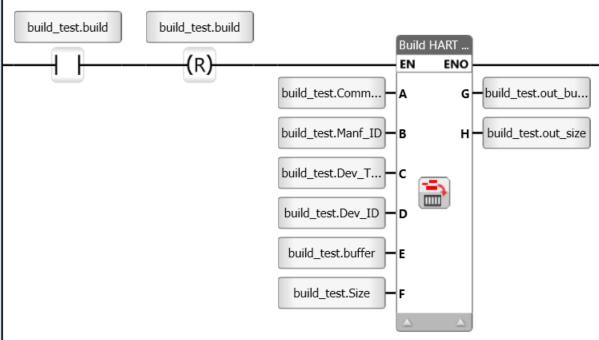
Use this function to build commands.
|
|
Parameter Name |
Purpose |
|
A |
HART Command number |
Link a tag to provide the command number |
|
B |
Manufacturer ID |
Will be ignored for command 0
|
|
C |
Device Type |
Will be ignored for command 0 |
|
D |
Device ID |
Will be ignored for command 0. Must be of size 3. |
|
E |
Data Buffer |
The command’s data. Can be left empty for commands without data. |
|
F |
Data Size |
The number of bytes in the data buffer |
|
G |
Buffer for HART Command |
The generated command is stored in this buffer. Note that the buffer's length must be big enough to hold the command. |
|
H |
Buffer Size |
The number of bytes in the generated command |
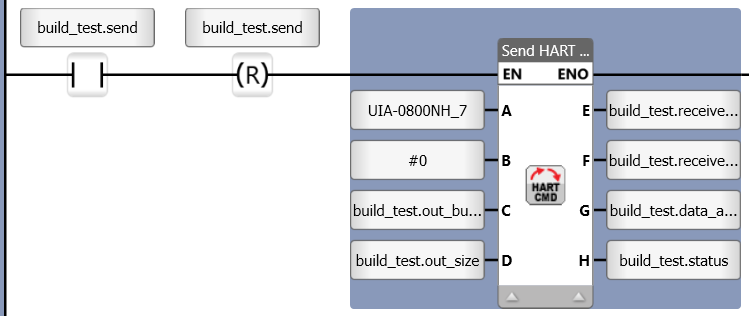
Use this function to send commands to the module.
|
|
Parameter Name |
Purpose |
|
A |
Hart I/O module |
Click to see all modules supporting HART defined in your Hardware Configuration. |
|
B |
Analog Input Number |
Select the desired input on your selected module. |
|
C |
Buffer Hart Command |
Select the buffer you created to send commands |
|
D |
Number of Bytes to Send |
This determines the number of bytes that will be sent from the buffer |
|
E |
Buffer Received Data |
The data received from the module is written into this buffer |
|
F |
Buffer for HART Command |
The number of bytes received from the module |
|
G |
Data Arrived Bit |
0=data has not arrived 1=data arrived |
|
H |
Status |
2 BUSY 0 READY -1 TIMEOUT ERROR -2 HART COMMAND INVALID IO ADDRESS -3 USER PARAMETERS ERROR -4 HART COMMAND IO BUS MSG SIZE ERROR -5 HART COMMAND USER RX BUF OVERFLOW -6 MEMORY ERROR -7 HART COMMAND RX BUF OVERFLOW -8 SYS FUNC ERROR -9 WAIT TO REPLY |
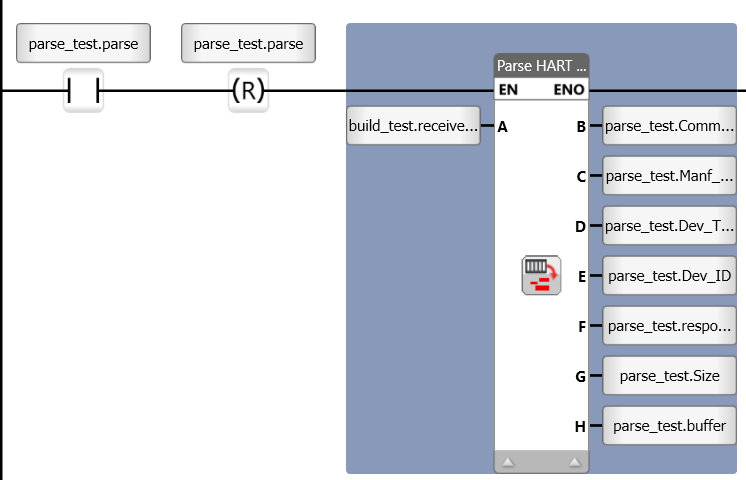
Use this function to send commands to the module.
|
|
Parameter Name |
Purpose |
|
A |
Hart Message Buffer |
The buffer that contains the HART message |
|
B |
Command Number |
Select the desired input on your selected module. |
|
C |
Manufacturer ID |
Will only be written to if command number is 0
|
|
D |
Device Type |
Will only be written to if command number is 0 |
|
E |
Device ID |
Will be ignored for command 0. Must be of size 3. |
|
F |
Response Code |
|
|
F |
Data Buffer |
The number of bytes received from the module |
|
G |
Data length |
The number of bytes in the messages' data buffer |
|
H |
Data Buffer |
Command's buffer |