
Use FTP to transfer files between UniStream and other devices via Ethernet. UniStream supports both FTP Client and Server functions.
Before implementing FTP communications, you must configure your HMI panel's Ethernet address.
FTP files are stored on the controller's SD card.
On the Solution Explorer tree, open PLC Communications> Protocols> FTP, and click Add New FTP Server.
UniLogic automatically creates a struct.
Note that you can add only one FTP Server per project.
Click the fields and enter the FTP Server name, the Username and Password. You can also select Read-only, to prevent files from being written to the controller's SD card.
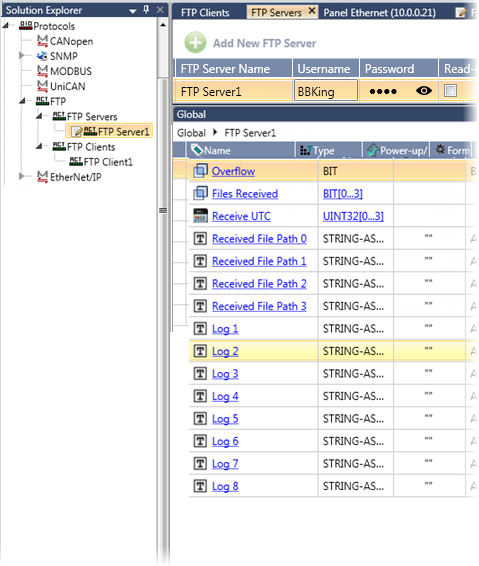
Struct
|
Parameter Name |
Data Type |
Description |
|
Overflow |
Bit |
No files may be received via FTP when the Overflow bit is ON. The Overflow bit is ON when all of the File Received bits are ON. |
|
Files Received |
Bits (0-3) |
Turn ON when a file has been received. These bits must be reset by the user |
|
Received File Path 0 |
String ASCII |
The path name may not start with a backslash. Use the format: |
|
Log 1-8 |
String ASCII |
The log of received files |
FTP/SFTP Clients
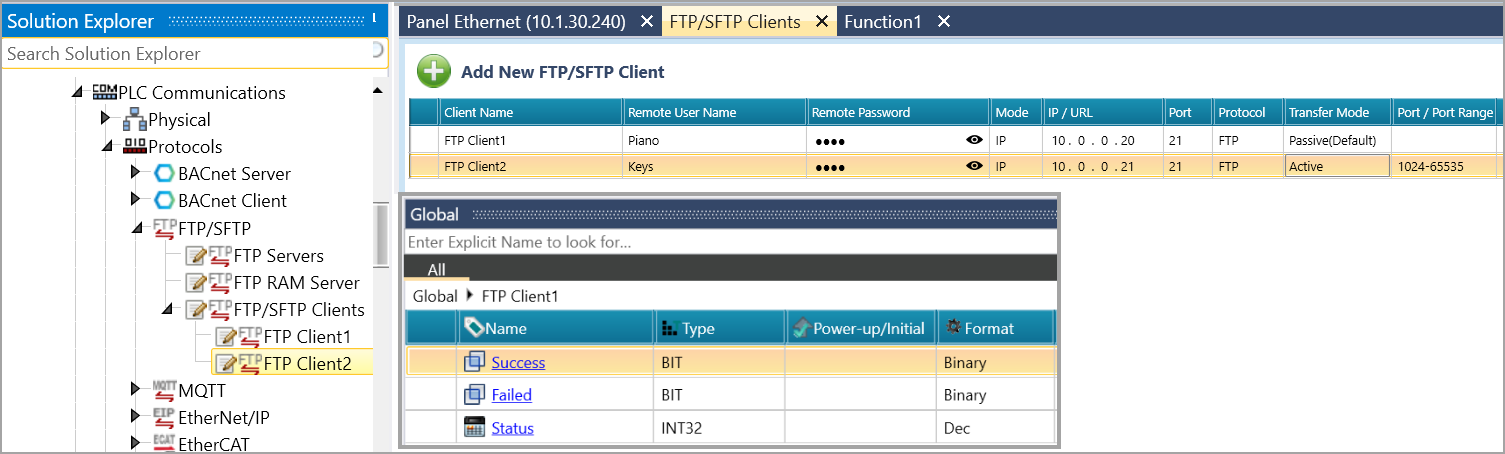
On the Solution Explorer tree, open PLC Communications> Protocols> FTP/SFTP, and click Add New FTP/SFTP Client.
UniLogic automatically creates a struct to service the Client.
|
Name |
Data Type |
Definition |
|
|
Success |
Bit |
Session successful |
|
|
Failure |
Bit |
Session failed |
|
|
FTP Request Status |
Int32 |
Status |
Message |
|
0 |
No errors |
||
|
1 |
Function started |
||
|
2 |
Function in progress |
||
|
-1 |
Connection error |
||
|
-2 |
Login error |
||
|
-3 |
Local file error |
||
|
-4 |
Remote file error |
||
|
-5 |
Permission error |
||
|
-6 |
General error |
||
|
-8 |
Timeout |
||
|
-9 |
Internal error |
||
Click and enter the FTP Client configuration fields.
|
Field |
Definition |
|
|
Client Name |
A unique name to identify the FTP/SFTP Client |
|
|
Remote User Name |
The username used to log in to the remote FTP/SFTP |
|
|
Remote Password |
The corresponding password for the remote user account |
|
|
Mode |
Select whether the connection uses an |
|
|
IP / URL |
Enter the IP address or hostname of the remote server, based on the selected mode |
|
|
Port |
TCP port for server communication |
|
|
Protocol |
Select the connection protocol: |
|
|
Transfer Mode |
For FTP only: choose |
|
|
Port / Port Range |
For FTP Active mode only: specify a single Port number (e.g., |
|
You transfer files via the FTP Ladder functions.
You provide the file paths with a ASCII string tag; you can enter the path as a power-up value or store the value to the tag.
Note that you must use a backslash to separate the folder names. This string, for example, used in the Send function, will pull a file from the root folder on the controller's SD card:
/samples/sampler1/my_file.usmp
FTP Send
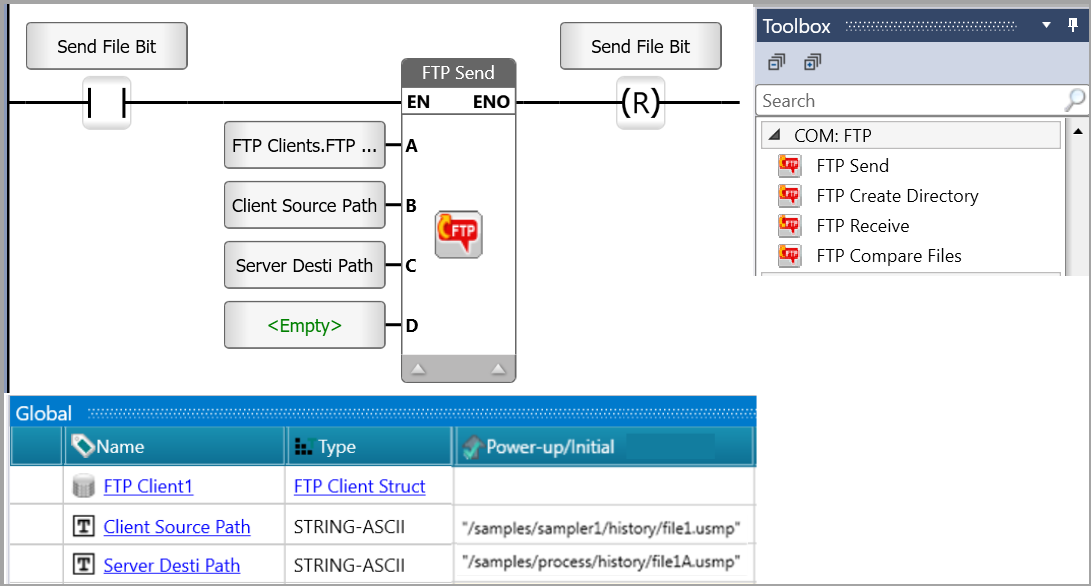
Use the FTP Send function to transfer a file from the controller's SD card to a remote FTP Server.
|
|
Parameter Name |
Type |
Purpose |
|
A |
FTP Client |
String |
Select one of the clients you defined in the FTP Client configuration. |
|
B |
Client Source Path |
String |
This provides the path to the file on your controller's SD. |
|
C |
Server Destination Path |
String |
This provides the path in the remote server. |
|
D |
Timeout (sec) |
UINT8 |
|
FTP Receive
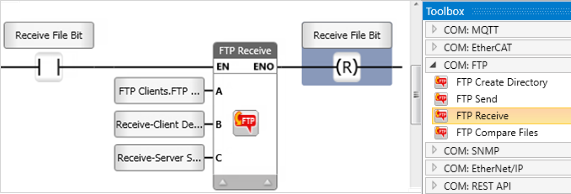
Use the FTP Receive function to receive a file from a remote FTP Server and save it to the controller's SD card
|
|
Parameter Name |
Type |
Purpose |
|
A |
FTP Client |
String |
Select one of the clients you defined in the FTP Client configuration. |
|
B |
Client Destination Path |
String |
This provides the path to the file on your controller's SD. |
|
C |
Server Source Path |
String |
This provides the path in the remote server, from where the files will be sent. |
Use the FTP Compare File to locate a file on a remote FTP Server, compare it to a file on the controller's SD card, and overwrite the SD file if it is different
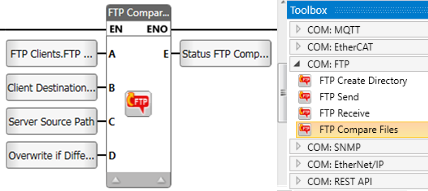
|
|
Parameter Name |
Type |
Purpose |
|
A |
FTP Client |
String |
Select one of the clients you defined in the FTP Client configuration. |
|
B |
Client Destination Path + Flie Name |
String |
This provides the path to the file on your controller's SD. |
|
C |
Server Source Path |
String |
This provides the path in the remote server, from where the files will be sent. |
|
D |
Overwrite if Different |
Bit |
0=No (do not overwrite) 1=Yes (overwrite) |
|
E |
Status FTP Compare |
INT8 |
-2 = Overwrite Fails -1 = FTP Error, Check FTP status 0 = Overwrite successfully performed 1 = Compare function in progress 2 = Files equal 3 = Files not equal |